

November
|
Enhance Journey Design with Dynamic Variables and UI Improvements in Experience Builder |
|---|
|
Experience Builder’s Add/Update Data on Profile node now codelessly syncs with upstream event payloads and supports incrementing and decrementing counter data types, providing more dynamic and real-time information. In addition, a new Split by ZML node is available for advanced users to write ZML logic and rout users based on the outputs, offering expanded journey pathing options. Several UI enhancements are also available in Experience Builder to provide a more intuitive and flexible user experience. The Experience Builder canvas toolbar now uses a contextual floating design to support recent updates to contextual node cards, the Experience Templates page has been refreshed, and CTA buttons are in a new location to stay consistent with broader platform changes. These enhancements will be enabled on various accounts starting October 30 and will be fully rolled out by November 6. |
-20251203-121017.gif?cb=a584853a5f1a3024ef8476918d5e4024)
-20251203-121017.png?cb=b065888a9dca847be0ccdd8b3b1deeb7)
|
|
Learn More: |
|
Deepen Message Customization with New Visual Editor Capabilities |
|
We’ve enhanced the Visual Editor to give you even more creative control and flexibility when building campaigns and templates. These updates help you fine-tune your brand experience, improve accessibility, and deliver richer, more personalized communications. You can now:
|
.gif?cb=1cde3f4b0224fa6c4eac318c955cc397)
|
|
UPDATE: New ‘From’ Address for Zeta Marketing Platform Notifications |
|---|
|
Starting Thursday, November 13, we are changing the ‘From’ address for Zeta Marketing Platform (ZMP) notifications from notifications@support.zetaglobal.com to notifications@notify.zetaglobal.com. This update only affects notifications to ZMP users, not your customers. If you have email inbox rules set up for ZMP notifications, please make sure to update them accordingly. Otherwise, no further action should be needed. Should you have any questions, please contact your customer success team. |
|
Keep Onboarding Moving: Easily Track Job Cards with the New “In Review” Status |
|---|
|
Onboarding Manager now makes it easier than ever to track work pending your review. With the new “In Review” status, you can instantly spot job cards awaiting your action across Kanban, List, and AI Summary views. By gaining immediate visibility into exactly where working is waiting for your input or signoff, you can reduce manual tracking and enjoy smoother, faster onboarding timelines. |
October
|
Optimize Programmatic Media Planning with Enhanced Forecasting |
|---|
|
The Audience Explorer forecasting tool has been expanded to deliver deeper visibility and more precise insights for campaign planning and audience targeting. Marketers can now view programmatic media forecasts by channel, device, and geography for specific audiences, enabling smarter, data-driven decisions. Users can also choose their preferred level of forecast confidence, aligning projections with their risk tolerance and strategic goals. Forecasts can be downloaded and integrated into external systems, streamlining incorporation into broader marketing and analytics workflows. |
.gif?cb=f20dc84b92024318148ea208bb24b03a)
|
|
Expand SDK Adoption with New React Native Plugin |
|
Zeta now supports React Native, bridging apps built in React Native with the full power of our iOS and Android SDKs through native modules and seamless integration. Developers can connect directly—no rebuilds or custom workarounds required—reusing existing components across platforms. For marketers, this means broader campaign reach and consistent engagement across all mobile apps, including those built on React Native. This expansion accelerates adoption and ensures brands can connect with audiences across one of the fastest-growing developer ecosystems. |
|
Accelerate Mobile App Onboarding with AI-Powered Registration |
|---|
|
A new conversational AI assistant now simplifies mobile app registration by automating setup, validating configurations in real time, and guiding users through each step with intelligent feedback. This eliminates manual errors, reduces setup time, and delivers a seamless, low-friction onboarding experience. By combining natural language interaction with AI-driven validation, marketers can launch apps faster with greater confidence and accuracy—unlocking smarter, more efficient campaign activation from day one. |
.png?cb=a70abb9a850e75cd67fa0f66e66ca089)
.png?cb=5e355b381f581f7887909cafe6651f30)
|
|
Enrich Journey Design with Contextual Nodes in Experience Builder |
|---|
|
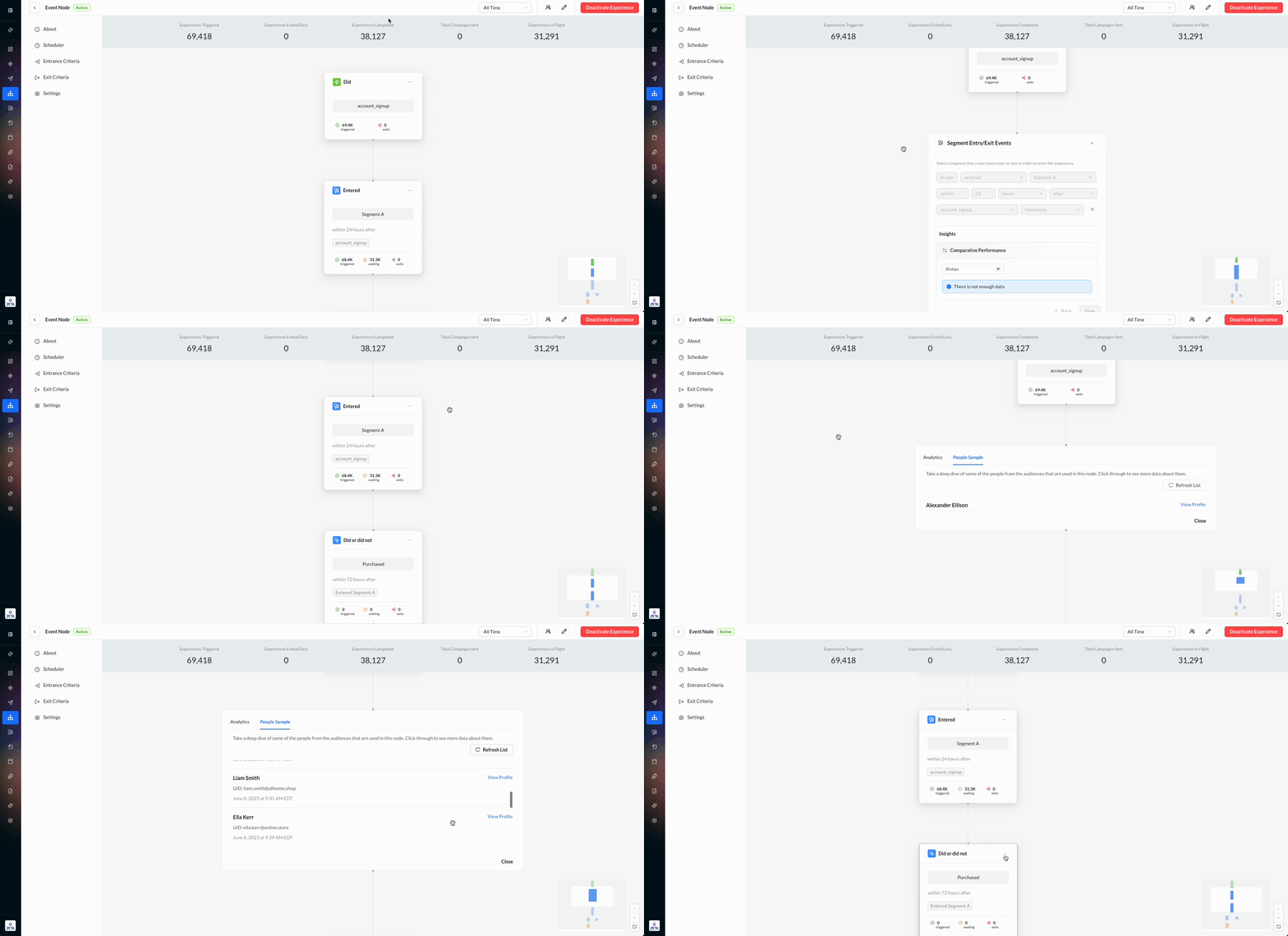
Recent enhancements to Experience Builder improve visibility, flexibility, and contextual control when designing customer journeys. The canvas now features a fluid configuration modal (replacing the side panel) for easier setup, and expanded node-level stats show sample users for active and audience-related nodes such as Split by Audience. These enhancements began rolling out on October 16 and became fully available on October 23. |
|
|
Test and Preview Personalized Push Messages with Confidence |
|---|
|
Marketers can now validate and preview personalized push messages in real time, ensuring active targeting, correct Liquid script rendering, and flawless user experiences before launch. This new enhancement allows up to 100 test recipients (via user IDs, emails, or CSV uploads) and supports testing by audience segments or external queries for complete accuracy. By simulating real recipient experiences, marketers can detect and fix personalization errors early, reducing launch issues and improving campaign precision without engineering support. |
|
Improved Clarity and Consistency on the People Properties Page |
|---|
|
Improved Clarity and Consistency on the People Properties Page |
|---|
|
We’ve redesigned the People Properties (Data) tab in Profiles to align with modern design standards and address user feedback around the Flag Properties with Incorrect Type release. Key Updates include:
These improvements make property management more intuitive, consistent, and reliable. The rollout began on October 22 and became fully available on October 30. |
-20251104-161152.png?cb=7643835c66ae73a228f1a809c98e896c)
|
September
|
Unlock Richer Targeting with Custom User Properties |
|---|
|
Our SDK now supports custom user properties, enabling teams to define and track attributes unique to their business (e.g., plan type, interests, loyalty score). Developers can pass custom key-value pairs through the user identification API, and these are stored in contact_properties and synced with user profiles. Marketers can then use these attributes for personalization, segmentation, and analytics, unlocking richer profiles and more precise targeting. |
|
Ensure Reliable Push Delivery with Sandbox & Production Configuration |
|
You can now explicitly set push notification environments as either sandbox or production during SDK initialization. This ensures device tokens and messages are always routed to the correct APNS host, reducing delivery errors and streamlining testing. By clearly separating test and live environments, you’ll benefit from greater reliability, faster launches, and smoother mobile campaign execution. |
|
Creative Workflow Enhancements |
|---|
|
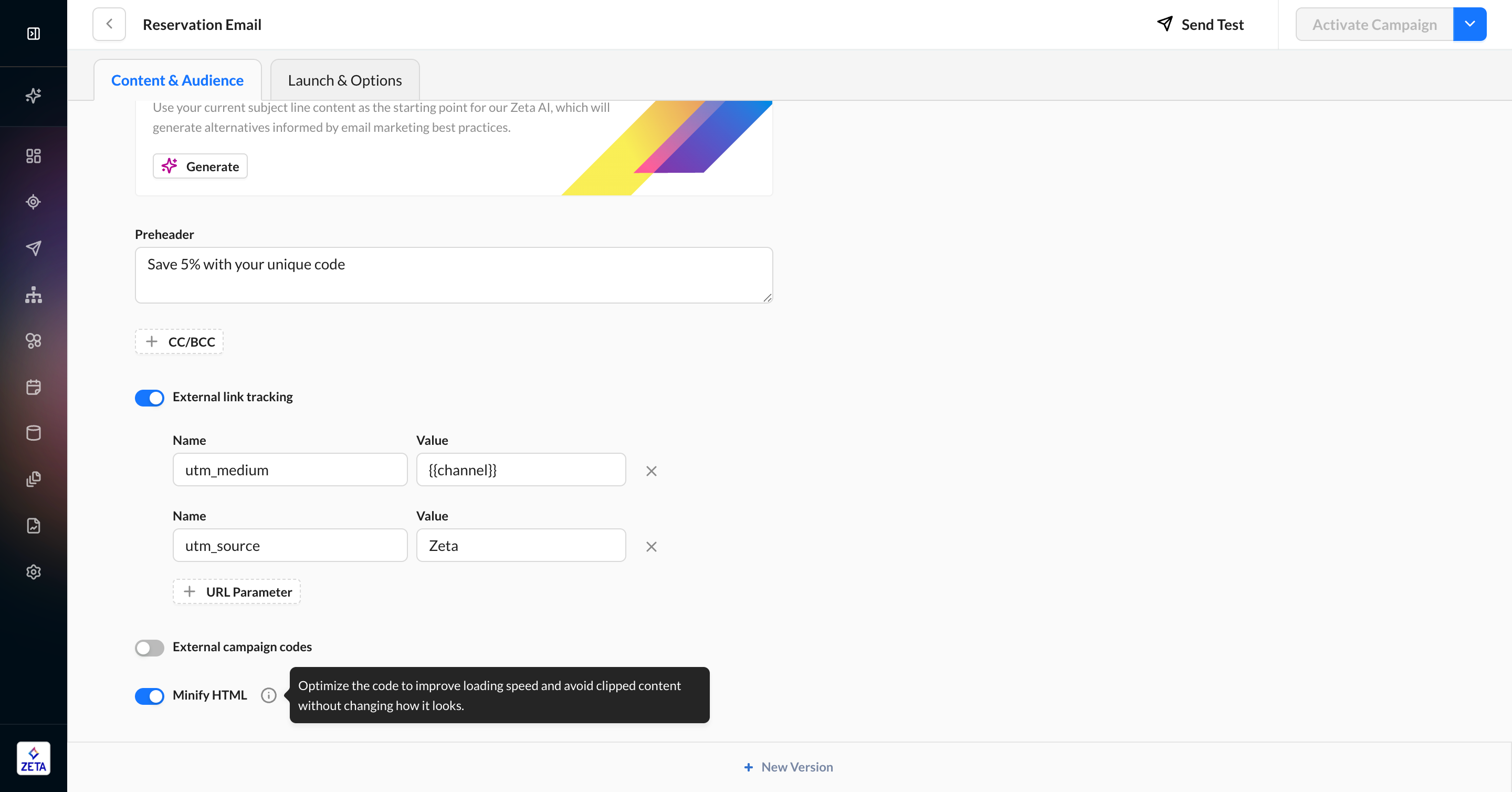
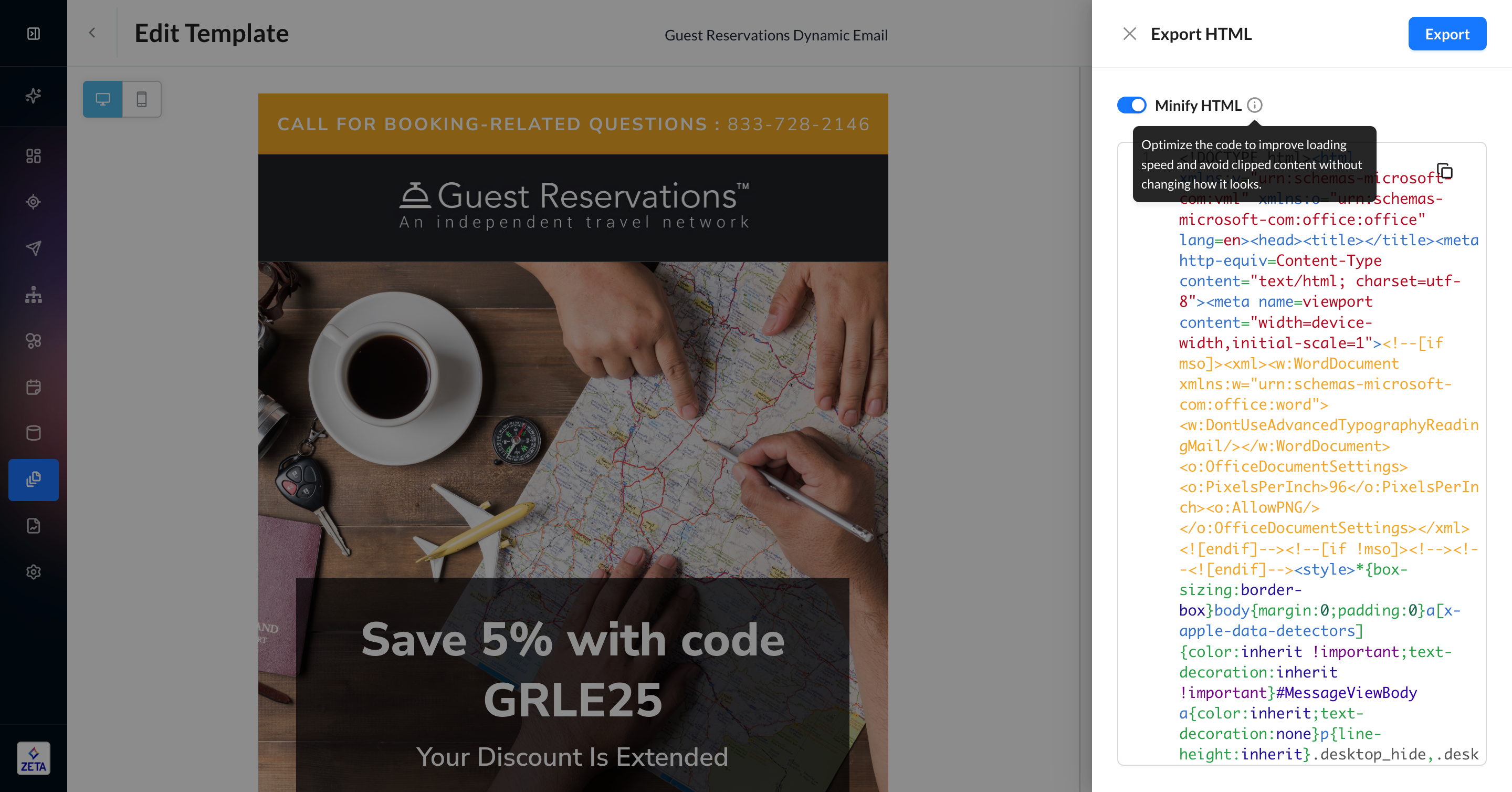
We’ve introduced several new updates across all ZMP email editors to improve flexibility and efficiency:
|
|
|
Learn More: |
|
Maintain Data Integrity with Read-Only Reports in Insights Studio |
|---|
|
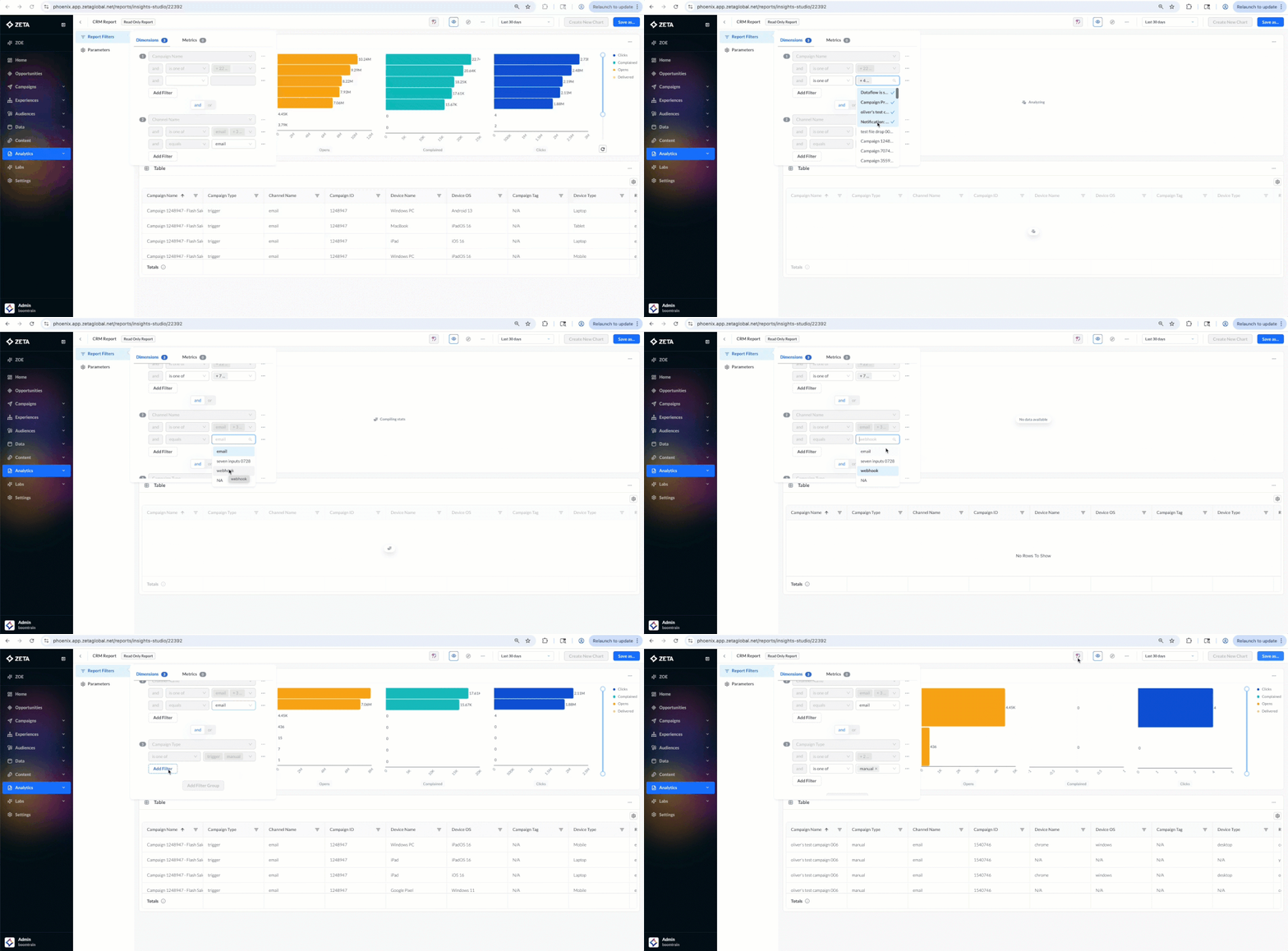
Reports in Insights Studio can now be set as read-only, giving collaborators access to explore insights without the risk of accidental edits or misconfigurations. Ideal for executive dashboards, client-facing summaries, and high-stakes reports, read-only mode ensures consistency, trust, and presentation-ready insights. |
|
|
Insights Studio Dashboards: In-View Filters |
|---|
|
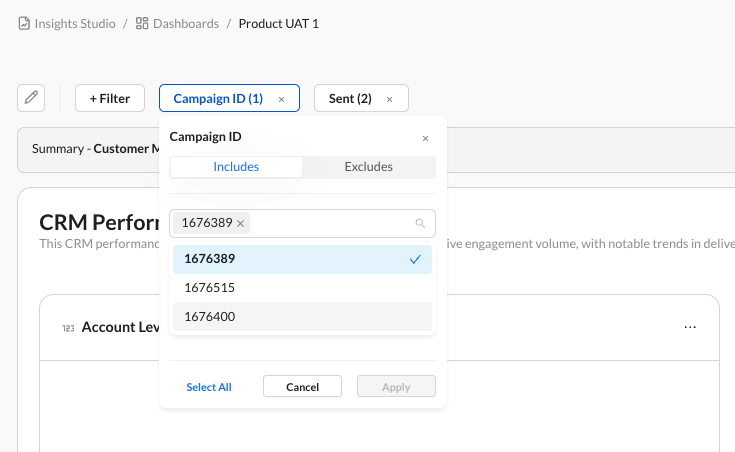
You can now add “in-view” filters directly to Insights Studio Dashboards. This makes it easier for marketers and non-technical users to interact with data through seamless filtering. |
|
|
Expand SDK Adoption with New Flutter Plugin |
|---|
|
Zeta now supports Flutter! Our new plugin connects Flutter apps with the full power of our iOS and Android SDKs through a simple Dart API. Developers can integrate quickly without duplicating logic, while marketers benefit from broader reach, richer engagement, and faster adoption across cross-platform apps. Installation guides and Zeta support ensure a smooth onboarding experience. |
|
Deepen Your Data Analysis with Multi-Metric Visualizations |
|---|
|
Deepen Your Data Analysis with Multi-Metric Visualizations |
|---|
|
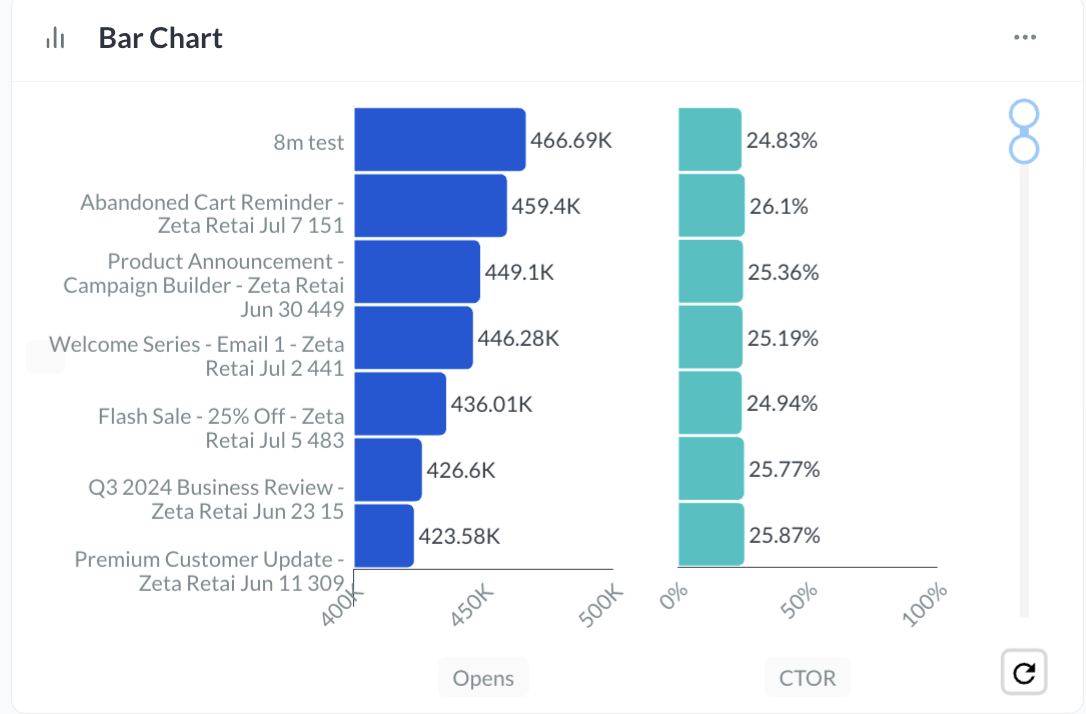
Within Insights Studio, you can now plot multiple metrics side-by-side on the same chart, allowing you to generate better insights and conduct more sophisticated analysis. To leverage this feature, first create a multi-series or bar chart and set the chart style to “side-by-side.” Then select multiple metrics such as CTOR and Opens, save your work, and the chart will automatically visualize both datasets. |
|
|
Learn More: |
August
|
Segment and Target Audiences Directly from Your First-Party Data—No SQL Required |
|---|
|
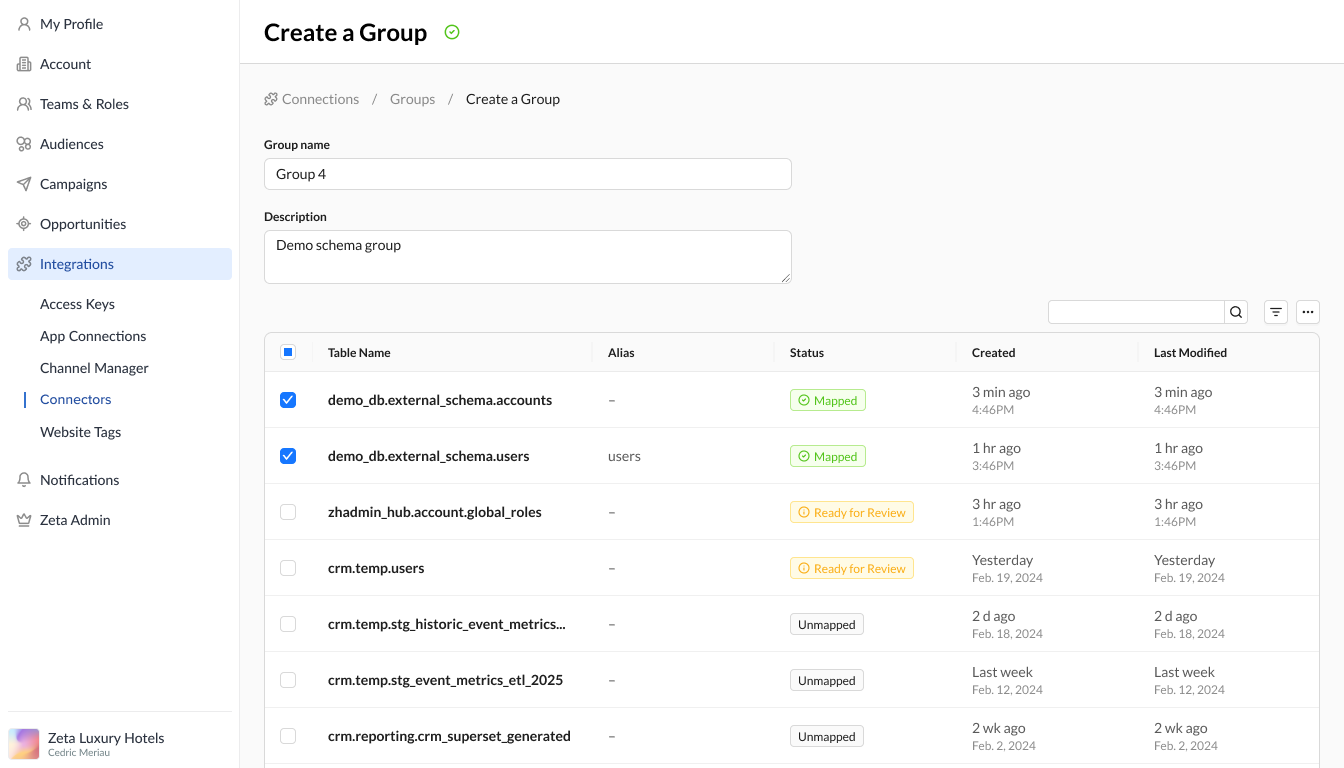
You can now segment and target audiences from your own first-party data in the Zeta Marketing Platform (ZMP) without writing a single line of SQL. With new enhancements to the external database UI, users can:
These updates make it easier for less technical users to flexibly connect to their data stores and build high-value audiences faster, enabling quicker campaign activation and more agile marketing execution. |
|
|
Improved Compliance: updateUser API Now Honors User Preferences |
|
We’ve enhanced the updateUser API to better support user preference compliance and eliminate the risk of unintentional resubscriptions. Previously, if the contact.status field was omitted in an update, the system defaulted that contact’s status to “new,” which could inadvertently resubscribe users who had previously opted out. Now, if a contact already exists and has a status, that status will remind unchanged unless explicitly updated. Only new contacts (those not previously seen) will default to “new.” This change gives you greater control and confidence when managing consent and ensures your workflows align with best practices in data privacy and compliance To ensure proper handling, we recommend auditing your current use of the updateUser REST API and JavaScript method to ensure contact.status is being used correctly—especially in scenarios where you intend to resubscribe a contact. |
July
|
Confidently Launch Error-Free Push Campaigns with Mobile Push Test Sends |
|---|
|
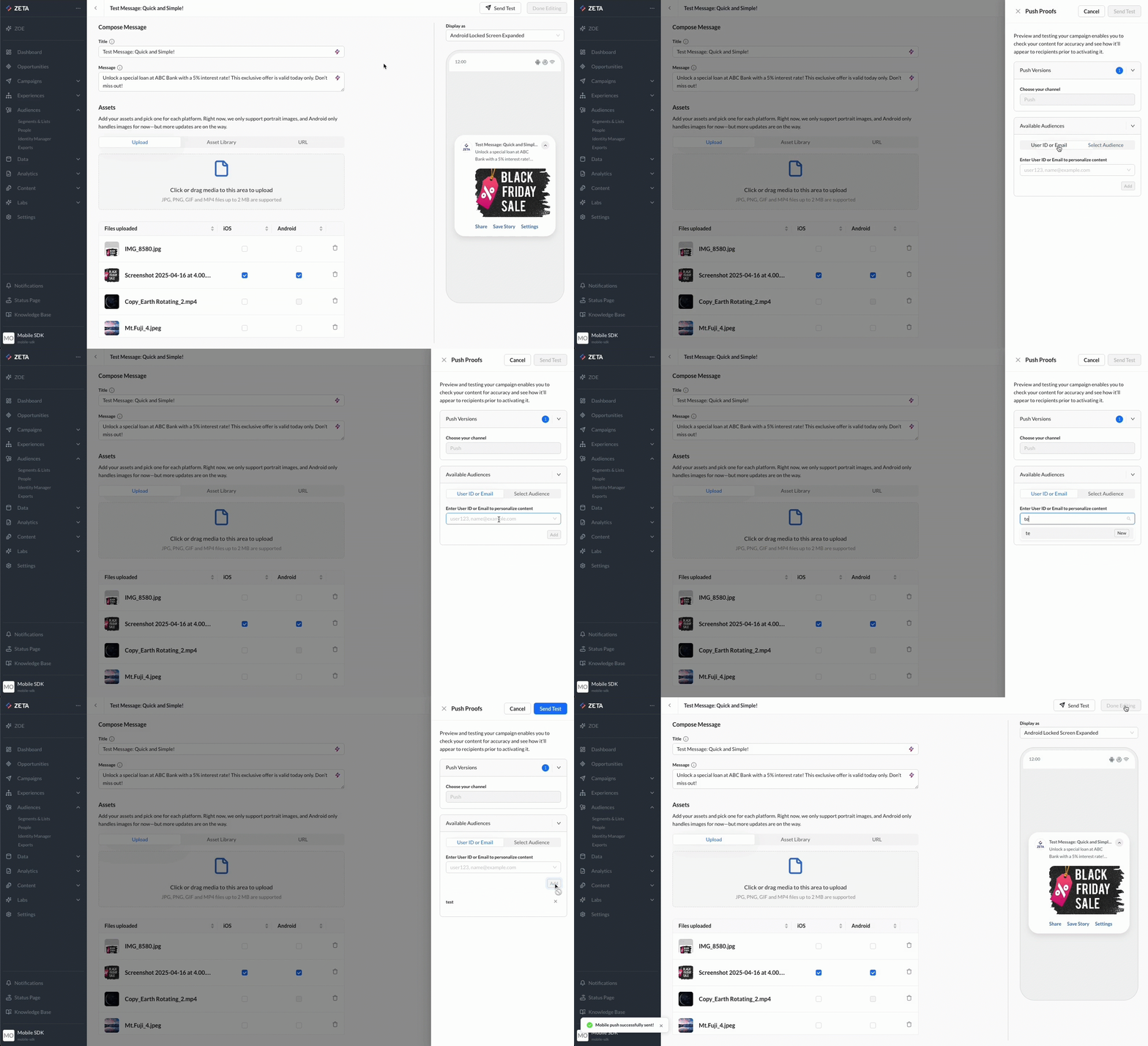
You can now test and preview Mobile Push campaigns in the Zeta Marketing Platform (ZMP) before deployment, ensuring every message looks exactly as intended and performs seamlessly. With Mobile Push Test Sends, you can confidently validate content and delivery on real devices through a simple, end-to-end workflow:
This feature removes the guesswork from mobile campaign execution. By validating message design, delivery, and personalization in advance, you reduce the risk of errors, ensure consistency across devices, and increase campaign performance. |
|
|
Introducing Campaign Templates: Your Solution for Accelerated Campaign Creation |
|---|
|
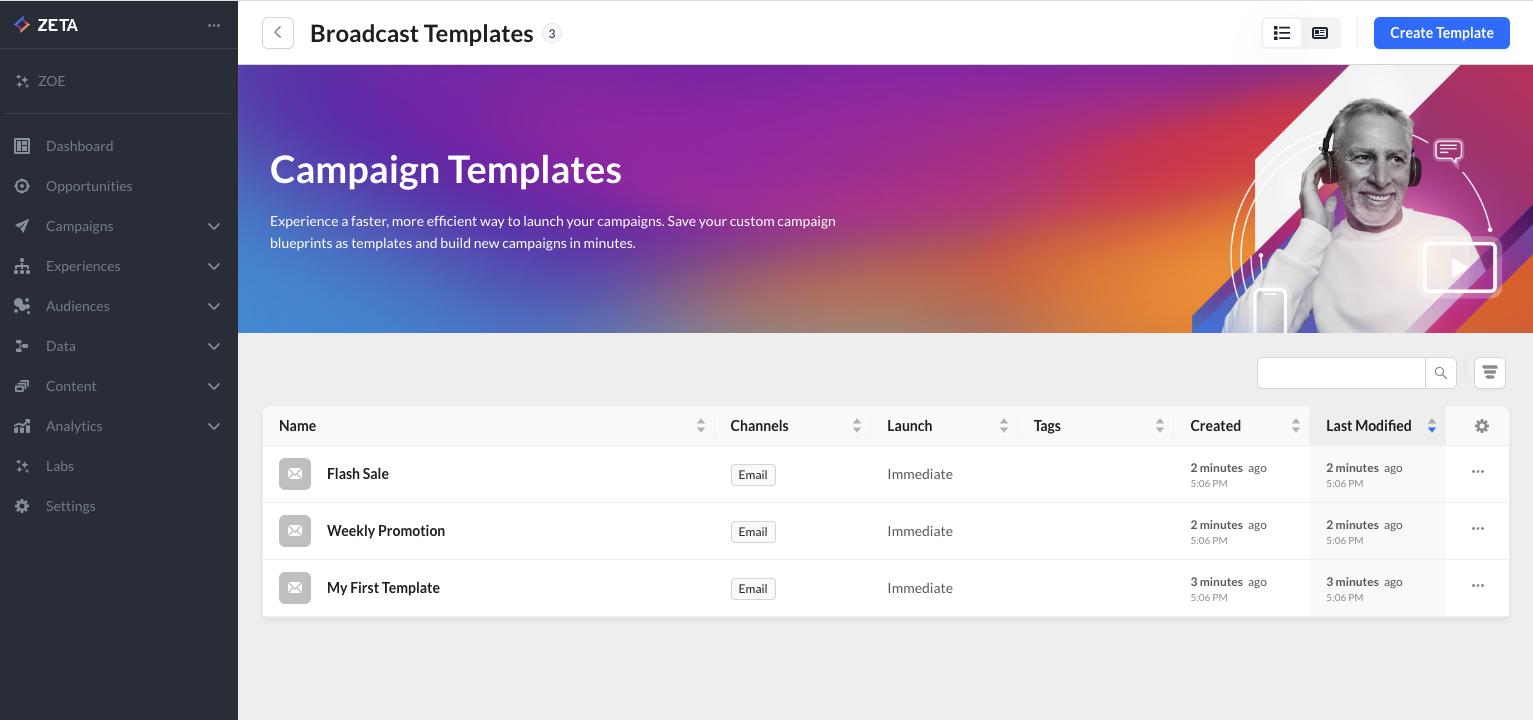
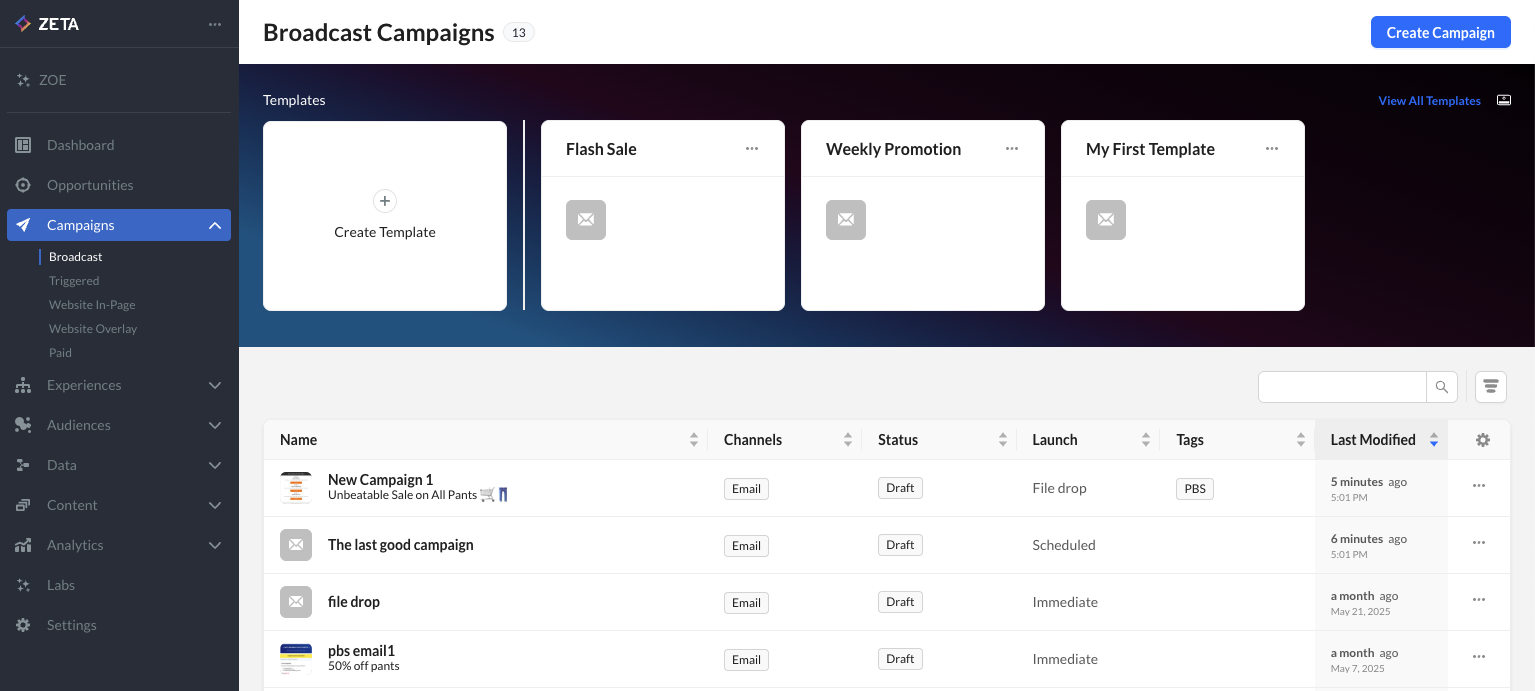
Building similar campaigns repeatedly? Now, you can save time and improve accuracy with the new Campaign Templates feature in the ZMP. Instead of cloning past campaigns or starting from scratch, you can now:
Campaign Templates eliminate manual rework and help you scale faster with consistent, high-quality campaign setups. |
|
|
Work Faster and Stay Organized with Content Template Version History and Archiving |
|---|
|
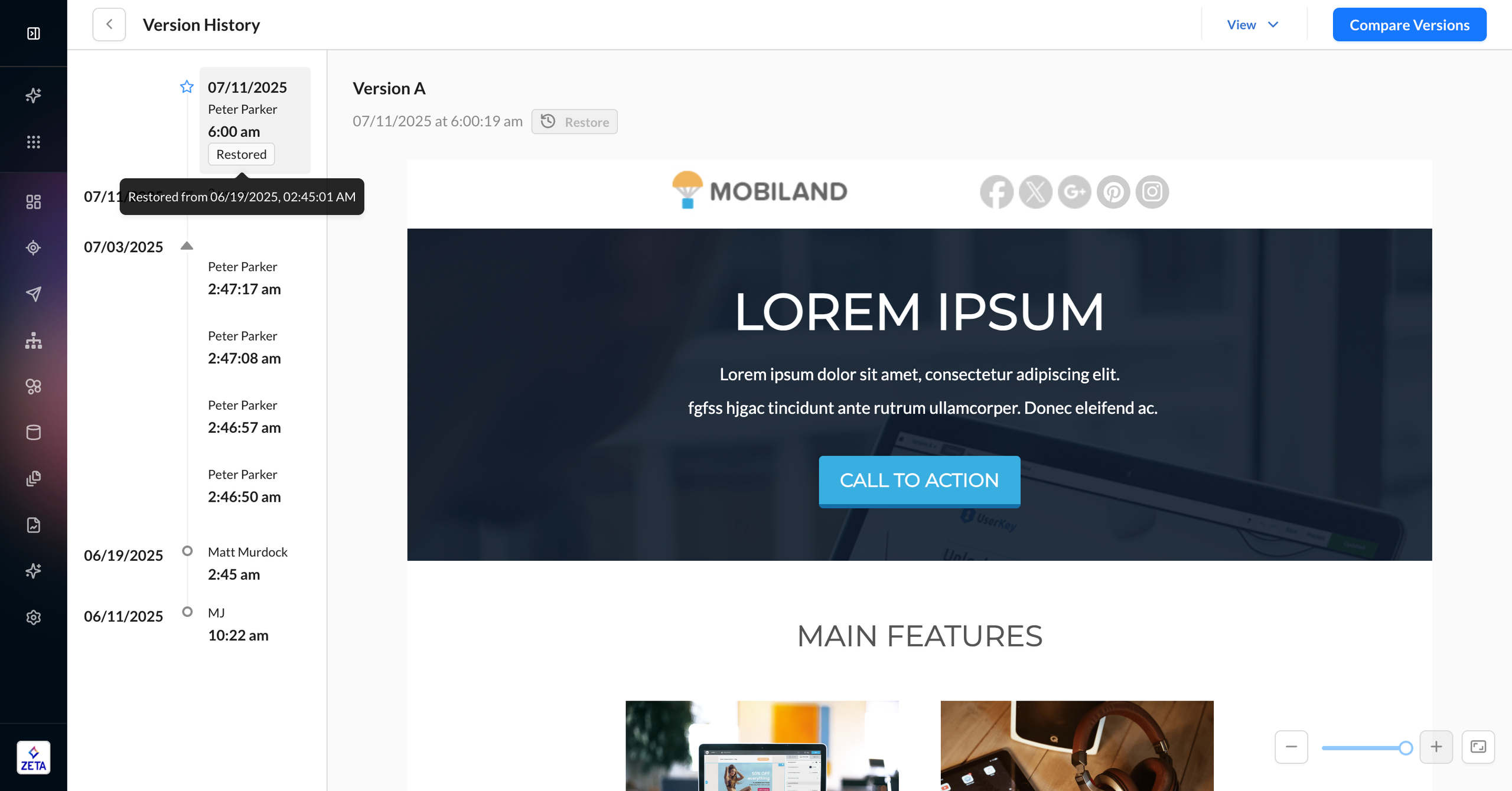
You now have full visibility and control over your email templates, with the introduction of version history and archiving across all template editors (Visual Editor, HTML Editor, and Visual Composer). With these updates, you can:
These enhancements give you greater transparency, control, and flexibility making it easier to manage creative changes, collaborate across teams, and maintain a clean, efficient template library. |
|
|
ZMP Navigation Enhancements |
|---|
|
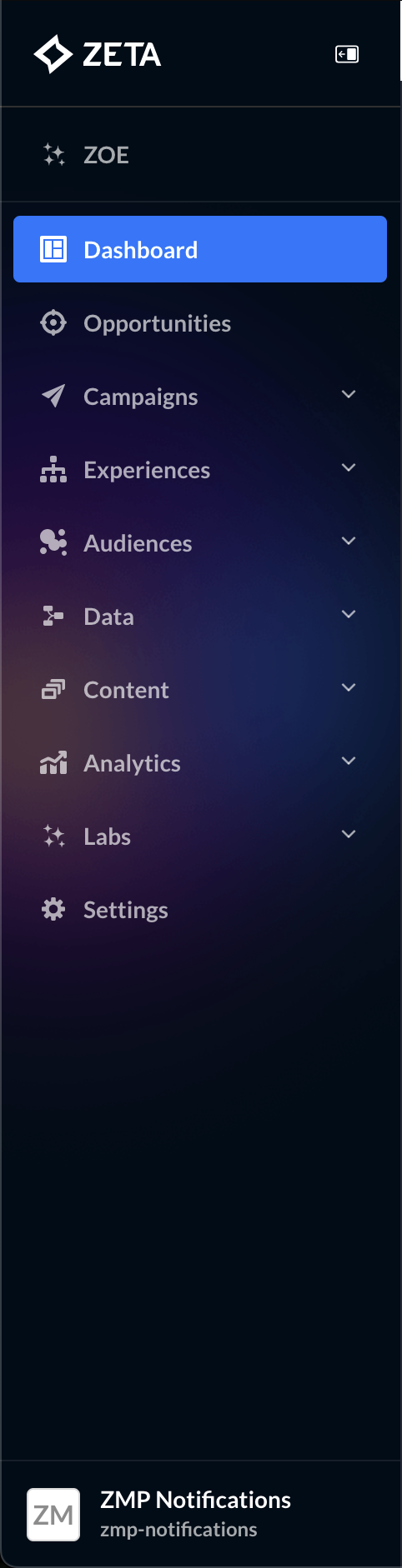
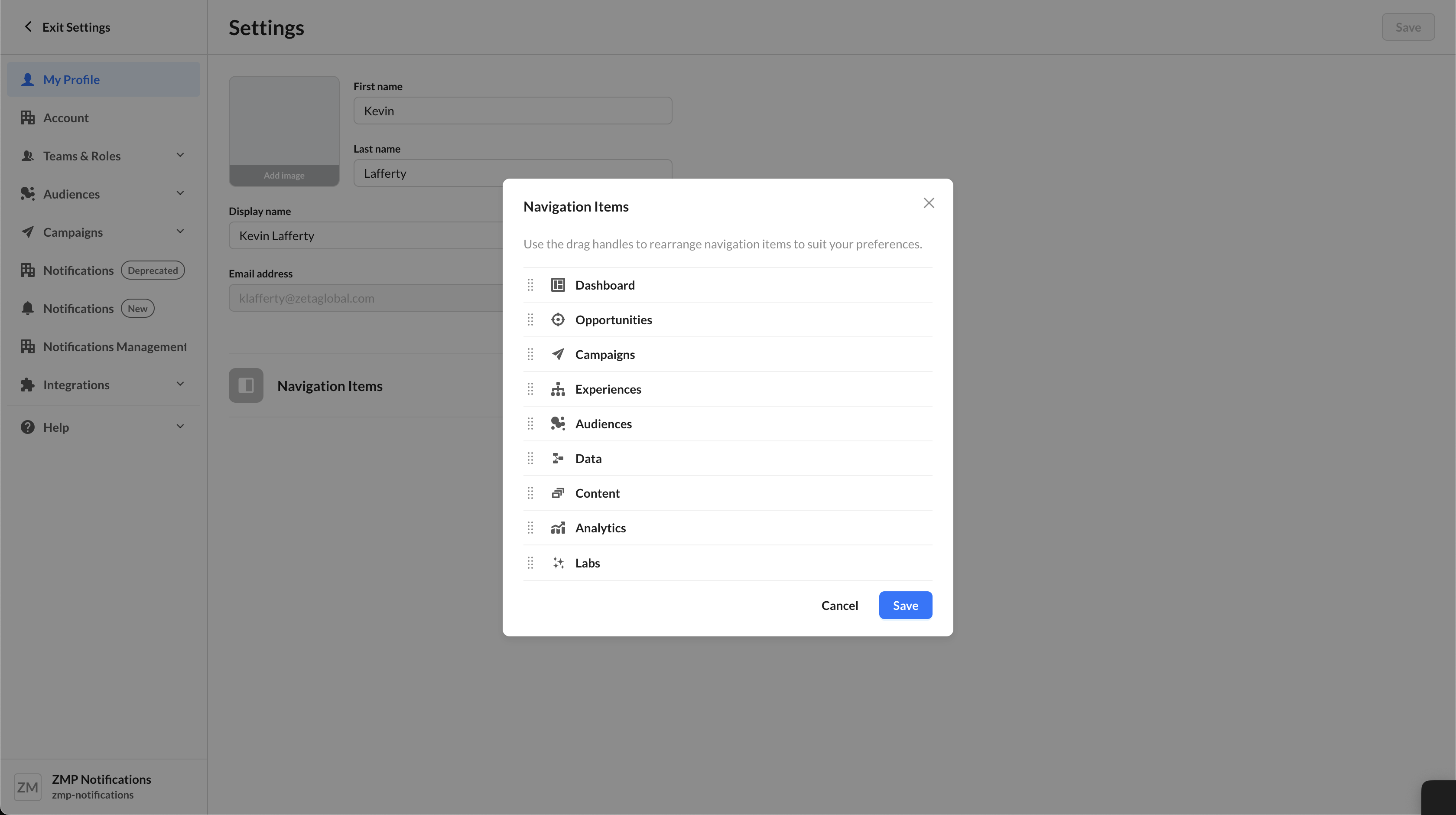
We’ve updated the main left-hand navigation bar in the ZMP with a refreshed design to make your experience smoother and more intuitive. Additionally, within the Settings menu, you’ll now find the navigation reordering option under Profile, making it quicker and easier to personalize your workspace layout. |
|
|
Learn More: |
June
|
Top/Bottom N Filter Now Available in Insights Studio |
|---|
|
You can now spotlight the most impactful data points in your reports with the new Top/Bottom N filtering capability in Insights Studio. Whether it's the top 10 performing campaigns or bottom 5 underperforming products, this enhancement helps you zero in on the key contributors without changing global filters or dataset views. Apply these filters at the chart level across categorical (non-date) dimensions, tailored to any metric in your dataset. To further improve clarity, pie and donut charts now display the top 10 dimension values by default, enhancing legibility and responsiveness. These updates help you eliminate noise, surface outliers or key drivers faster, and build more focused, actionable dashboards. |
.png?cb=2e2c72603786e6db6b42cba2ca1d8e12)
|
|
SSH Authentication Now Supported for SFTP Connections |
|---|
|
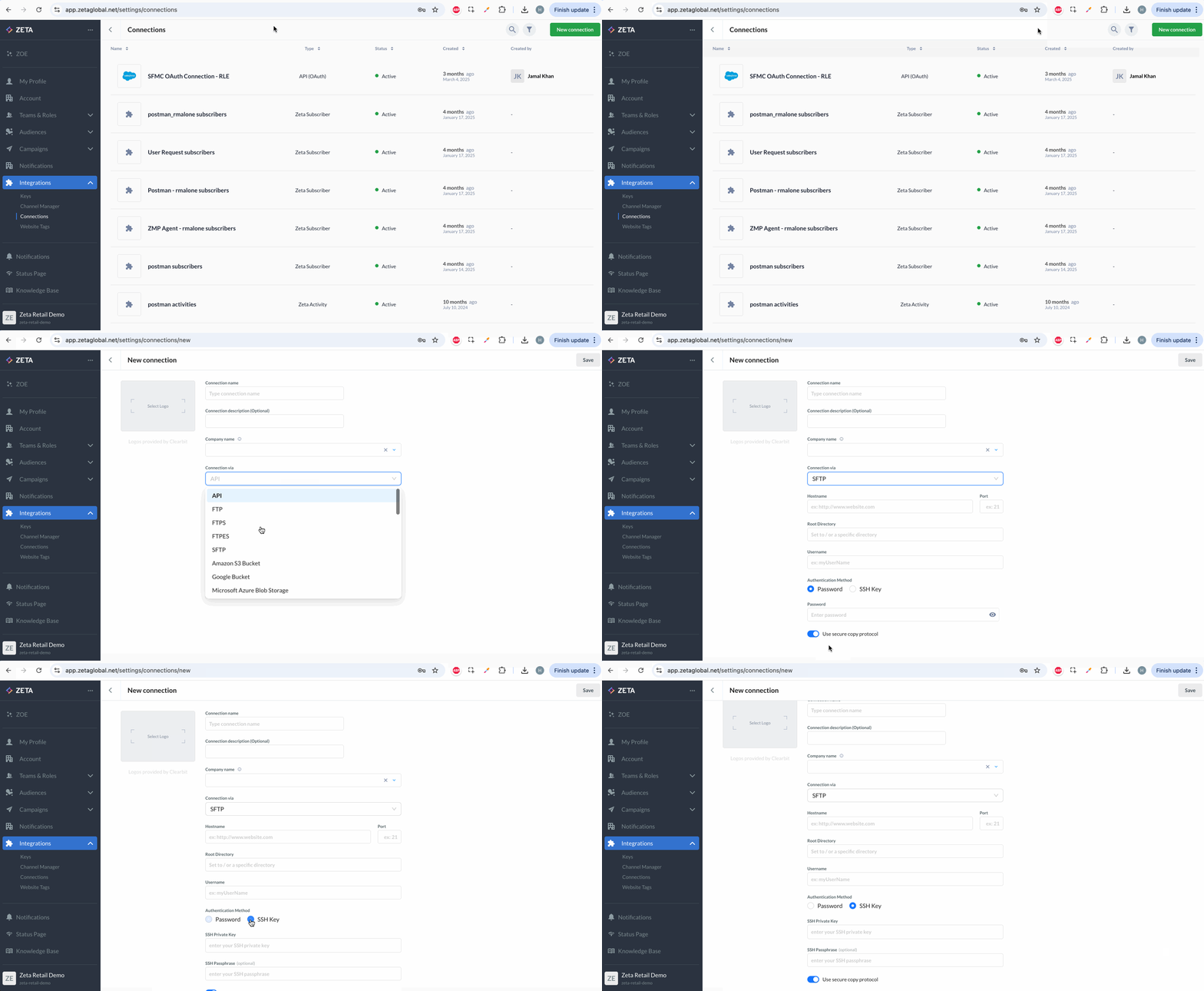
You can now use SSH key-based authentication when configuring SFTP connections in the Zeta Marketing Platform, making file transfers more secure and setup more seamless. With Secure Copy Protocol now enabled by default, you’ll benefit from added flexibility while still having the option to disable it as needed. |
|
|
Experience Builder Enhancements: Chaining Experiences + New Node Design |
|---|
|
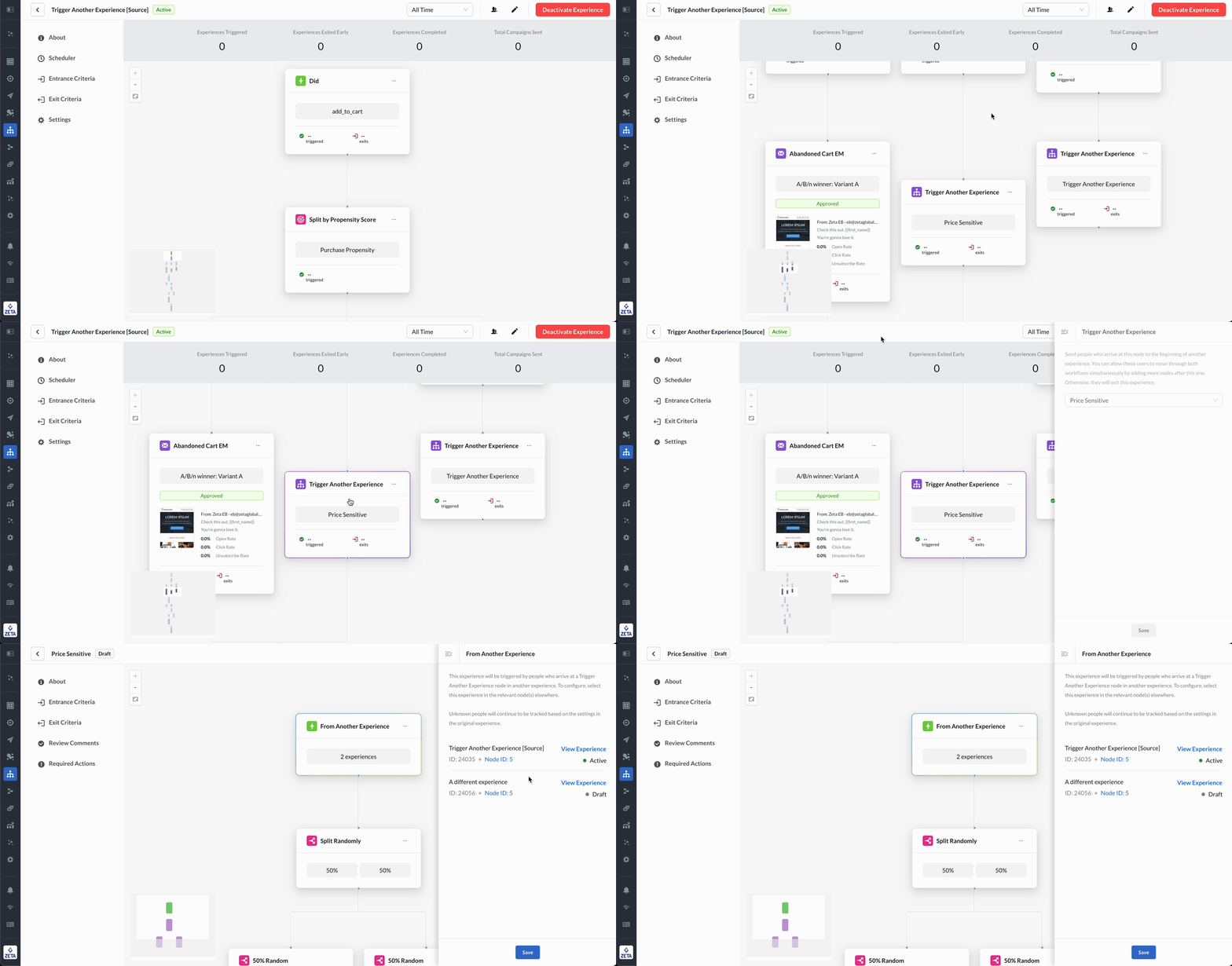
Build more cohesive customer journeys with the ability to chain experiences together in Experience Builder. Use the new Trigger Another Experience action node and From Another Experience trigger node to connect experiences seamlessly, making your journey design more dynamic and efficient. Additionally, we’ve refreshed the canvas and node card design to display more hierarchy and context, helping marketers create and manage experience with greater clarity and speed. |
|
|
Learn More: |
|
Aggregate Business Requirements Seamlessly in Onboarding Manager |
|---|
|
Say goodbye to scattered documents and disjointed handoffs. With our latest Onboarding Manager enhancement, you can compile all business requirements into a single streamlined document directly from the platform.
This enhancement improves transparency, saves time, and accelerates collaboration during onboarding. |
|
Streamline Workflows with Self-Service Key Management |
|---|
|
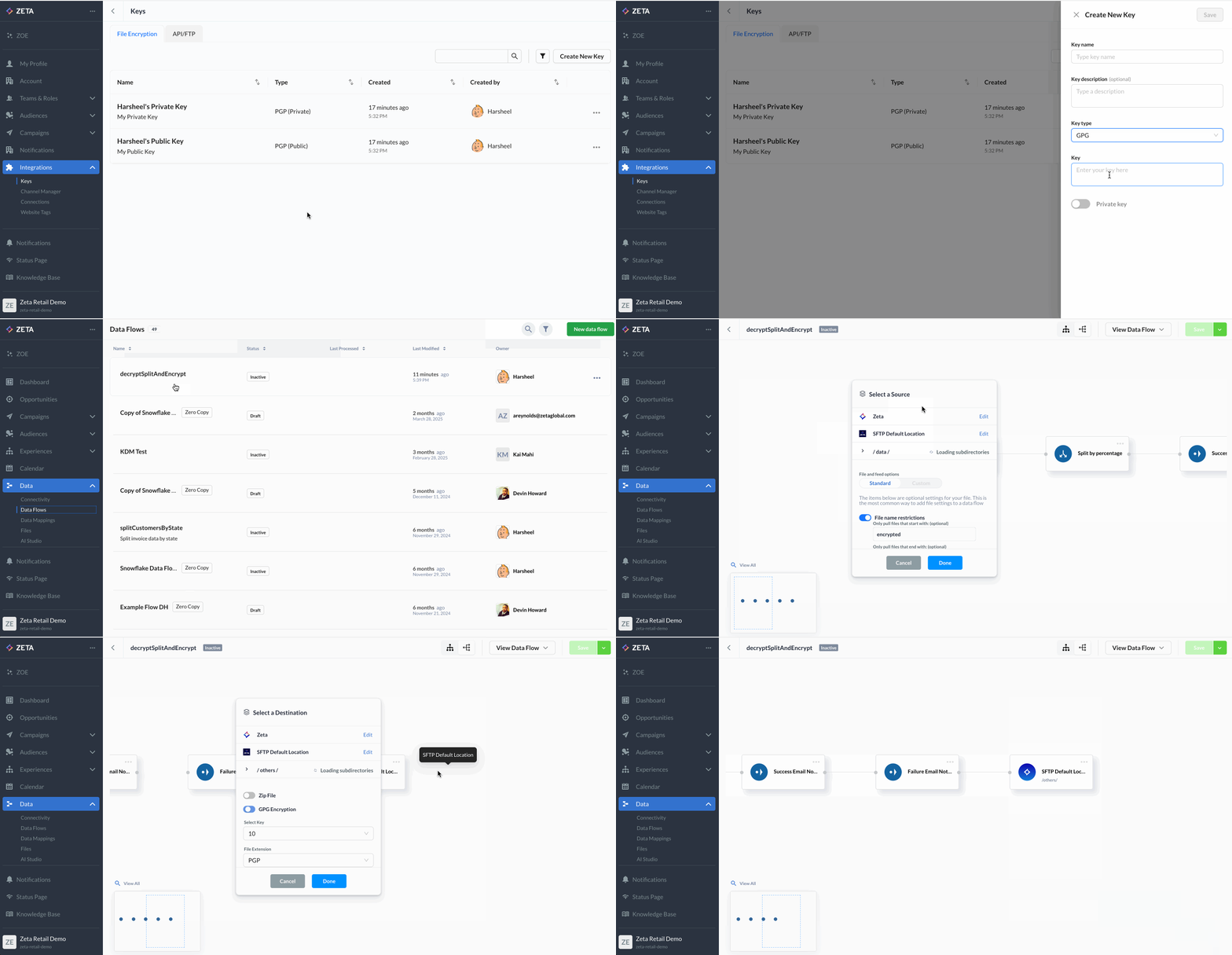
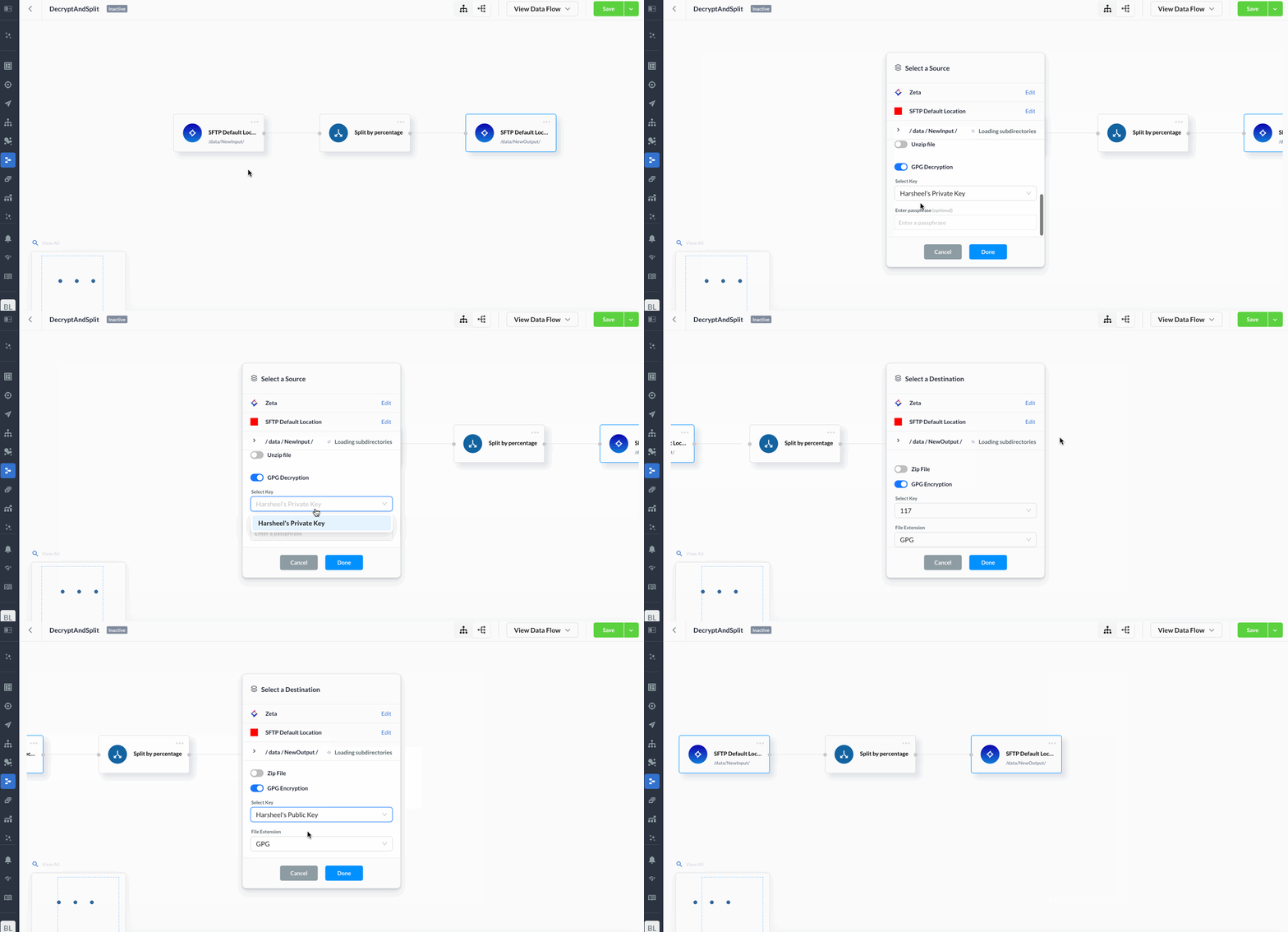
Managing PGP or GPC encryption and decryption keys is now easier than ever. With our new self-service key management feature in the Zeta Marketing Platform (ZMP), you can upload and manage your encryption keys directly in the UI, and select them instantly for use in Data Flows. This eliminates dependency on external teams, ensuing faster, secure processing of incoming and outgoing files so you can move your workflows forward with confidence. |
|
May
|
Smarter Content Organization with Enhanced Assets and Snippet Management |
|---|
|
We’ve made it easier to manage, find, and organize your content in the ZMP, helping you work more efficiently when building campaigns. What’s new:
Both the Asset Library and Snippets pages have a refreshed UI to align with recent ZMP design updates, making the experience more intuitive. |
-20250529-094503.gif?cb=fc4a37fe89de3d21bf14085759a293ca)
|
|
Learn More: |
|
Streamline Collaboration with Deep-Linked Job Cards in Onboarding Manager |
|---|
|
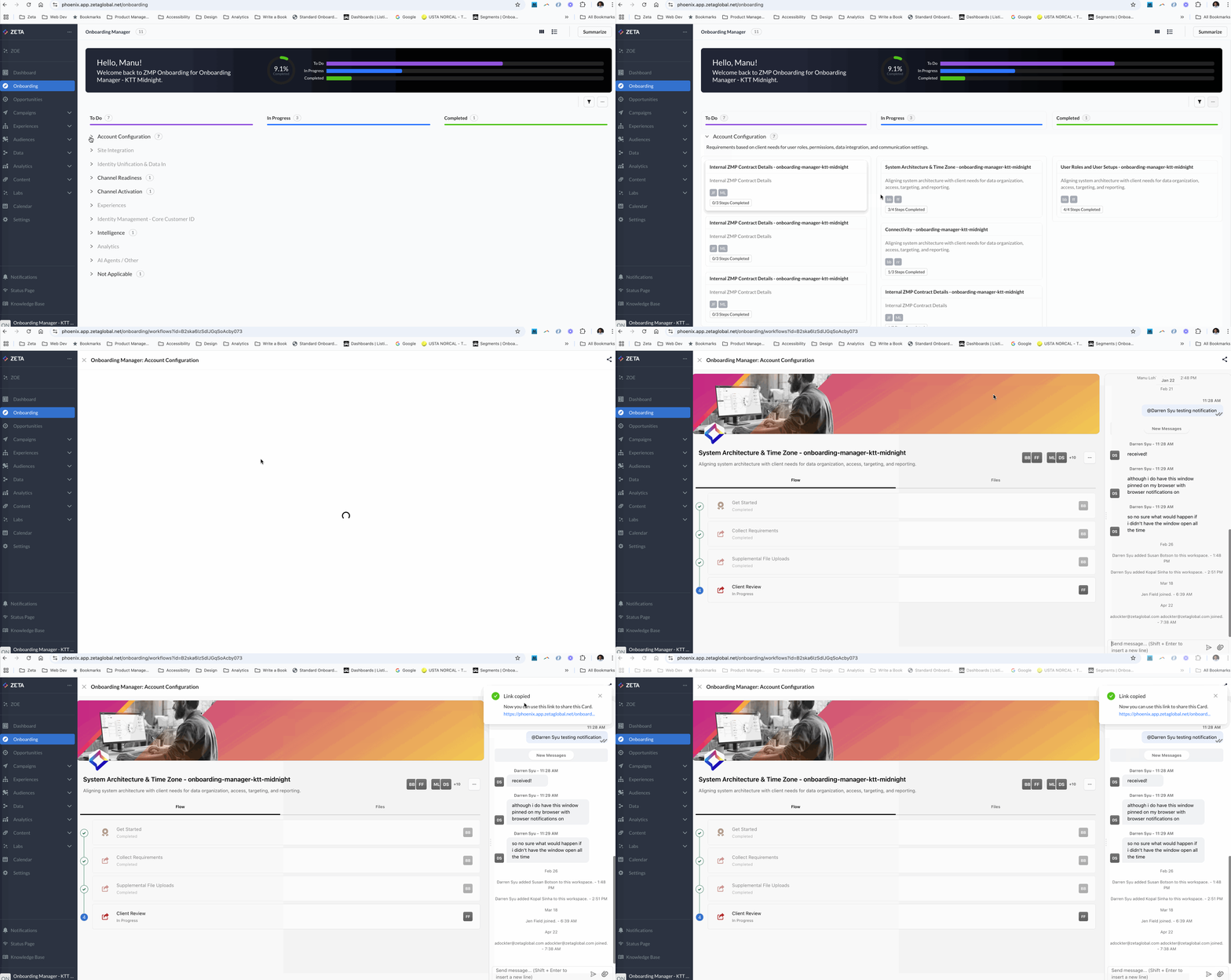
Managing onboarding tasks is now simpler and more collaborative with new deep-linking capabilities in Onboarding Manager. Each job card now has a unique, sharable URL—allowing you to share relevant cards directly with teammates without navigating through the entire dashboard. This enhancement helps with:
|
|
April
|
Experience Builder: Enhanced User Insights and Control |
|---|
|
Gain deeper visibility into user behavior with new user lookup in Experience Builder. This feature allows you to chart user paths across all journeys, complete with timestamps for every node-level entry and exit. You can also manually exit individual users, either one at a time or in bulk, directly from the lookup view offering greater flexibility and control. You’ll also notice enhancements to the user interface to streamline your workflow: Entrance and Exit Criteria buttons are now always visible, with a green indicator when active. These updates make it easier than ever to design, monitor, and optimize your experiences for maximum impact. |
.png?cb=98a58fd2c495e4333025d3140103fd5d)
|
|
Learn More: |
|
Improved Unsubscribe Cascade Enhancement for Better Compliance |
|---|
|
We’ve enhanced our unsubscribe cascade logic to handle more than 10 profiles associated with a single email contact. A new asynchronous process allows the ZMP to process additional unsubs more efficiently, improving compliance management and reducing the risk of over-communication. |
|
Engage App Users with Toaster-Style In-App Messages |
|---|
|
Boost in-app engagement with our new “toaster-style” messages—personalized, non-intrusive notifications that appear automatically when users open your app. Ideal for promotions, reminders, and updates, these messages are easy to configure in the ZMP, with the SDK handling image rendering and delivery. Reach nearly your entire app audience without requiring opt-ins, while maintaining a seamless user experience. |
|
Accelerate Time to Value with Onboarding Manager |
|---|
|
Introducing Onboarding Manager, an AI-powered workflow in the ZMP, designed to simplify and accelerate onboarding. It captures discovery inputs and proposed solutions that align to your business needs, creating a smoother onboarding experience and helping you realize value faster. |
|
Streamline Your Onboarding Management with Bulk Actions |
|---|
|
Manage onboarding projects more efficiently with Bulk Actions in ZMP’s Onboarding Manager. Superusers can now update multiple job cards at once from the List View, with support for five key actions: assign watchers, assign client, assign Zeta lead, change scope, and archive. These enhancements help you:
|
.gif?cb=085725f43a464e228c73005b9fadd4ba)
|
|
Save Time with AI-Powered Onboarding Project Summary |
|---|
|
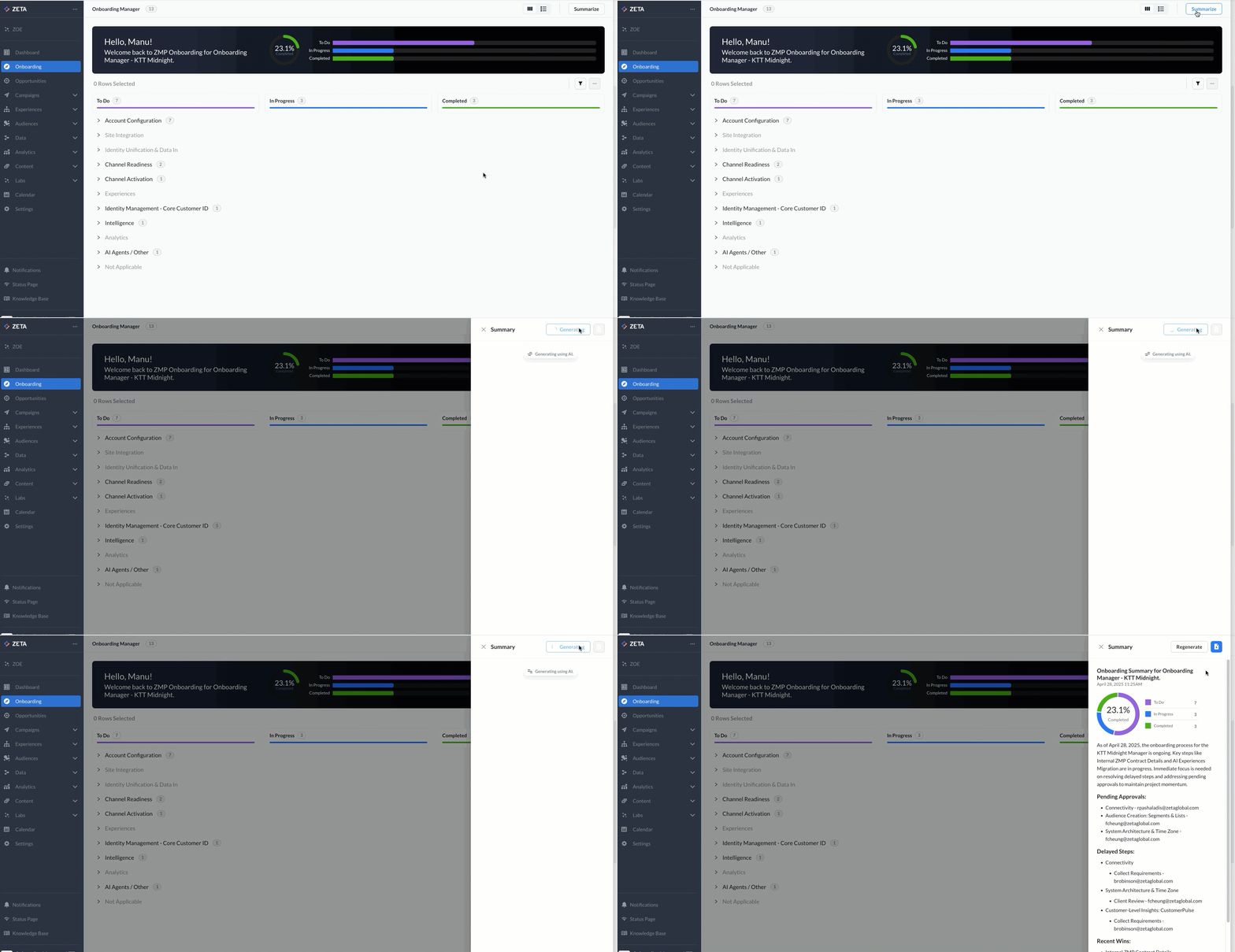
Stay informed and reduce manual effort with the new AI-powered project summary in Onboarding Manager. With a single click, Zeta’s AI analyzes all active job cards and generates a downloadable summary that highlights pending approvals, delayed steps, and recent progress. This feature helps you:
|
|
March
|
Revolutionize Your Marketing Analytics with Insights Studio |
|---|
|
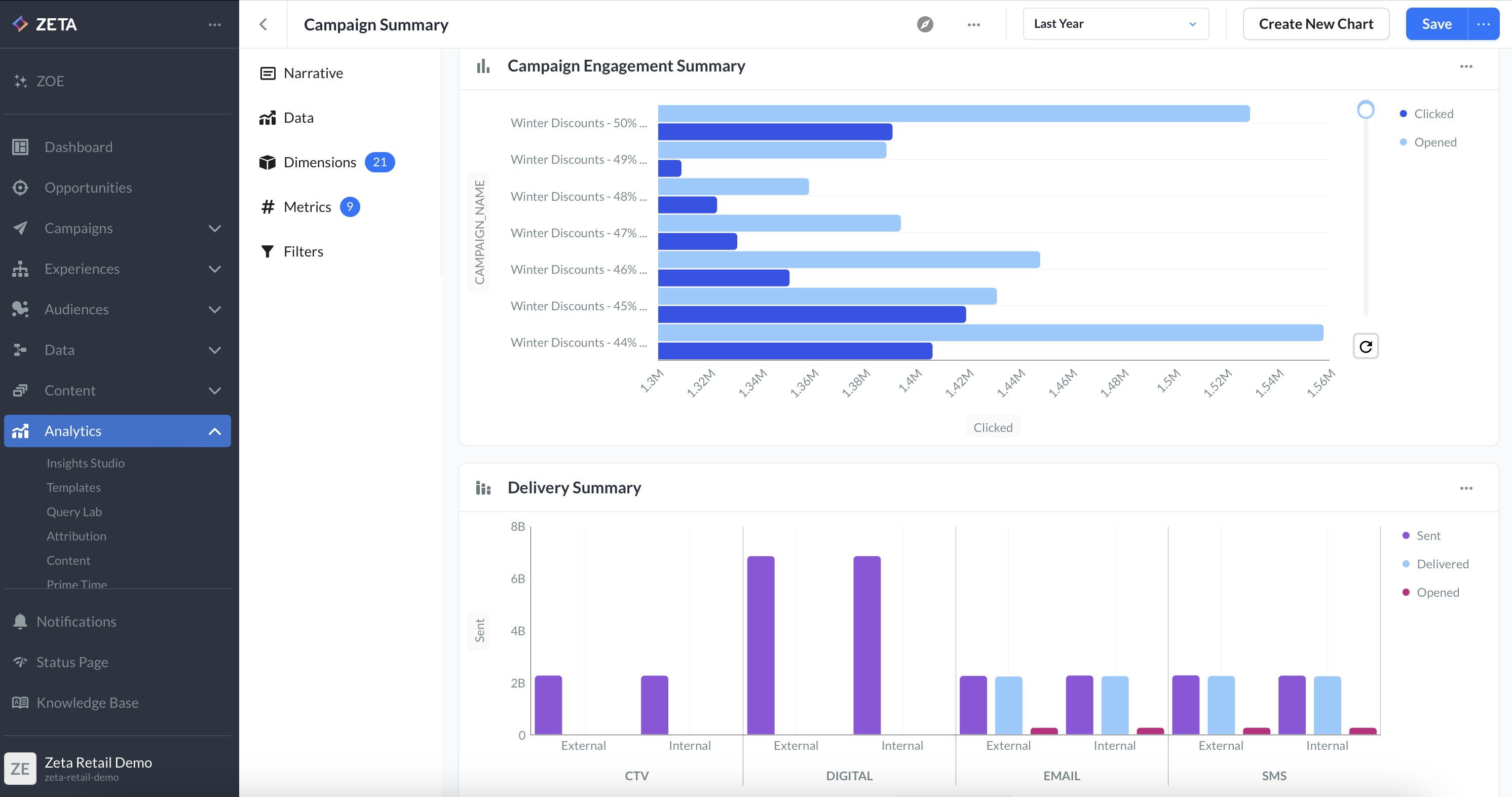
Insights Studio, the next evolution of ZMP Report Builder is now available. A comprehensive business intelligence tool designed for data visualization and reporting. Insights Studio eliminates the need for third-party reporting tools by providing a unified, self-serve analytics interface within the Zeta Marketing Platform. With Insights Studio, you can:
Take advantage of these powerful new capabilities today! |
|
|
Fast Track Your Success with Zeta’s AI Agents |
|---|
|
We’re excited to announce that Zeta’s AI Agents are now generally available! Integrated directly within the Zeta Marketing Platform, our AI-powered agents handle specialized tasks such as campaign quality validation, building audiences, and synthesizing insights about customers and prospect. By automating key tasks, AI agents help improve productivity, enhance customer experiences, and drive operational efficiencies—with the potential to save businesses 400 hours of work per month. With this release, the ZMP now empowers you to:
To get started, please contact your Zeta Account Manager. |
|
[BETA] Agentic Workflows |
|---|
|
Agentic Workflows have now entered beta. This groundbreaking capability enables you to chain AI Agents together to create fully customizable workflows that accomplish more sophisticated tasks, such as:
By taking automation to the next level, Agentic Workflows create a deeper impact across the entire customer journey and transform your marketing efforts. If you are interested in joining the beta program, please contact your Zeta Account Manager. |
|
Flexible Layouts: Switch Between Horizontal and Vertical Views for Data Flows |
|---|
|
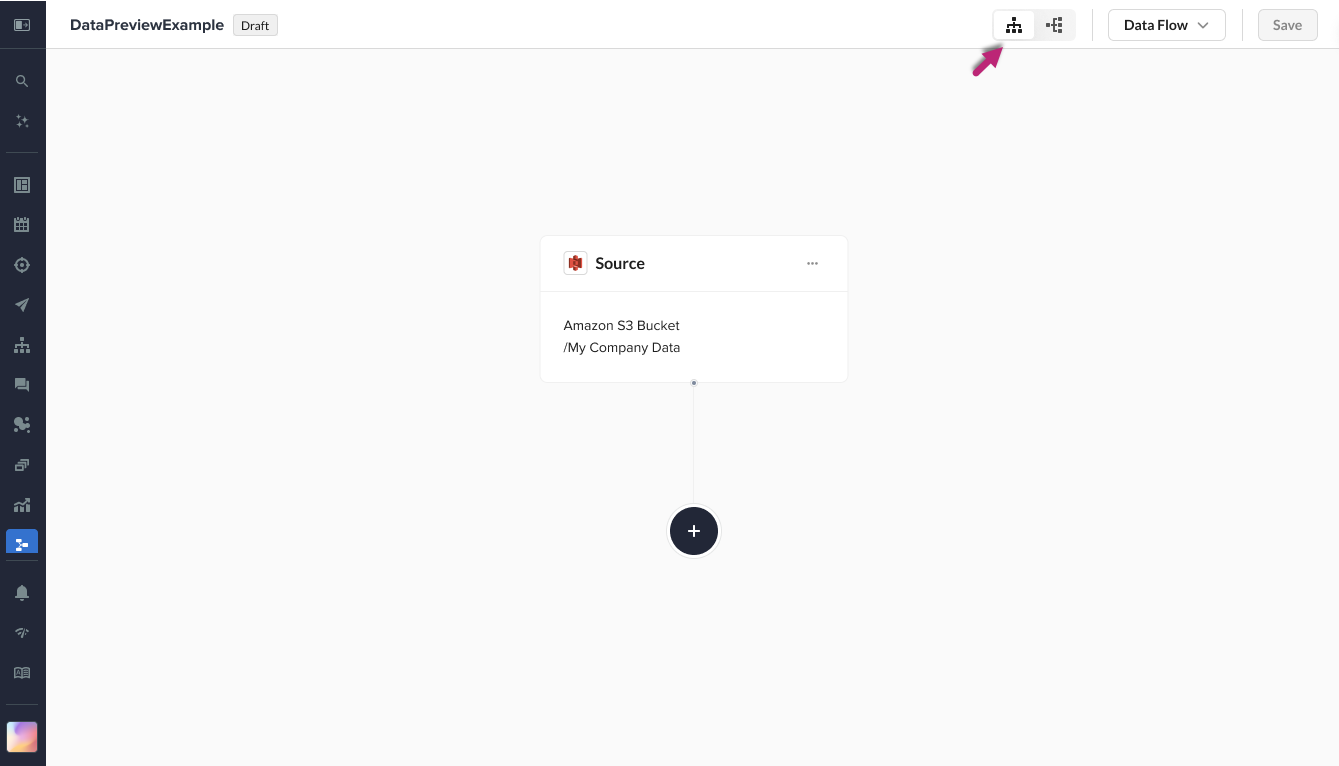
You now have greater flexibility when designing and visualizing your data flows. A new segmented control in the top right of the Data Flows canvas lets you switch between horizontal and vertical layouts, making it easier to create flows in your preferred format. To enable this feature, please contact your Zeta Account Manager. |
|
|
Enhance Engagement with Visual-Rich Push Notifications |
|---|
|
You can select images directly from the Asset Library when creating push notifications in the ZMP. This feature supports images for Android, while iOS users can leverage images, GIFs, and videos. After selecting and editing media, you can preview the notification in real time before finalizing the setup. Empowering you to create visually compelling push messages without developer assistance. |
|
New Identity Tab in Single View of the Customer |
|---|
|
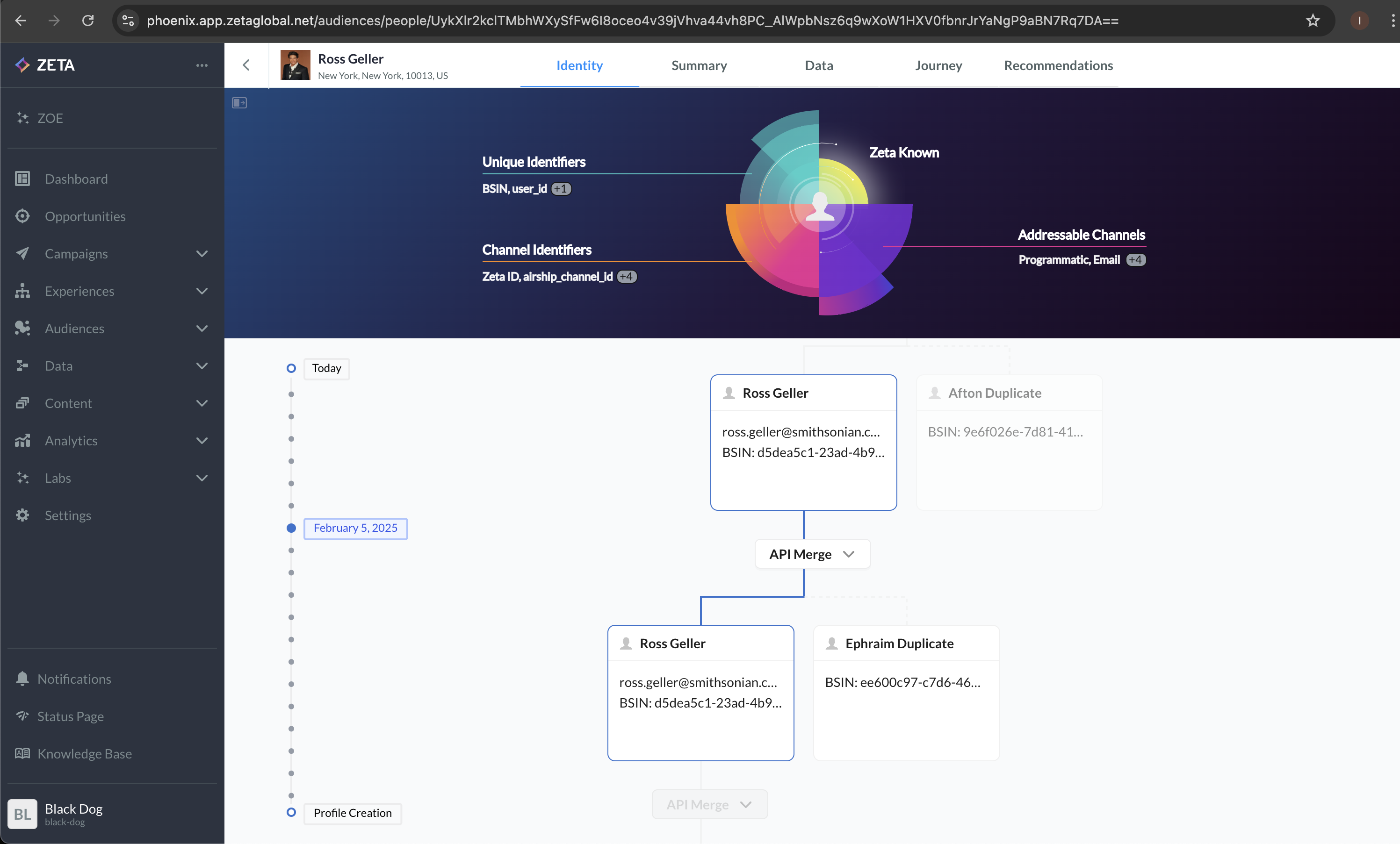
We’ve enhanced the Single Customer View with a new identity tab, offering:
This update provides critical insights into identity resolution, helping you make more informed marketing decisions and troubleshoot more effectively. |
|
|
Prime Time – New Control/Test Group Dimension in Customer Marketing Dataset |
|---|
|
We’ve added a Prime Time Group dimension to the Customer Marketing dataset in Insights Studio, enabling:
|
|
Improve Your Data Analysis with New Chart Types in Report Builder |
|---|
|
We have enhanced Report Builder with new chart types and improved configurations that empower you with more flexible and visually compelling ways to analyze and present data. With these additions, you can now:
These enhancements collectively improve data storytelling, decision-making, and overall report usability, making it easier for you to extract meaningful insights from complex datasets. |
|
Flexible Event Export Capabilities |
|---|
|
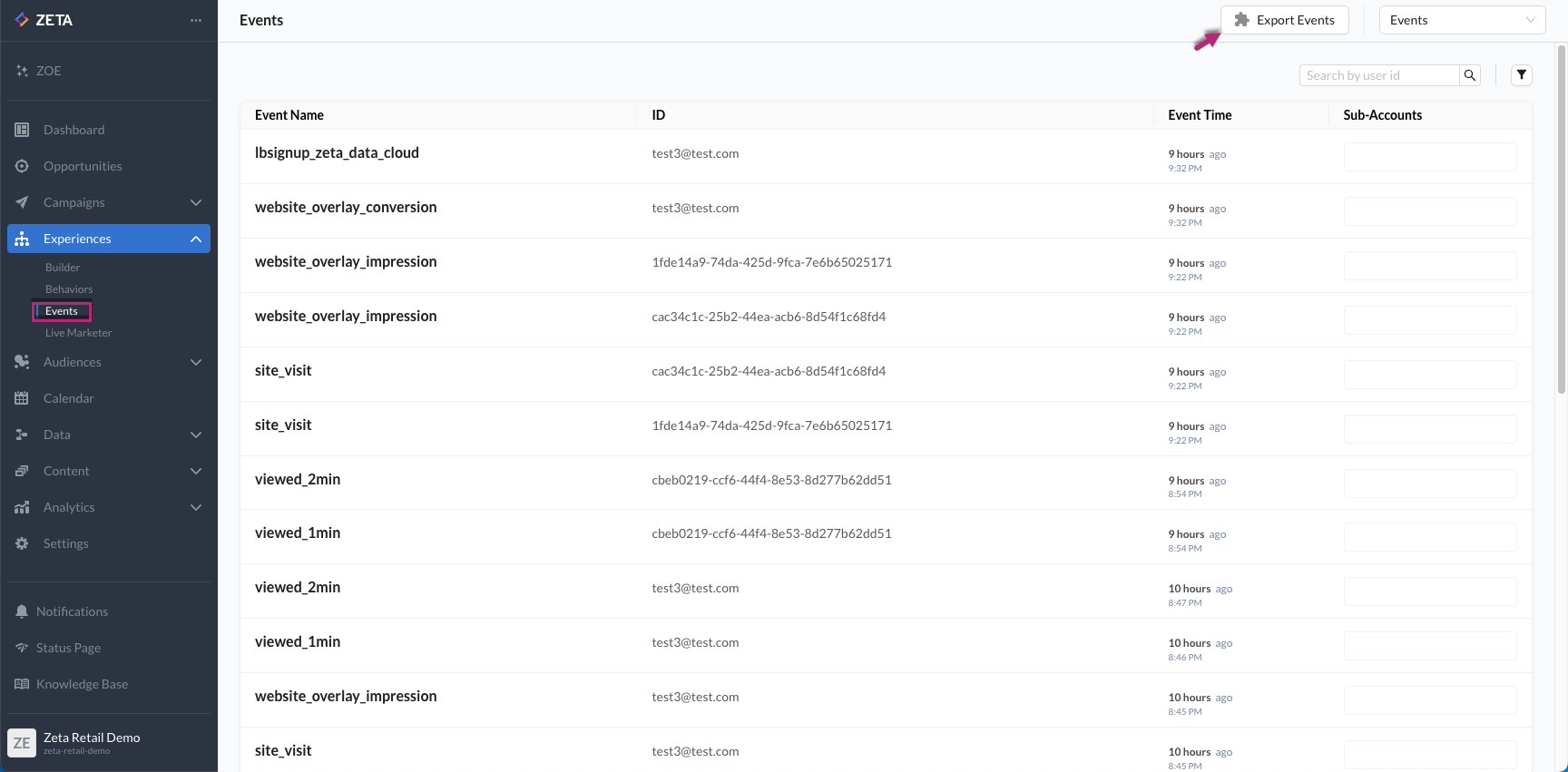
You can now export events directly to file-based destinations like SFTP, Amazon S3, and more within the ZMP. This new capability allows you to:
Managing and exporting user behavior data is now simpler and more flexible than ever. |
.gif?cb=8de013a442299d40593a7df3a1c6979c)
|
|
Optimize Delivery & Response with New ‘Distribute Over Time’ Send Option |
|---|
|
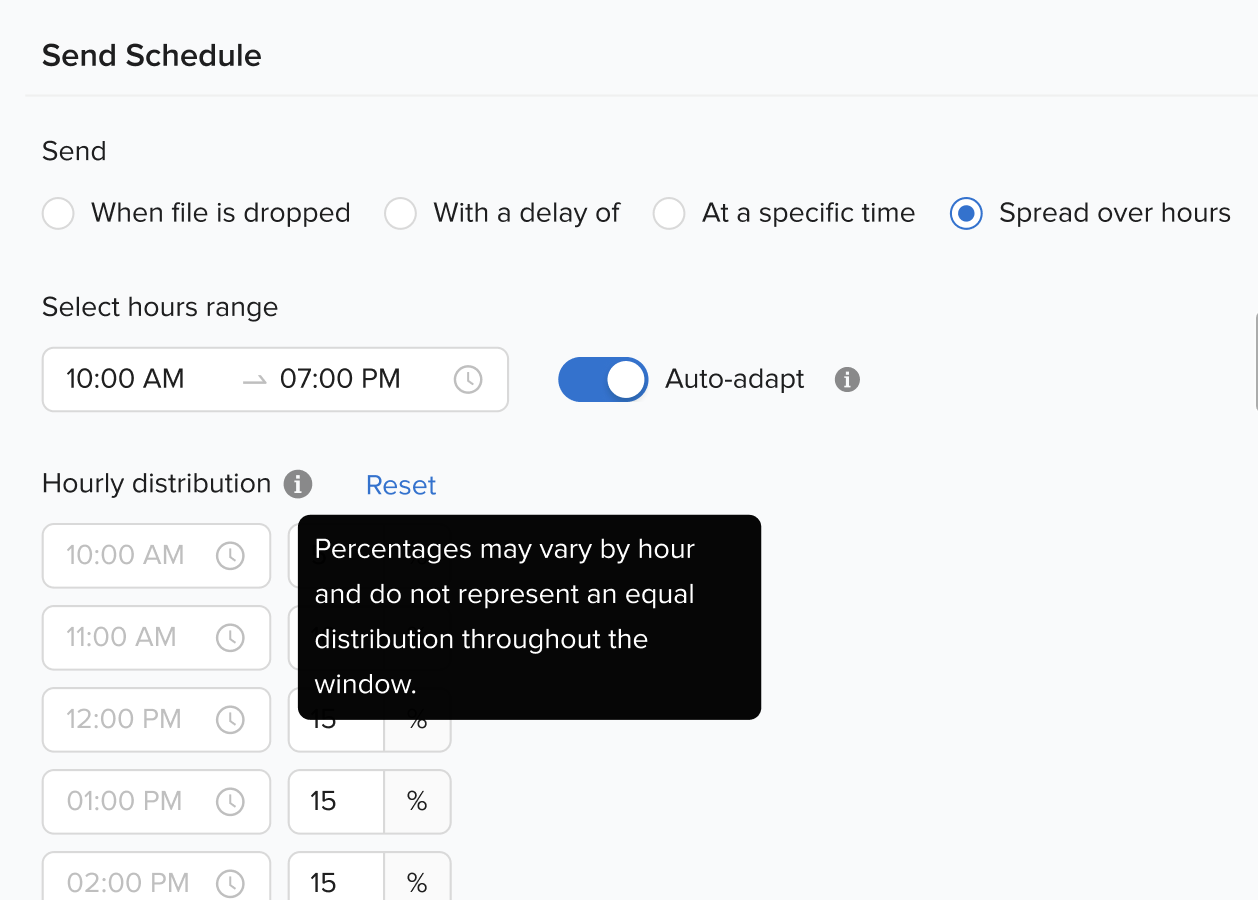
The ZMP now offers a ‘Distribute Over Time’ feature, allowing you to gradually send messages over a selected period rather than all at once. This helps:
|
|
February
|
Simplify Testing with Portable Content |
|---|
|
Easily share content templates and snippets across accounts without the need for manual rebuilding. Share them as a copy or a linked entity pointing to the same template or snippet. This new portable feature streamlines testing across development and production accounts for greater efficiency. Additionally, the redesigned email templates library offers a more streamlined and intuitive experience, further enhancing your workflows. |
|
Learn More: |
|
New Self-Serve Custom Datasets and Enhanced Visualization Options in Report Builder |
|---|
|
Introducing key updates to Report Builder to simplify ad-hoc reporting and streamline report creation, delivering more efficient and personalized insights:
|
|
Profile Properties: Flagging Incorrect Types |
|---|
|
The Zeta Marketing Platform now flags incorrectly typed profile properties (e.g., a property is set as a number but the value provided is a string). Making it easy to identify and correct misclassified data at the profile level, improving data quality and accuracy. |
|
Zeta Clean Room: Audience Sharing |
|---|
|
The Zeta Clean Room now enables secure audience sharing, allowing two parties to exchange audience data in a privacy-compliant manner to expand their addressable marketing universe. A key use case is audience acquisition:
This update enhances collaboration, unlocking new audience opportunities while maintaining data security. |
.png?cb=145e0a6293086fc048fc4ea3430addfc)
|
January
|
New Targeting Options in Experience Builder: Split by Propensity Score + 10 Branches |
|---|
|
Target customers and prospects more intelligently with the new Split by Propensity node in Experience Builder. This feature allows you to use propensity scores for more precise targeting. Additionally, all split nodes now support up to 10 branches per split, enabling more granular targeting across properties, channels, and scores. These enhancements help you deliver more personalized experiences for your end customers, driving higher engagement and improved campaign ROI. |
|
.png?cb=3f3251acf171d25e3a0cf02204843d53)
|
|
Improve Your Data Quality with Expanded Inbound Data Controls |
|---|
|
We’ve added inbound controls for four key data types—string, number, Boolean, and date—to ensure data sent to the Zeta Marketing Platform is in the correct type and format. These controls can be enabled per property and automatically reject incorrect values. Key enhancements include:
These enhanced controls improve data quality, helping you achieve more accurate and effective marketing results. |
|
Enhance Your Data Categorization with New People Properties Features |
|---|
|
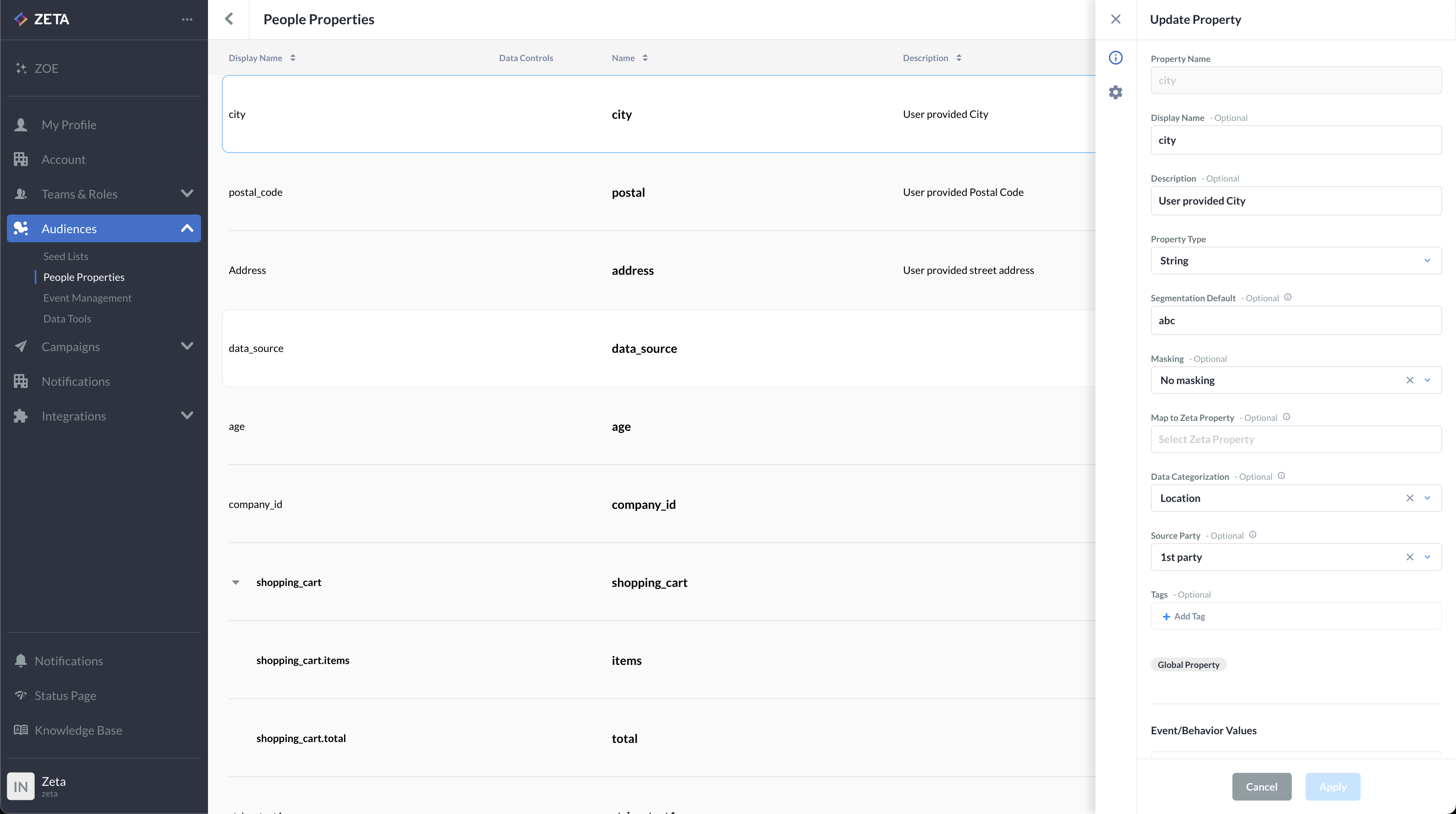
We’ve updated the People Properties page with a refreshed UI and expanded metadata fields, making it easier to organize and catalog your data. The improved UI experience better supports nested properties and allows you to customize your list of fields for enhanced control and visibility. New metadata fields include:
These updates provide deeper insights into each field, giving you more control and clarity over your data. |
|
|
|
Zeta Visitation Report: Track Your DSP Campaign Impact on Store Traffic |
|---|
|
Introducing the Zeta Visitation Report (ZVR) in Report Builder designed to help measure your DSP campaign’s impact on store visits. With ZVR, gain actionable insights on campaign performance across creatives, line items, and tactics. Drill down to regional and store-specific trends, and track daily visit averages by campaign and region. Use these insights to optimize your marketing strategies and maximize ROI. |