

December
|
Improved Controls for Scheduling Snowflake and Google BigQuery Data Ingestion Flows |
|---|
|
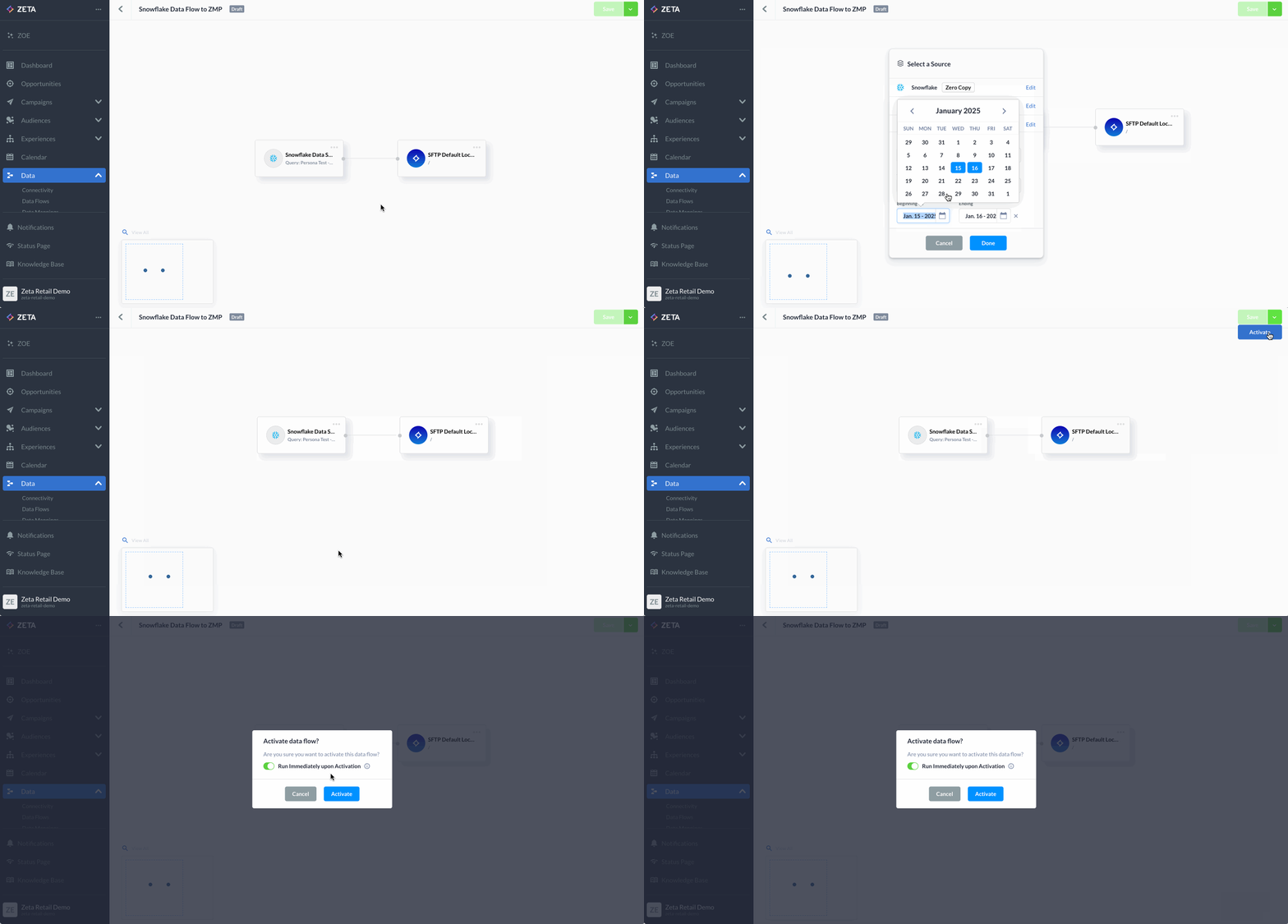
You can now control whether a data flow runs immediately upon activation or follows the schedule specified in the source card, with new features for Snowflake and Google BigQuery sources. By default, flows run immediately to ensure backward compatibility. However, you can adjust this setting during activation or reactivation. This feature is currently available on an opt-in basis. To enable it, please contact Zeta Support. |
|
|
November
|
Introducing Zeta Intelligent Mobile: Your AI-Powered Partner for Smarter Campaigns and Unmatched Customer Insights |
|---|
|
We’re excited to announce the launch of Zeta’s Intelligent Mobile solution, designed to empower marketers to predict, engage, and optimize more effectively than ever! By integrating identity, intelligence and messaging into a single unified solution, you can achieve cross-channel campaign success across all touchpoints with unmatched precision and agility. This new solution, part of the Zeta Marketing Platform, includes Mobile SMS, MMS, Push, Wallet, and soon-to-come features like In-App messaging and Mobile Inbox. The innovative solution enables brands to:
|
|
|
|
Learn More: |
|
Real-Time Data Flow Status Monitoring |
|---|
|
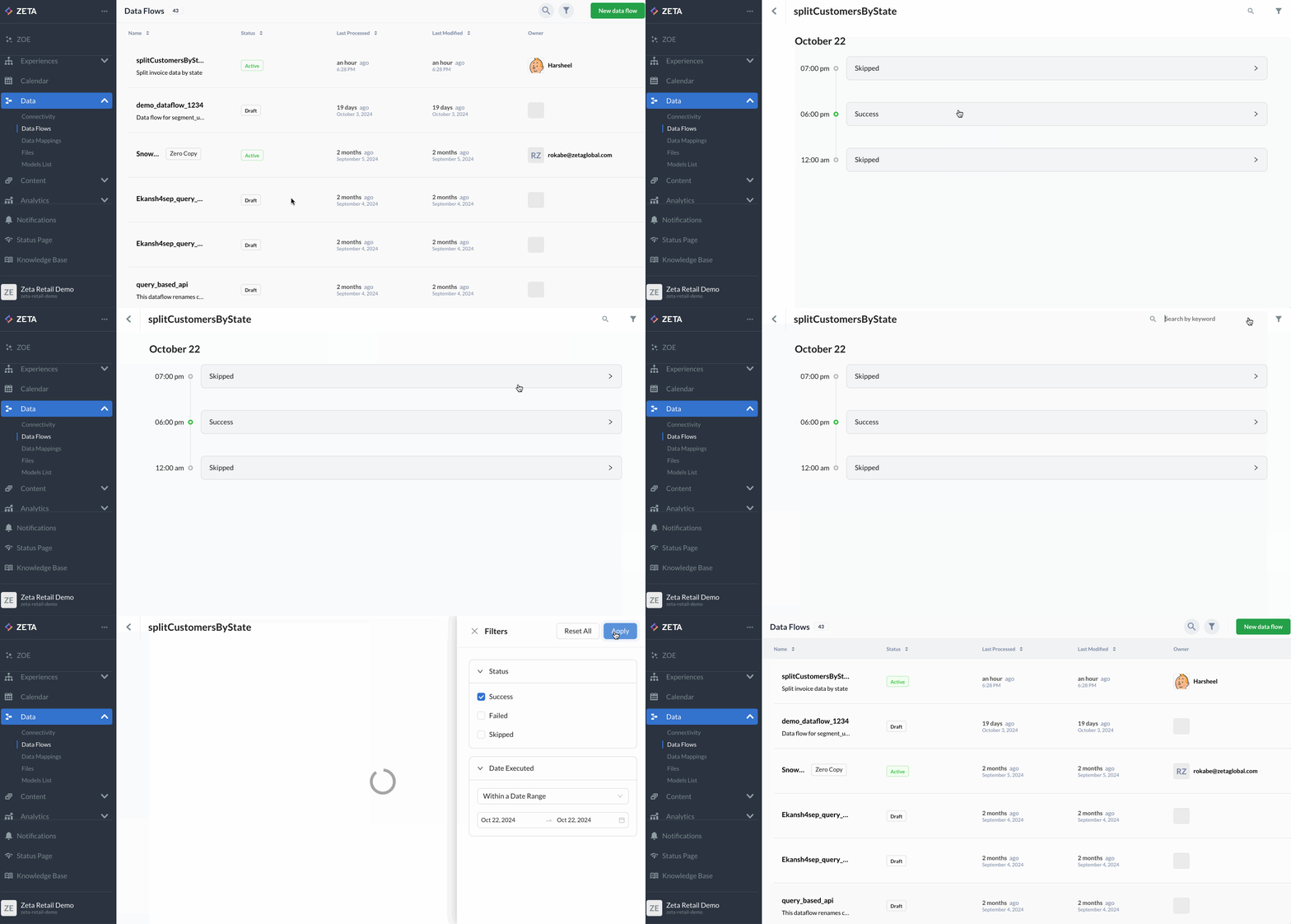
With our new real-time data flow status feature, you can easily monitor the progress and health of your data flows directly within the Zeta Marketing Platform. Instantly check whether flows are not running, in progress, or completed (successfully or with failures). You can also filter past executions by status or keyword and view key metrics like row counts to streamline your workflow. These enhancements reduce dependency on IT support and improve operational efficiency for your marketing teams. To learn more, check out Data Flows | Execution History. |
|
|
|
Streamline Your Workflows with New Content Enhancements |
|---|
|
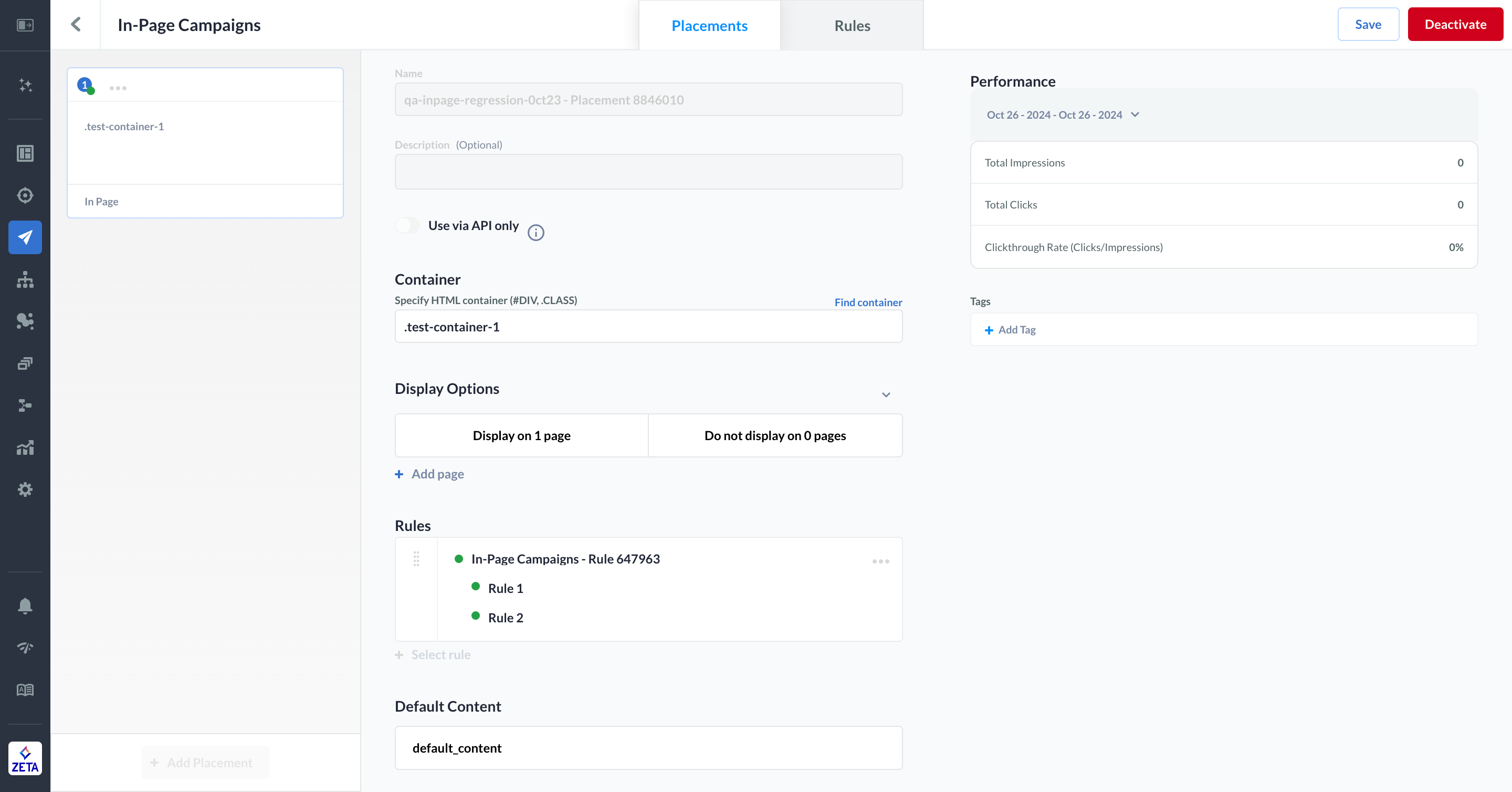
We’re excited to announce three new features now available in the Zeta Marketing Platform:
These updates streamline your content development workflows, enabling you to work more efficiently and effectively. For more information, check out Website - In-Page Campaigns | Editing an Active Campaign. |
|
|
|
Optimize Experience Decisioning by Merging Split Nodes |
|---|
|
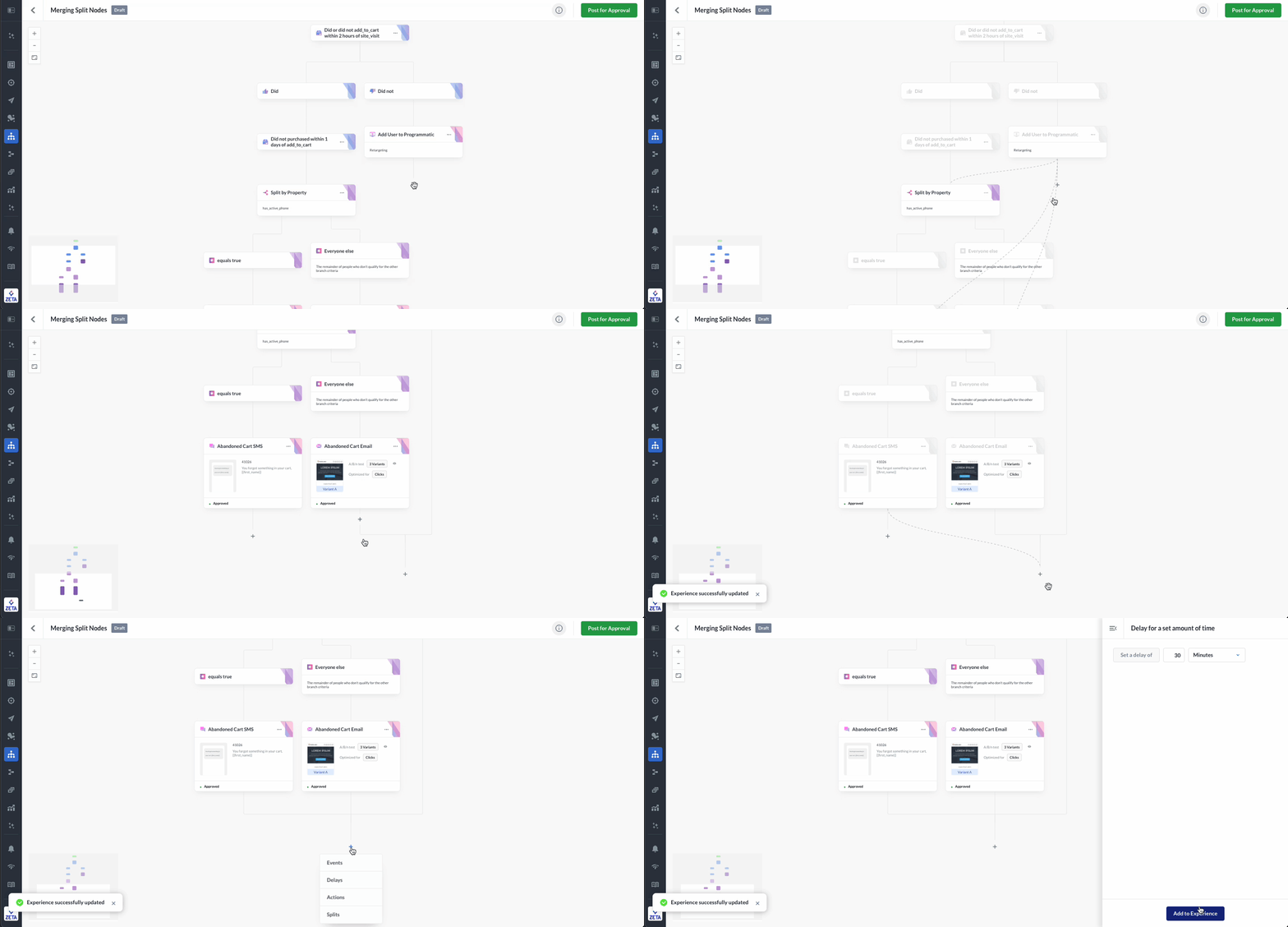
For experiences with split branches in Experience Builder, you can now merge non-consecutive nodes into a single point. Simply click ‘Merge’ in the node menu, select the desired node or point, and any ineligible nodes will automatically be disabled. This enhancement optimizes workflows, reduces the time and effort required to build experiences, and minimizes the likelihood of errors. To learn more, visit All About Nodes | Merging Split Nodes. |
October
|
Zero Copy Data Updates |
|---|
|
We’ve enhanced the Zeta Marketing Platform UI to clearly highlight where zero-copy data access is available. Zero-copy accesses data through a data warehouse connection or GET API, allowing the ZMP to process, aggregate, transform, and activate the data on the fly without materializing it. In short, zero-copy minimizes redundancy and replication, reducing data transfer costs, risks, and delays. Specific areas in the ZMP now indicating zero-copy data access in the UI include Data Flows, Unified Connectivity, Connections (under Settings), External Data Sources (under Settings), and Audience Explorer. |
|
Programmatic Forecasting Metrics in Report Builder |
|---|
|
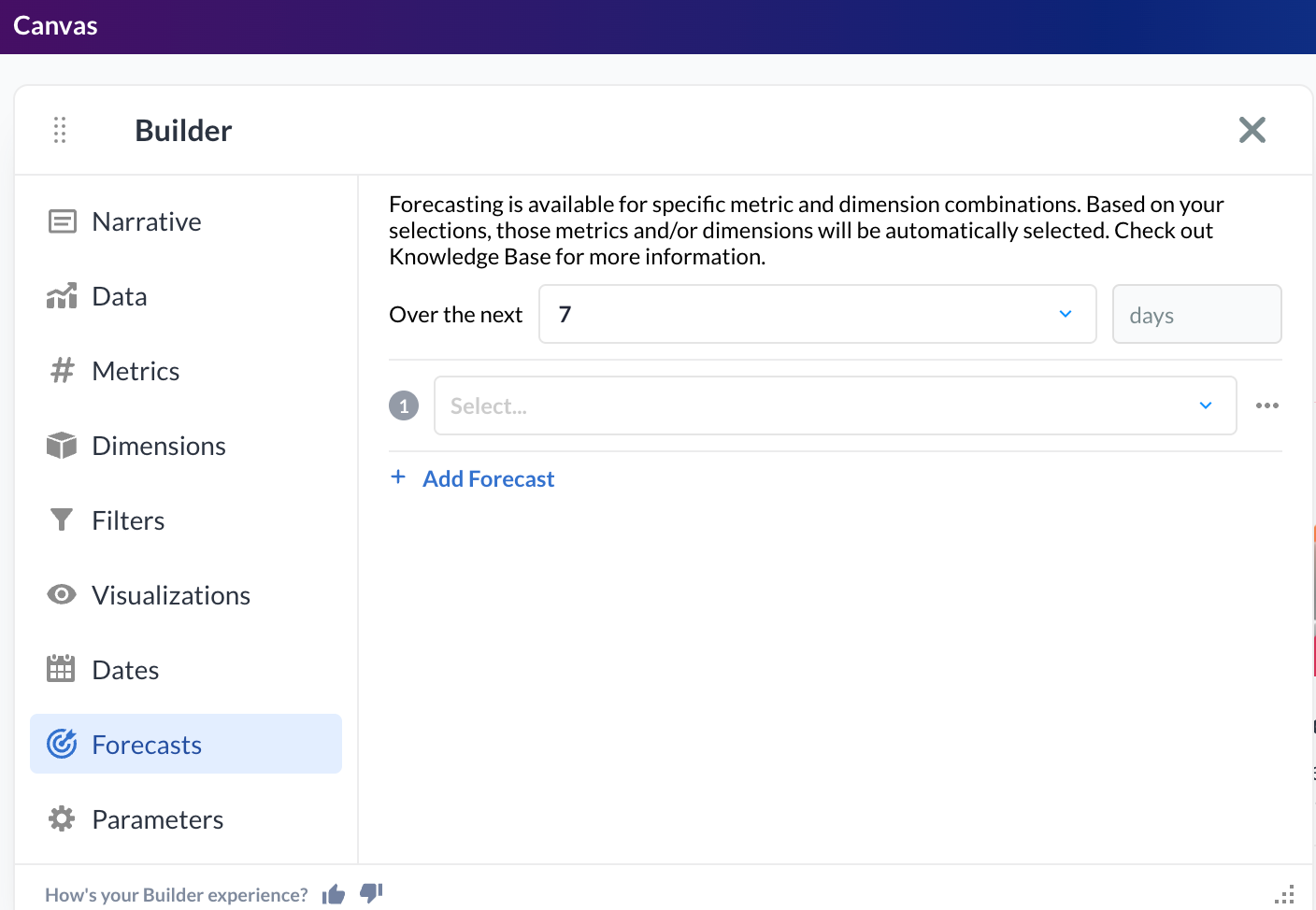
We’re introducing Programmatic Forecasting Metrics as part of the latest upgrade to Report Builder’s Media Activation Reports. Get a comprehensive view to help plan for future budget allocation, optimize resource management, and make informed decisions, based on forecasted outcomes. |
|
|
August
|
Event Management Enhancements |
|---|
|
The Events Mapping page within ZMP Settings has been updated and renamed to Event Management. The expanded functionality now allows you to list all events for a given account, add display names and descriptions to events, and edit event mappings. These enhancements provide greater transparency and control within the ZMP UI for managing events. |
|
Bring the Power of Zeta Data Cloud to Your In-Page Campaigns |
|---|
|
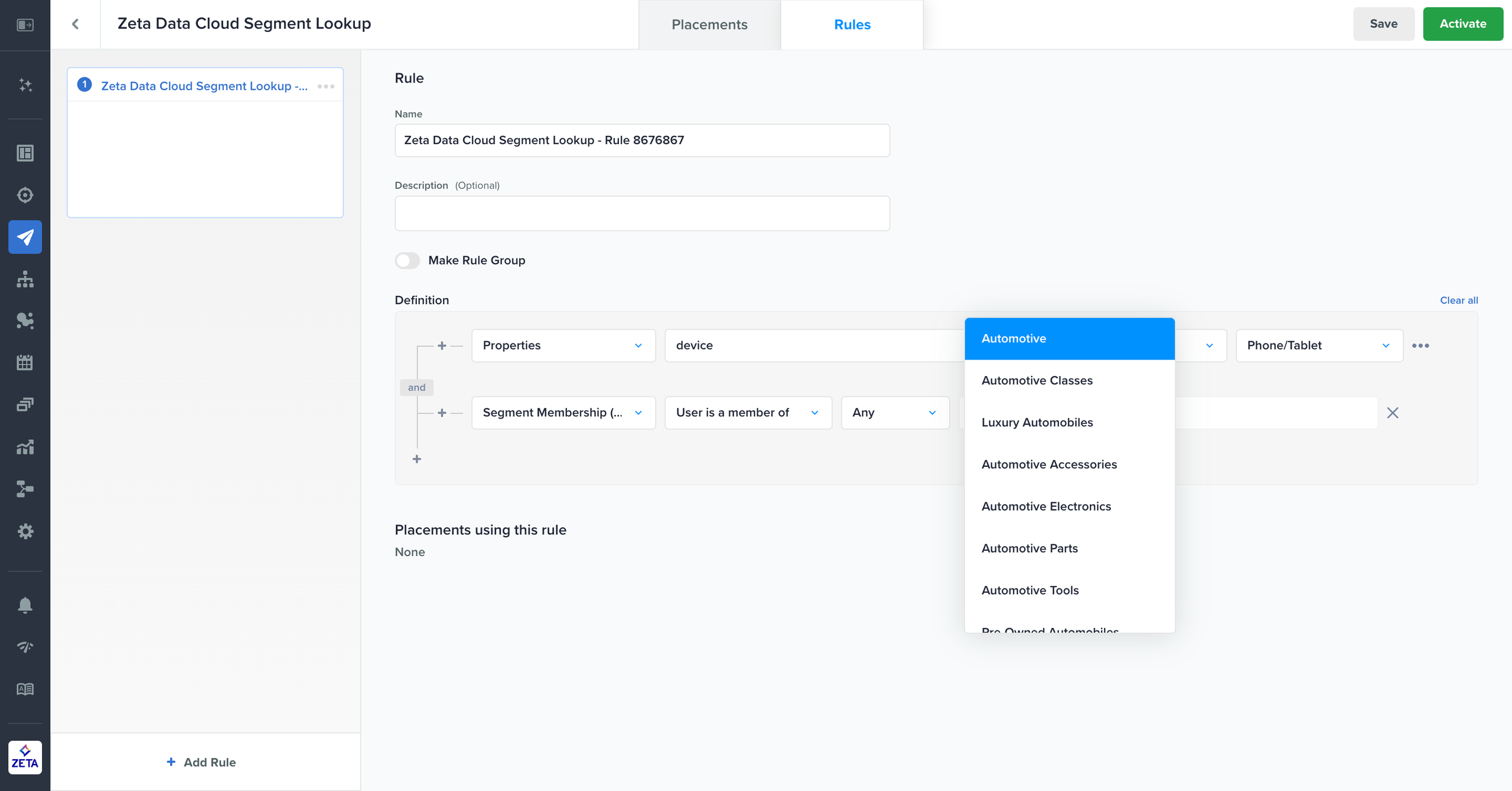
Site visitors who view an in-page campaign may not be known to you but could be known to Zeta through our proprietary Data Cloud. In the Rules tab, you now have the option to target or suppress these Zeta Data prospect segments for in-page campaigns. Additionally, you can combine Zeta Data behavioral signals with properties, transient attributes, or customer segment membership for even more precise targeting. This enhancement enables you to deliver a more personalized experience to all site visitors, including prospects. |
|
|
|
Optimize Retargeting and Channel Mix with the ‘Split by Identity’ Node |
|---|
|
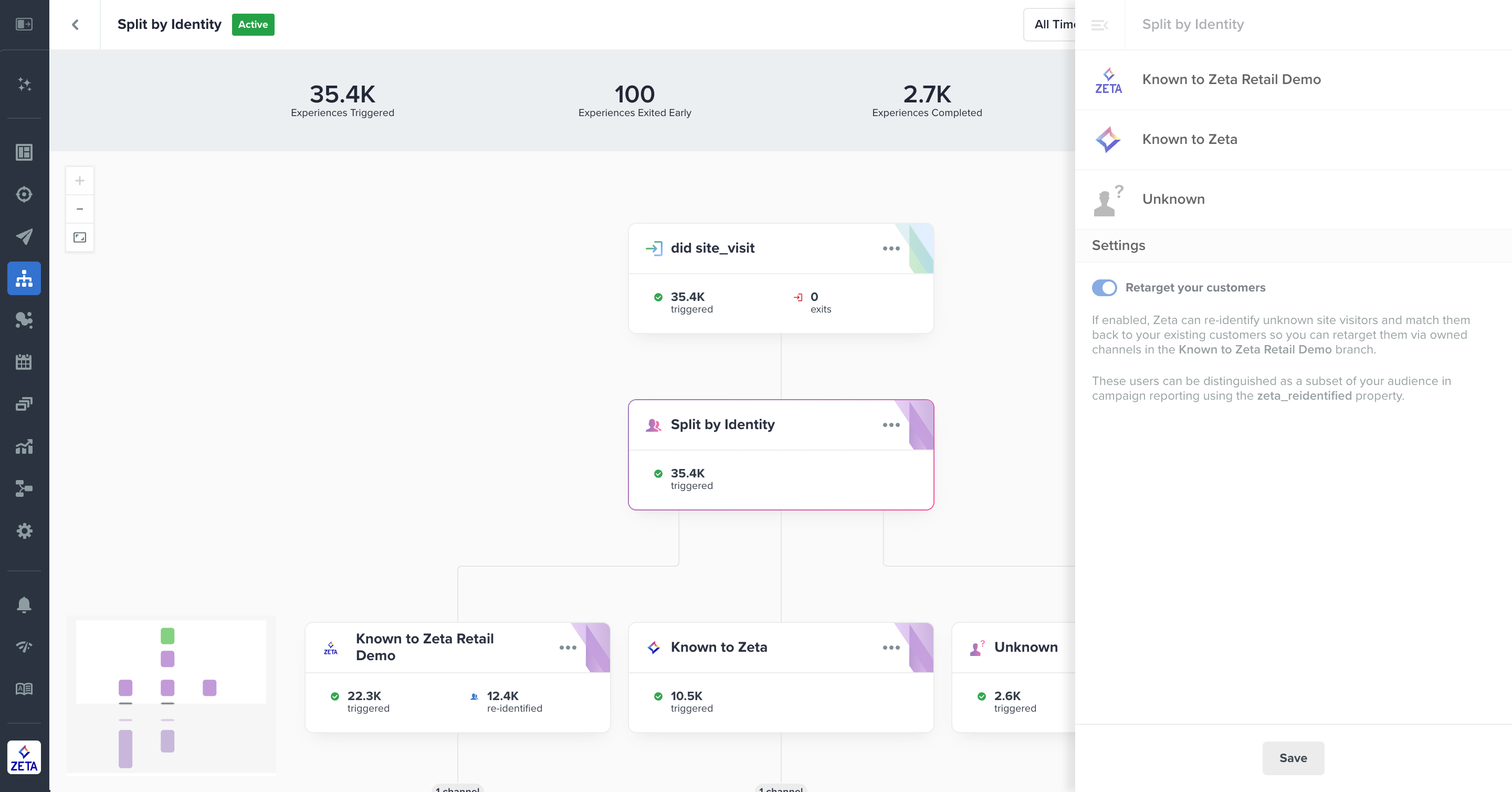
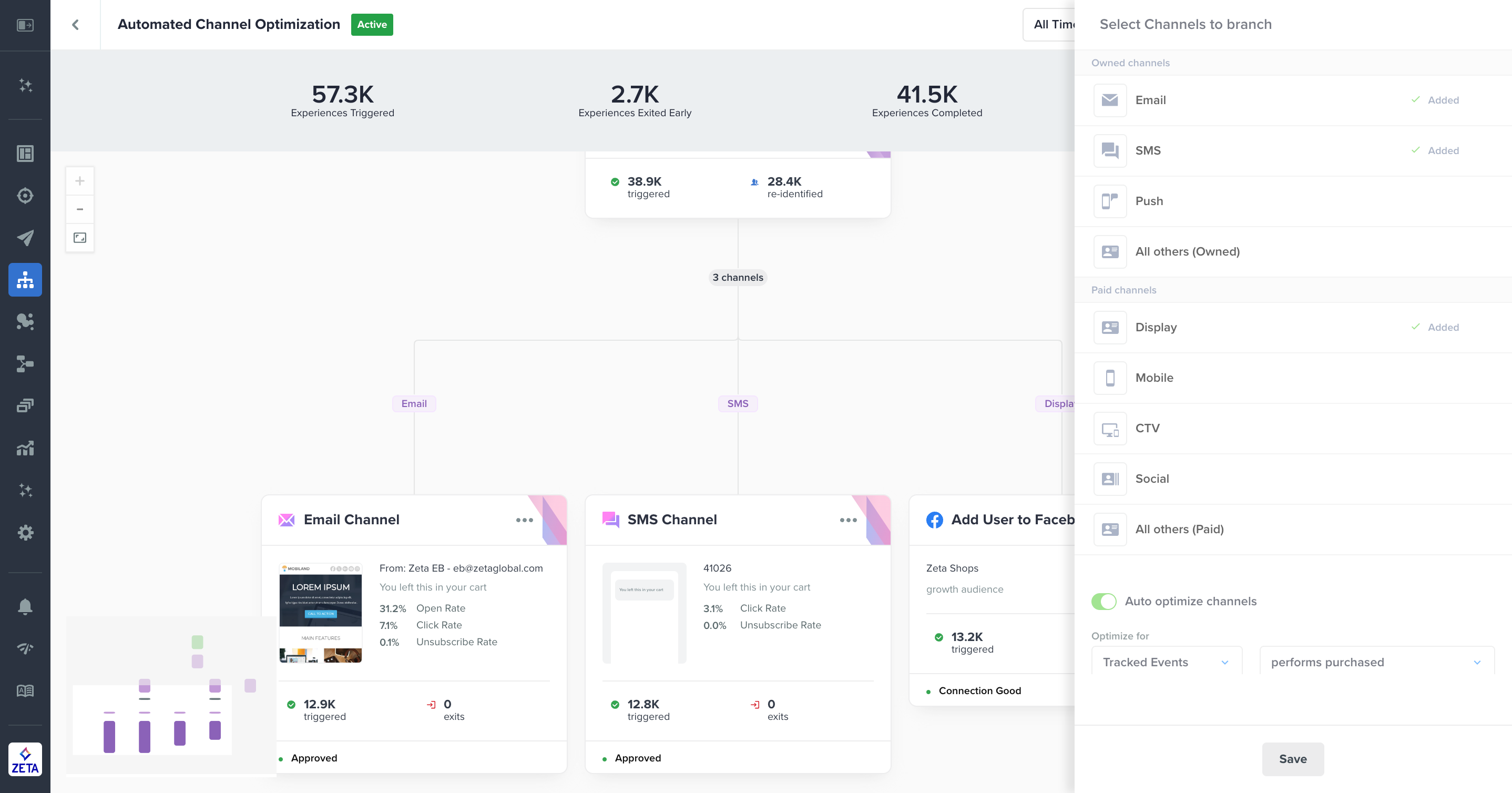
The Split by Identity node in Experience Builder is a powerful feature that allows you to leverage both Zeta Data Cloud and AI to identify users and engage them on the most effective channels. Use Split by Identity to:
To learn more, please contact your Zeta Account Manager. |
|
|
|
Learn More: |
May
|
Asset Library Enhancements: Batch Upload, Update and Archive, and Tags |
|---|
|
Digital media assets are core to designing a compelling content strategy, but over time, they accumulate and become increasingly complex to manage. That’s why Asset Library now offers several new capabilities to improve efficiency, including batch upload functionality to add multiple assets at once, update functionality to update an asset (e.g., change an image from a blue car to a red car) without creating a new asset or changing all instances where the image is used, archive functionality for outdated or unused assets, and tagging functionality to categorize and sort assets. Collectively, these enhancements streamline your asset management workflows and boost productivity. |
|
.gif)
|
|
Read More: |
|
Streamline Workflows with Direct Data Flow Access from the Connectivity View |
|---|
|
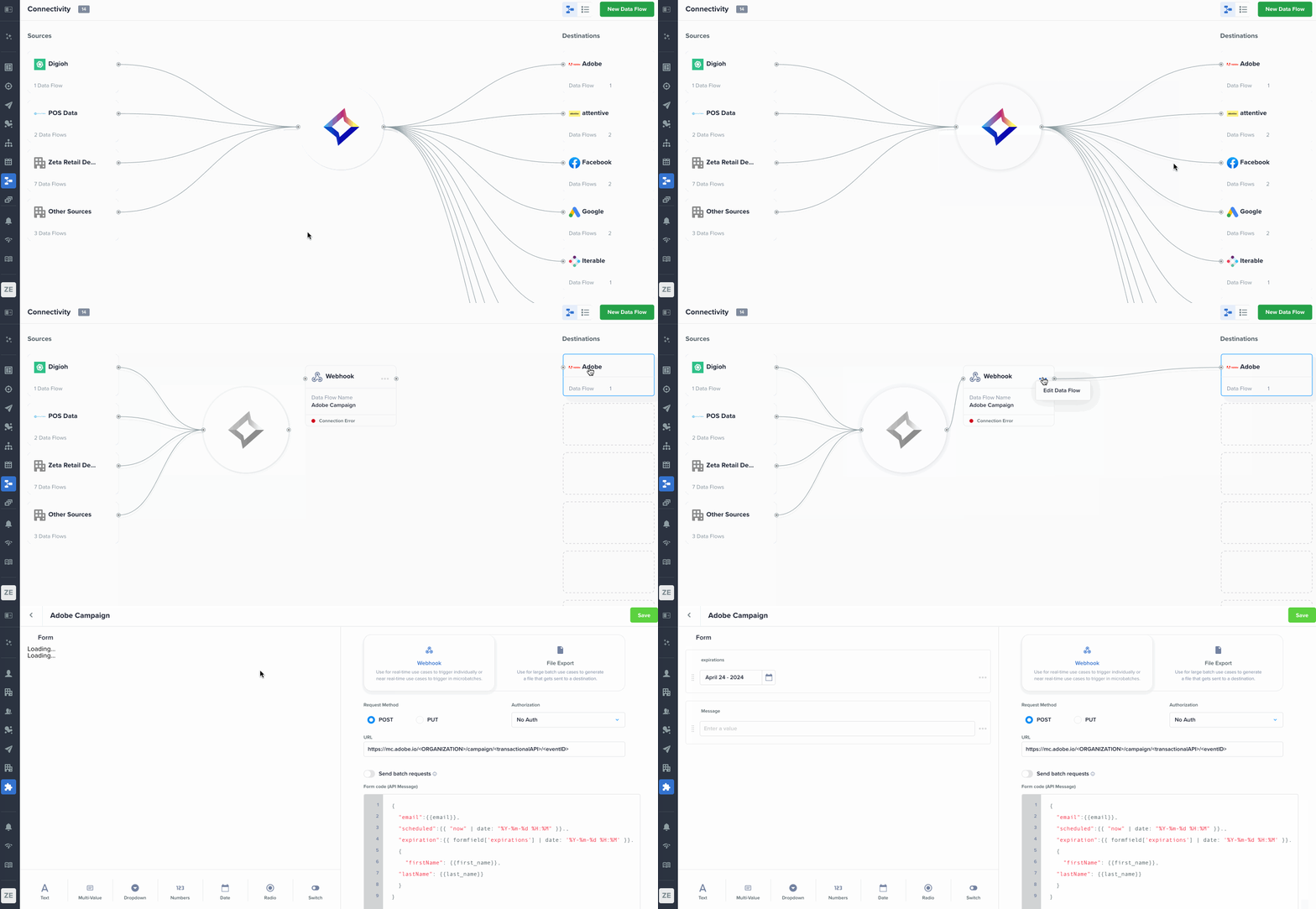
You can now view, edit, and manage data flows directly from the Data > Connectivity interface without navigating to other places in the platform. This enhancement creates a more seamless data management experience and greater efficiency in your workflows. |
|
|
|
Read More: |
|
Experience Builder - Multi-Day Delivery Window |
|---|
|
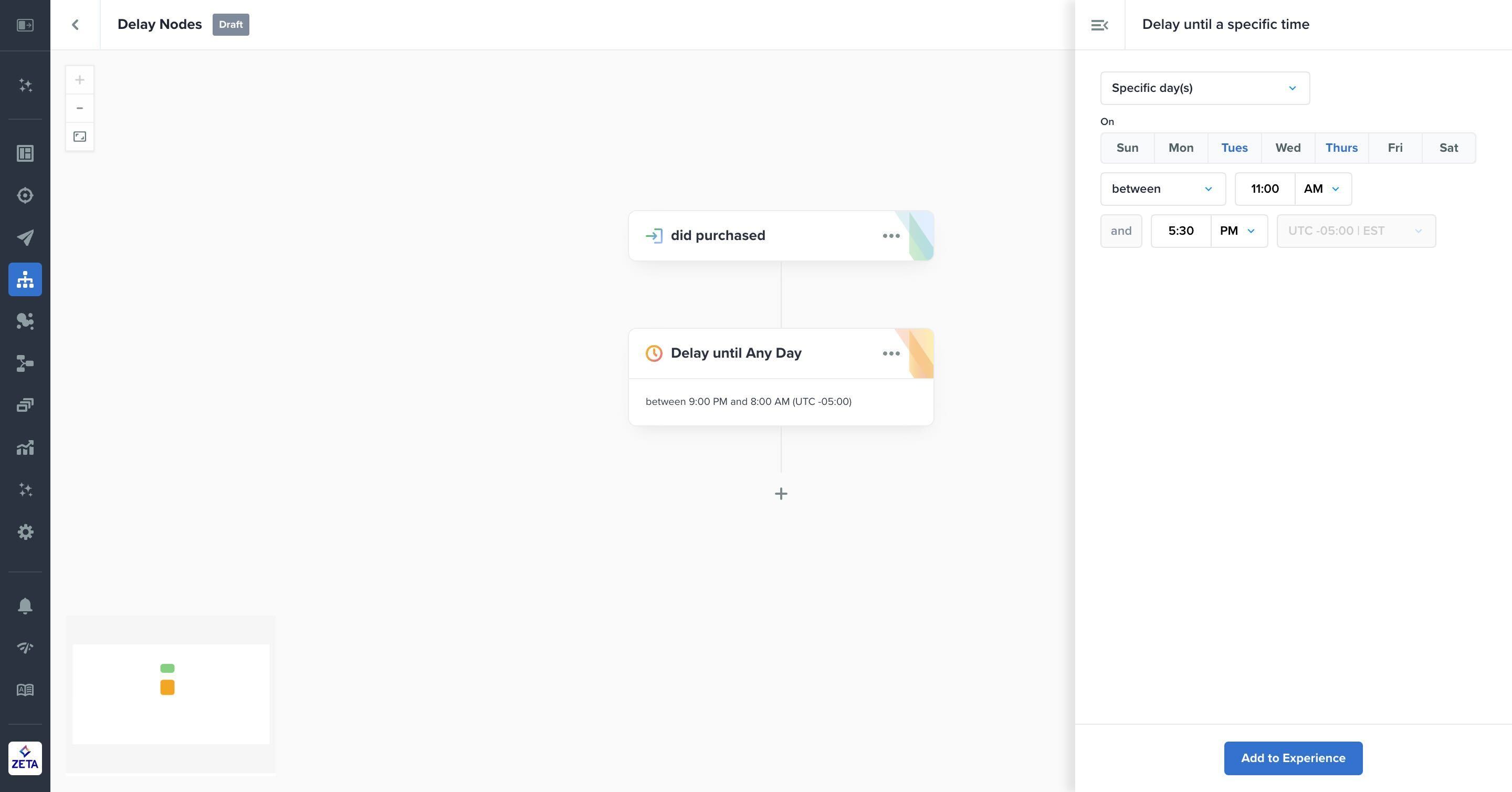
Within Experience Builder you can now set up delivery windows on multiple days (or every day) to control when campaigns are sent. Specific updates under Delay > Delay Until a Specific Time include specific day(s) and any day, and both delay types support overnight windows as well. These enhancements give you more control and flexibility over targeting and unlock additional use cases such as compliance and respecting users’ quiet hours. |
|
|
|
Read More: |
|
Gain Contextual Insights into the Performance of Experiences |
|---|
|
Gain Contextual Insights into the Performance of Experiences |
|---|
|
Experience Builder now provides both historical and forecasted performance for nodes. While an experience is in draft mode, you can see historical performance for unique users in triggers and events and forecasted performance for unique users across all nodes. When an experience is in active mode, marketers can see relative performance over time, forecasted performance for an upcoming period, and actual performance vs. forecasted performance to compare results. This exciting addition equips you with more intelligence and contextual tools to set up experiences as well as learn from them. |
|
.jpg?cb=a712e923dd66c252a28029af7a45a92c)
|
|
Read More: |
April
|
Save Time with Asset Library’s Powerful Search Functionality |
|---|
|
Over time, it becomes increasingly challenging to manage accumulated digital assets and locate them efficiently. With Asset Library’s new search capability, you can now find assets quickly and easily. Simply enter a search term, and the Asset Library will return matches based on Zeta’s AI-generated tags. This eliminates the need for adding tags manually and the potential for users to upload the same asset multiple times. It’s never been faster and easier to find the assets you need to build engaging marketing campaigns! |
|
.png?cb=536f182f55c0c4843d714bbdd5eede8c)
|
|
Read More: |
|
Campaigns at a Glance Widget Enhancements |
|---|
|
With new enhancements to the Campaigns at a Glance dashboard widget, you now have the ability to add unlimited metrics, choose how many metrics to view at once, and scale programmatic campaigns up or down (e.g., view all campaigns for one advertiser or drill down into a specific line item or tactic). Collectively, these upgrades allow you to further customize your ZMP Dashboard experience. |
.png?cb=7116fc9115d608967573db148a03c751)
|
|
Read More: |
|
New Broadcast Campaign API |
|---|
|
Zeta’s new Broadcast Campaign API provides greater flexibility to integrate the Zeta Marketing Platform with your pre-existing content tools. This updated Campaign Creation API enables the full scope of campaign development currently available in the ZMP. By allowing your teams to use a familiar tool and interface, this API creates operational efficiencies and enables greater control over your campaign workflows. |
|
Read More: |
|
Forecastable Metrics in Report Builder |
|---|
|
Take the guesswork out of campaign planning with a set of forecastable metrics now available in Report Builder! You can now easily generate reliable forecasts to inform budget allocation, resource management, and strategic planning for your marketing initiatives. Alongside the new forecasting feature, we are introducing a series of enhancements to further streamline the report-building process. These include a floating and resizable builder component and the ability to view up to three data visualizations at once. |
|
.png?cb=6f88384bb414d1a23c5069b8396556b6)
|
|
Read More: |
|
Generative Insights and Recommendations for CustomerPulse |
|---|
|
We are excited to introduce the latest update to CustomerPulse, generative insights and recommendations. This new function will take all the guesswork out of CustomerPulse. Instead of spending valuable time trying to identify key insights and recommendations the new generative feature will do this in seconds. This function is available for all CustomerPulse visual outputs. Please visit CustomerPulse and try it for yourself to understand the valuable information this new feature will generate. |
|
Read More: |
|
Zeta Clean Room |
|---|
|
We are excited to introduce Zeta Clean Room, a privacy-centric data-sharing solution that maximizes the value and addressability of first-party data. A new approach to traditional clean room infrastructures, our solution can be deployed quickly without engineering support—reducing setup costs and accelerating your time to value. This first phase of the clean room enables event data sharing for customer profile enrichment and more targeted segmentation. Future phases will unlock additional data types and use cases. To learn more, please contact your Zeta Team. |
|
.png?cb=09c226bb6bfa9e1563f554e618465cf7)
|
|
Read More: |
|
Enhanced Event Reporting |
|---|
|
With the upgraded Events report type in Report Builder, you can now analyze more granular event data, including pixel data from Zeta DSP. Explore performance metrics such as order amount and order quantity split out by product ID, customer type, or your very own custom dimensions for a deeper dive into your insights! 🚀💥 |
|
Read More: |
March
|
Experience Builder has a new look! |
|---|
|
This exciting enhancement transforms the nodes into colorful cards that provide a sleeker, at-a-glance preview of events, actions, delays, and splits directly within an experience canvas. This is the first phase of the Experience Builder redesign is now live with more updates to come. If you have any questions, please reach out to your account or client services team. |
|
.gif)
|
|
Read More: |
|
It’s now easier than ever to add Seed Lists to the ZMP |
|---|
|
Check out the new design enhancements to the Seed List UI in the ZMP. It’s now easier than ever to add, update, and maintain seed lists in the platform. |
|
%20(1).png?cb=7116fc9115d608967573db148a03c751)
|
|
Read More: |
|
Increase Security with New REST API Authentication |
|---|
|
We have added a JSON Web Token (JWT) authorization which allows you to generate a refresh token in ZMP and use that to create a JSON web token for API authorization. This feature provides added security and more control over ZMP API access. Please reach out to your Zeta Account Team if you would like this feature enabled. |
|
Read More: |
February
|
Improve Productivity with the New Asset Library |
|---|
|
Effective digital asset management is essential for you to create compelling campaigns. Now easily accessible in the ZMP navigation, Zeta’s new Asset Library allows you to upload images and manage your creative library with flexibility and ease. Streamline workflows, improve productivity, and leverage powerful content to make your campaigns shine. |
.png?cb=2256bfbea3f6d973685e225d04ac4534)
|
|
Read More: |
|
Gain Greater Transparency with the Forecast vs. Actual Widget |
|---|
|
A new widget has been added to the Dashboard that compares actual performance against our forecasts. This innovative feature provides transparency into the accuracy of Zeta’s predictions and recommendations and helps you, in turn, optimize marketing performance. |
.png?cb=2daf8a54293f2530d901b6afe8fffc13)
|
|
Read More: |
|
Elevate Your Data Management with Connectivity Canvas |
|---|
|
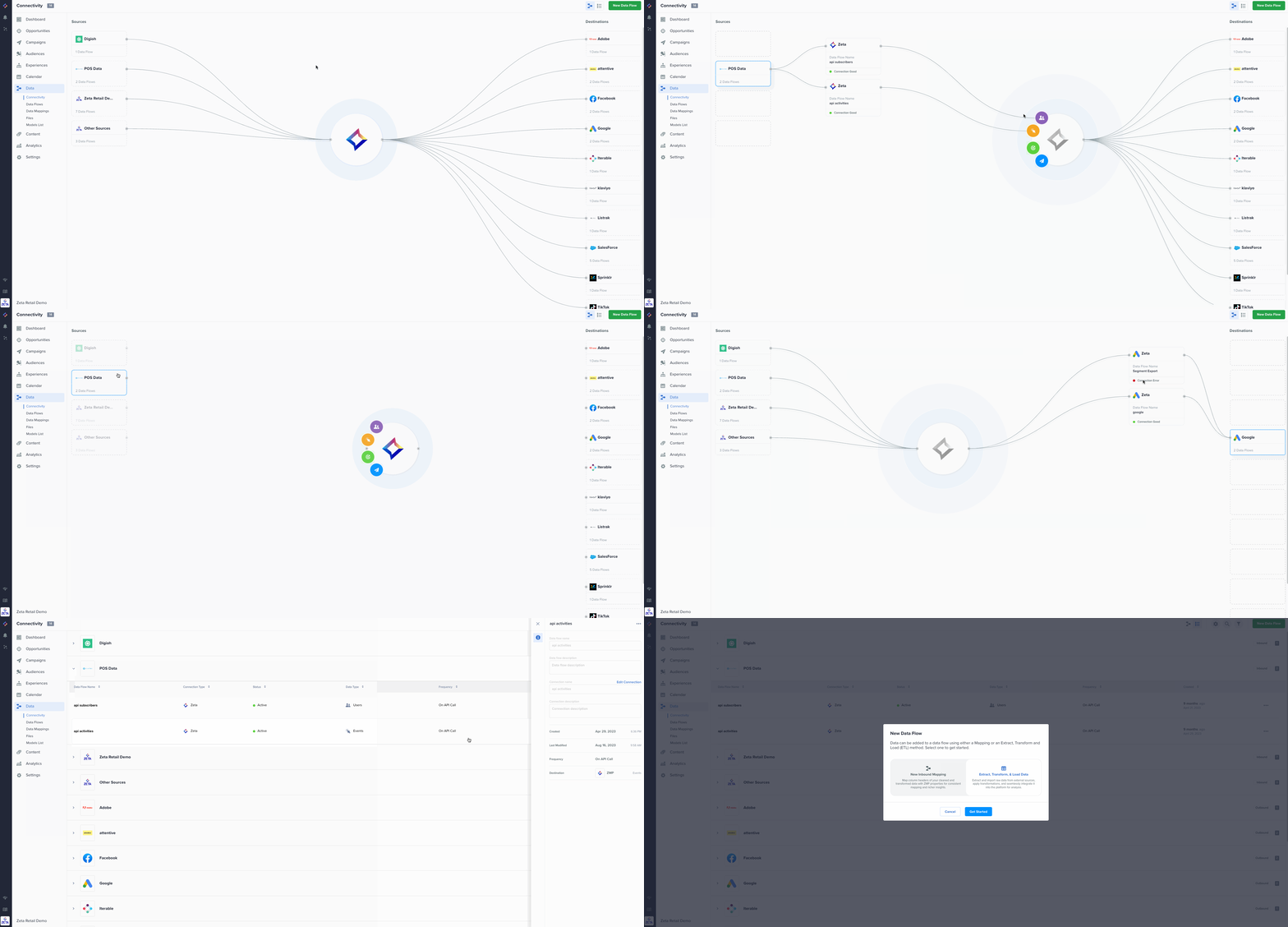
Now generally available, Connectivity Canvas streamlines data management by providing a unified view of all your data sources and destinations to/from the Zeta Marketing Platform in a visual butterfly diagram and tabular list format. From Connectivity Canvas, you can easily create new data flows, choose data mappings for prepared data, or design an ETL flow for data cleaning. Offering enhanced transparency and control, Connectivity Canvas simplifies your data journey in the ZMP so you can do more sophisticated marketing. |
|
|
Read More: |
|
Streamline Your Data Ingestion Workflow with Data Mappings |
|---|
|
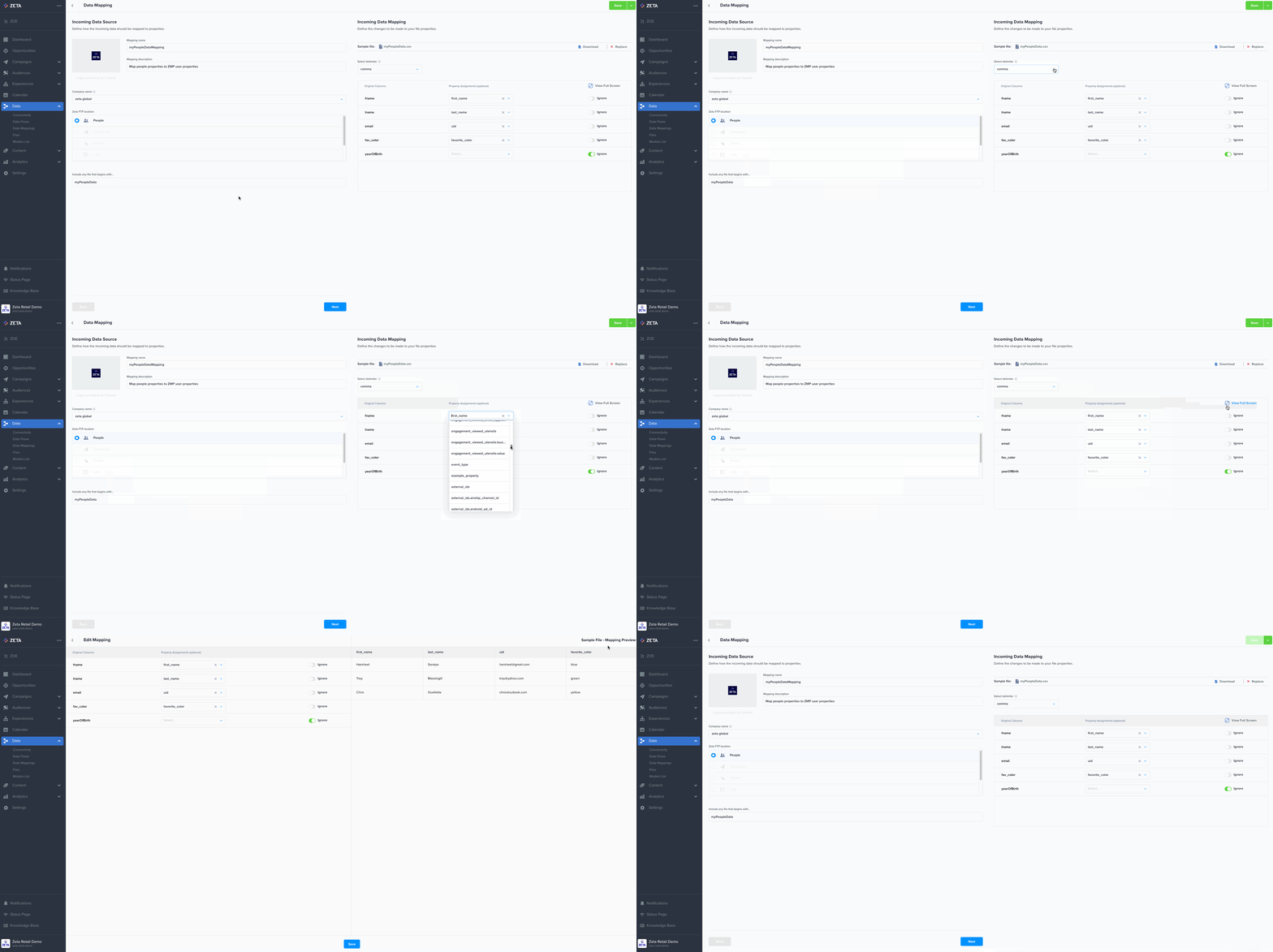
Data Mappings allows direct mapping of fields from any imported file to ZMP-specific people properties, including custom fields. With this enhancement, you create a mapping one time in the ZMP (e.g., fname column mapped to the ZMP’s first_name property) and any uploaded files automatically trigger those mapping rules (e.g., the values in fname column for every user will be stored as first_name in the ZMP). This capability eliminates the need to rename column headers in your datasets before file uploads, reducing manual work and ensuring seamless and accurate data alignment within the ZMP. |
|
|
Read More: |
|
Enhanced Filtering on the Connections Page |
|---|
|
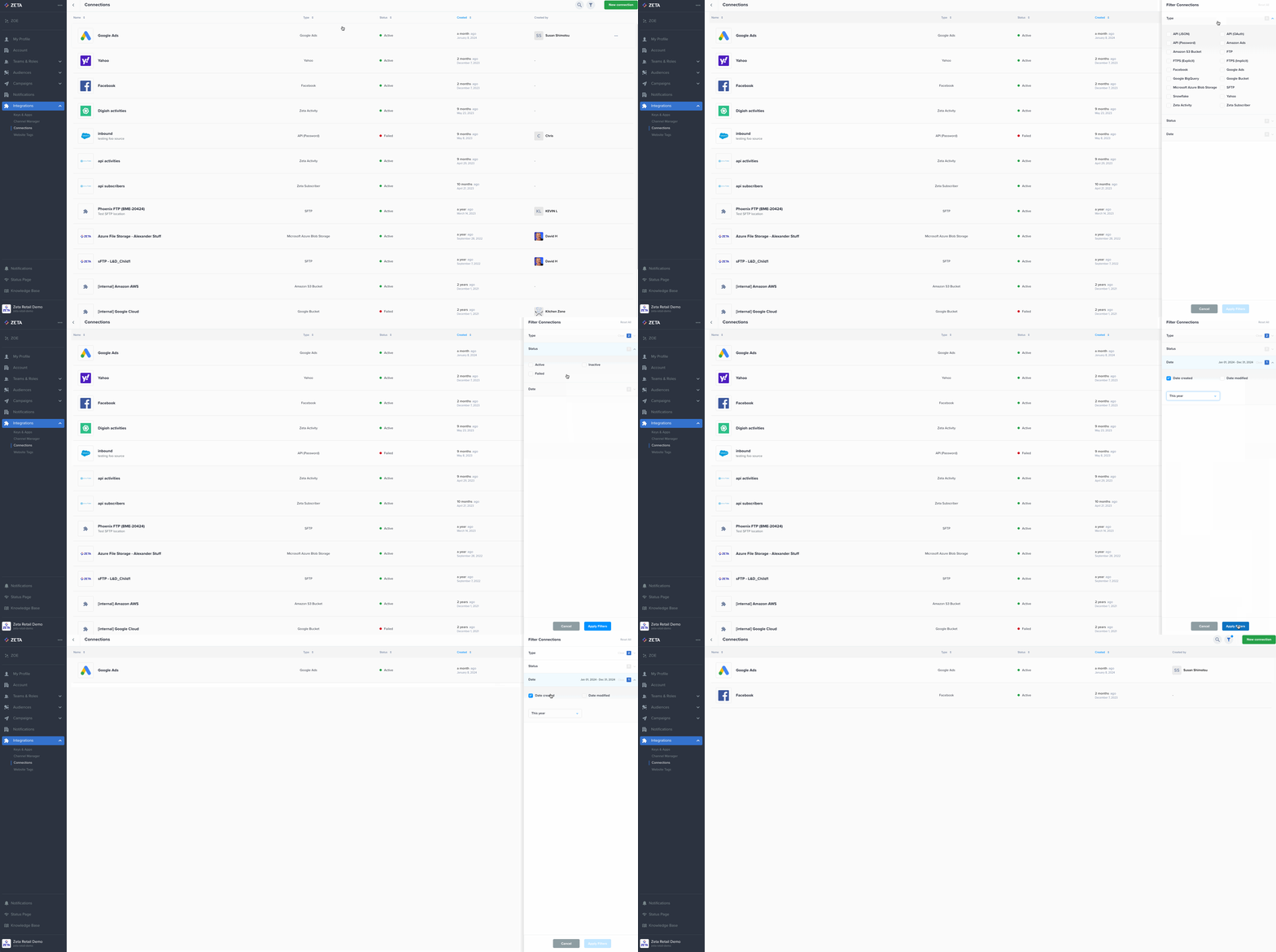
When working with large volumes of integrations, it can be difficult to find specific connections quickly. With new powerful search capabilities on the Connections page (located under Settings > Integrations), you can effortlessly filter by Type, Status, Created, and Modified criteria. Additionally, any integrations with issues will be flagged with a red ball icon and Failed status. Say goodbye to tedious scrolling and hello to speedier searches and better visibility when looking for the right connection! |
|
|
Read More: |
|
Select Vanity Shortened Links for SMS/MMS |
|---|
|
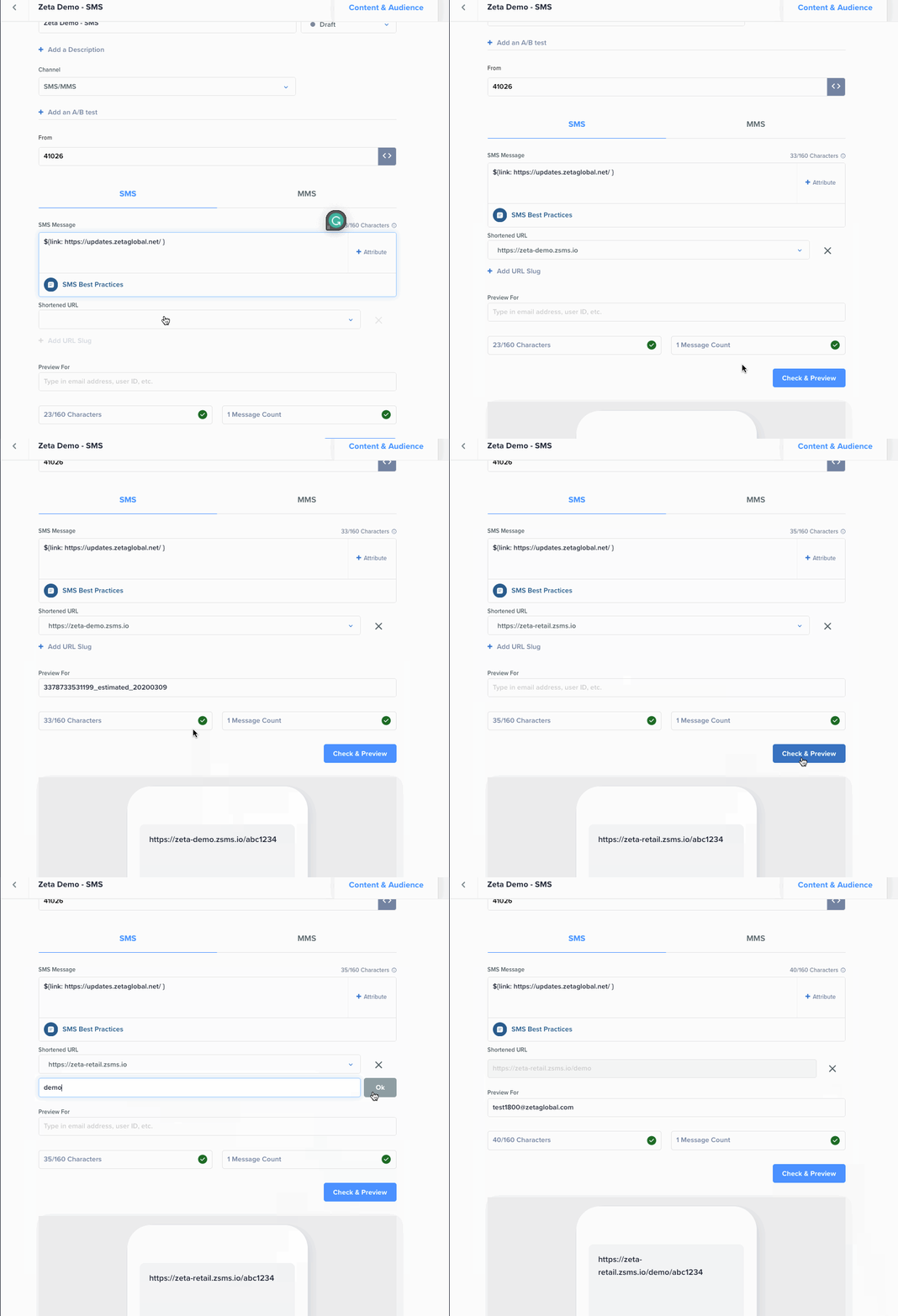
When a link is added and automatically shortened for an SMS/MMS campaign, you now have the option to select the domain of the shortened URL, plus the option to add a slug. This flexibility means that you can use your website domain and maintain consistent branding in your SMS/MMS messages. |
|
|
Read More: |
|
Introducing Data Flows (For EU Customers) |
|---|
|
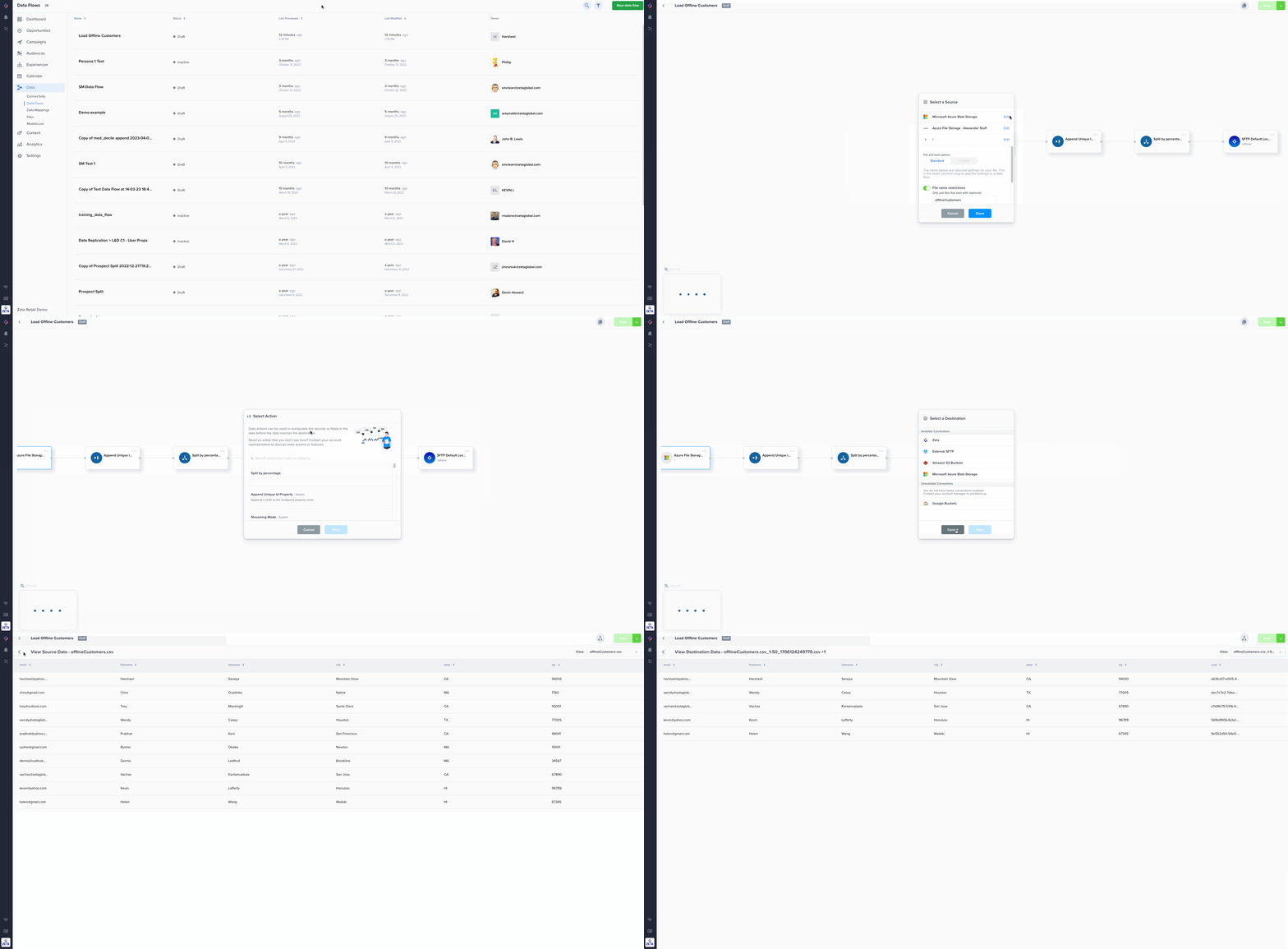
Data Flows, a low-code solution designed to simplify the onboarding and configuration of various data sources is now available for all customers in EU. With its marketer-friendly UI, setting up a diverse range of data sources and destinations is now more accessible than ever. This includes seamless integrations with external SFTP, Amazon S3, Google Cloud Storage, and many others. This capability exists for US customers, and we’re excited to expand these capabilities further. |
|
|
Read More: |
January
|
🚀 Unveiling the Future of Email Deliverability Reporting! |
|---|
|
Introducing Report Builder’s new deliverability template—a streamlined, customizable, and efficient solution to analyze your email deliverability metrics. Use this report to gain actionable insights, save time, and optimize your campaigns. Please note - With this new template addition in Report Builder, we have sunset the legacy deliverability report page in the Analytics section of the ZMP. If you have any questions or concerns, please reach out to your Zeta Account team. |
|
Read More: |
|
Introducing Custom Attribution Models: Your Marketing Advantage |
|---|
|
We understand that every business is unique, and that’s why we’re giving you the flexibility to create attribution models tailored to your specific needs. With this feature’s extended lookback windows, you can gain deeper insight into marketing performance and allocate resources more effectively. Plus, with increased transparency into how your attribution models work, be confident you’re assigning credit for conversions accurately. |
|
Read More: |
|
Improved Membership Checks and Audience Building for Prospect Segments |
|---|
|
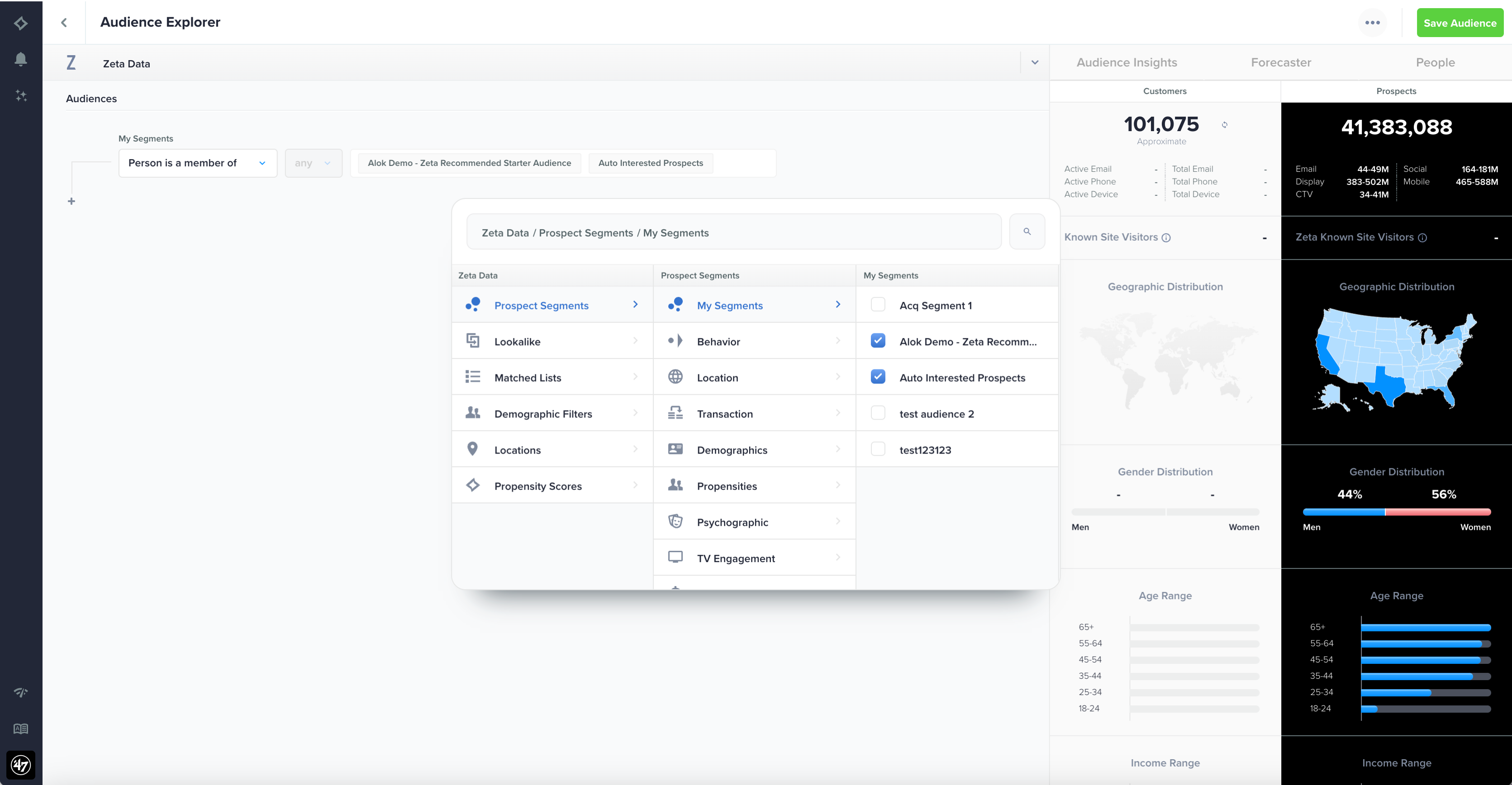
Discovering and creating target audiences for your acquisition campaigns just got more efficient. With our latest enhancement, you can easily check membership for previously created prospect segments by navigating to Zeta Data -> Prospect Segments -> My Segments. This means that if you have segments that performed well in the past, you can now reuse them in new targeting efforts and build upon them by layering additional criteria. |
|
|
Read More: |
|
People Page Filters |
|---|
|
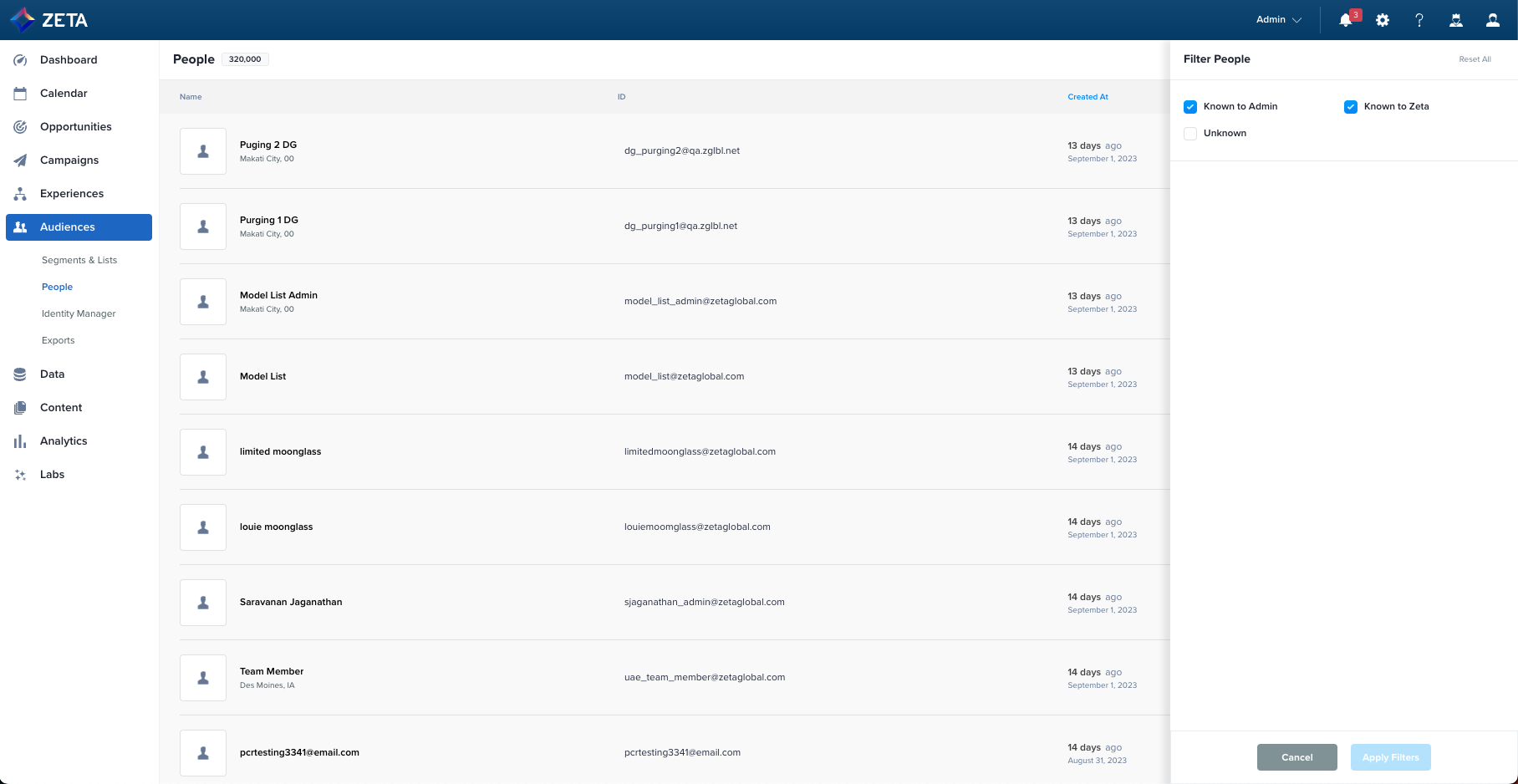
The People page, located in Audiences, now allows you to filter people by status—known to customer, known to Zeta, and unknown. The page also hides unknown individuals by default, streamlining that view for accounts with many anonymous users. These enhancements support a variety of use cases and saves you time and effort. |
|
|
Read More: |
|
Easily Access the ZMP with an Improved Single Sign-On Experience |
|---|
|
A new Single-Sign On (SSO) button now appears for users who log into the ZMP via SSO and get timed out of the platform due to an inactive session. Previously, an inactive session would redirect to the standard user/password login page, forcing you to navigate to your app manager or a browser bookmark to log back in. This enhancement minimizes disruptions in your workflows and improves the overall experience. |