

Calculated Fields let you create dynamic dimensions and metrics using configurable logic instead of relying only on existing schema fields. Combined with Variables, they help make reports more flexible and reusable across charts and tables.
Calculated Fields can be used to:
-
Dynamically switch metrics or dimensions
-
Create conditional logic
-
Simplify report customization
-
Reuse logic across visualizations
Accessing Variables & Calculated Fields
To get started:
1. Open a Report.
2. Navigate to the Variables section in the left sidebar.
3. Use:
-
Parameters to define reusable inputs
-
Calculated Fields to create dynamic logic
You can also access parameter controls from:
-
Report Filters
-
Chart Local Filters
.gif?cb=2c7d2013910845b39c9cf12cf5041cc5)
Creating Parameters
Parameters define the values that drive Calculated Fields. Parameters are reusable inputs that let a report viewer or builder choose a value once and use it across calculated fields, filters, charts, or tables. Use them when the report logic needs to change based on a selected value, such as a metric, category, date, threshold, or true/false option.
You will see the Parameters tab only when you are working in the Variables area of a report and parameters are available for that report. If a report does not use parameters, you may not need to create or adjust anything in this tab.
For example, you can create a parameter named Selected Metric with values such as Revenue, Orders, and Clicks. A calculated field can then use that parameter to decide which metric to display, so the same chart can switch views without being rebuilt.
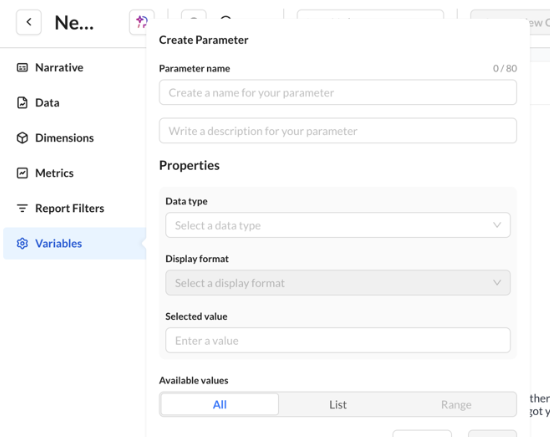
To create a parameter:
1. Go to Variables → Parameters
2. Click Create
3. Configure the parameter settings
4. Save the parameter
Parameter Settings
Each parameter can include:
|
Setting |
Description |
|---|---|
|
Name |
Label used throughout reports |
|
Description |
Optional helper text |
|
Data Type |
Defines the type of values allowed |
|
Default Value |
Initial selected value |
|
Available Values |
Controls selectable options |
Supported Data Types
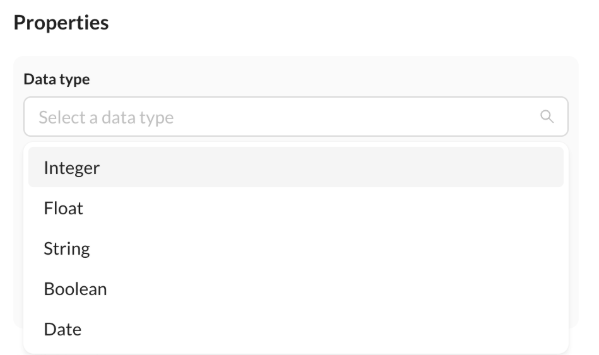
|
Type |
Recommended Use |
|---|---|
|
Integer |
Counts and thresholds |
|
Float |
Rates and percentages |
|
String |
Category selections |
|
Boolean |
True / False conditions |
|
Date |
Time-based selections |
Available Value Options
Parameters support different value modes depending on the use case.
|
All |
Allows unrestricted manual input. |
|
List |
Provides predefined selectable values. |
|
Range |
Limits selections to a defined numeric or date range. |
Creating Calculated Fields
Calculated Fields use parameter-based logic to dynamically return dimensions or metrics.
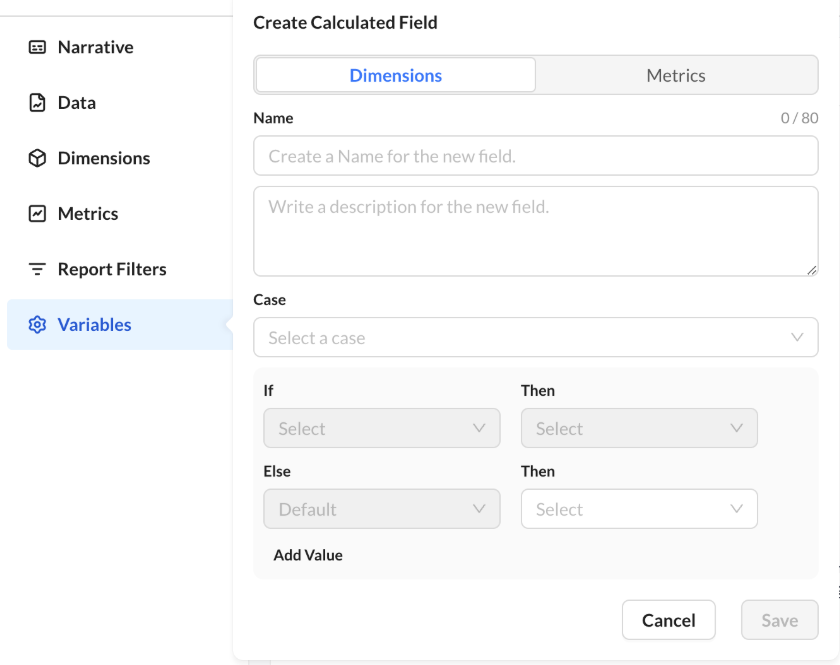
To create one:
1. Open Variables → Calculated Fields
2. Click Create
3. Choose whether the field returns:
-
A Dimension
-
A Metric
4. Define the logic conditions
5. Save the field
Building Logic Rules
Calculated Fields use conditional logic made up of:
|
Element |
Purpose |
|---|---|
|
Case |
Selects the parameter to evaluate |
|
If / Then |
Defines matching conditions |
|
Else |
Defines fallback behavior |
You can add multiple conditions to create more advanced logic flows.
Using Calculated Fields in Charts
Calculated Fields can be used anywhere standard dimensions or metrics are available, including:
-
Chart axes
-
Tables
-
Filters
-
Ranking logic
-
Conditional formatting
Once created, they appear in selectors alongside standard fields.
To add % of total or % change on a table without writing SQL, use Dynamic Calculations in Chart Options on the table widget. That does not replace Calculated Fields. See Chart Types.
Renaming and Deleting Calculated Fields
You can rename or delete a calculated field or parameter after you create it.
-
Renaming a calculated field or parameter updates saved charts, tables, and dashboards that use it.
-
Deleting a calculated field asks for confirmation and removes it from widgets that referenced it.
Filters & Parameters
Parameters can also be adjusted directly from filter panels. You can:
-
Change parameter values at runtime
-
Apply different report views without rebuilding charts
-
Reuse the same report structure with different logic paths
Best Practices
-
Use clear parameter names for easier report management.
-
Use List values when you want controlled user selections.
-
Use Range values for thresholds or date windows.
-
Add fallback logic with Else conditions to avoid empty results.
-
Keep Calculated Fields focused on one business logic purpose whenever possible.