
Experience Builder | Canvas Organization and Editing Controls
|
|---|
|
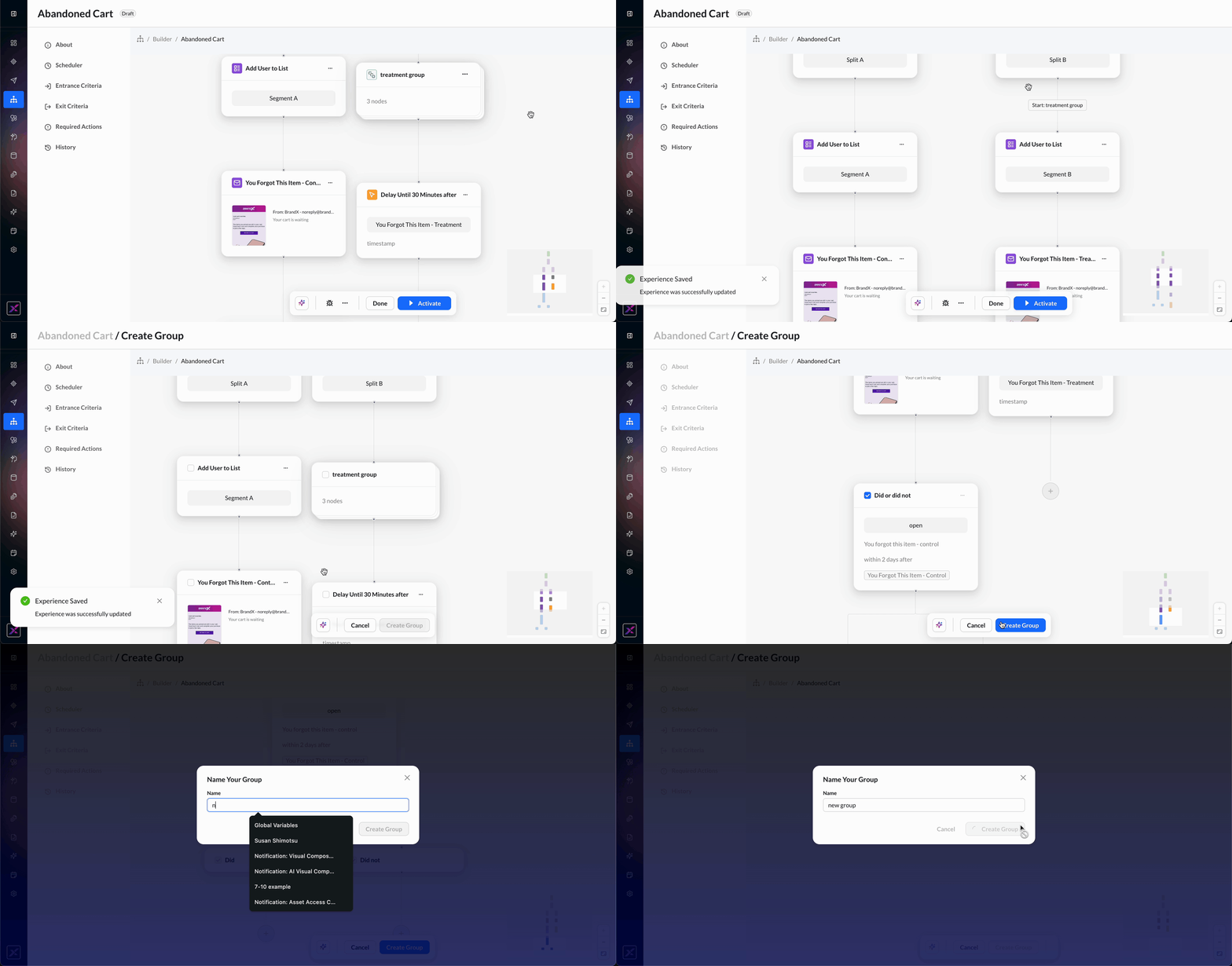
Navigate Complex Experiences with Canvas Groups and Undo/Redo Controls Experience Builder now makes it easier to manage complex journeys with clearer organization and more confidence while editing. Group related steps to simplify your canvas, then use Undo and Redo to safely explore, refine, and recover from changes. With Groups, you can select related nodes, give them a meaningful name, and collapse them into a compact section. Expand, rename, edit, or remove groups as your journey evolves—keeping complex branches easier to scan and manage. You can now undo and redo to reverse or restore canvas changes during your editing session, whether you are updating an experience, version, or template. Use buttons in the Actions menu or familiar keyboard shortcuts to recover from accidental changes and keep building with confidence. What this means for you
This will be enabled for accounts on a rolling basis between July 30 and August 5. |
|
Learn More: Nodes |
|
|
Product Module: EXPERIENCE_BUILDER |
Insights Studio | Executive Dashboard Exports with Linked Summary Insights
|
|---|
|
Turn Insights Studio Dashboards into Executive-Ready Presentations in Minutes Sharing marketing performance with stakeholders often means manually rebuilding charts, copying screenshots, and creating presentations that quickly become disconnected from the underlying data. Insights Studio now makes it easy to turn any dashboard into a polished, executive-ready PowerPoint presentation with AI-generated summaries, KPI overviews, and chart visuals. In addition, key insights in the top dashboard summary now include hyperlinks that navigate directly to the supporting dashboard widget, making it easy to validate findings and explore the underlying data. What this means:
|
|
Learn More: |
|
Product Module: INSIGHTS_STUDIO |
Channel Activation | Campaign-Level Mobile Push Deduplication by Push Token
|
|---|
|
Deliver Mobile Push Campaigns Without Duplicate Notifications When multiple profiles are linked to the same mobile device, a single push campaign can unintentionally send duplicate notifications—creating a poor customer experience, increasing messaging costs, and inflating campaign metrics. Campaign-Level Mobile Push Deduplication in the Zeta Marketing Platform (ZMP) ensures each device receives only one notification per campaign, even when it is associated with multiple profiles. Why it matters:
Whether you're promoting a retail offer, sending an important account notification, or running an engagement campaign, this enhancement helps deliver a cleaner customer experience while reducing unnecessary sends. |
|
Learn More: Mobile Push | Preventing duplicate push sends |
|
Product Module: CHANNEL_ACTIVATION |