ZMP Release Notes [26.09.03]

Channel Activation | Broadcast Campaign API Update - Support One-Time File Drop Campaigns & API Broadcast Campaigns

Expand Broadcast Campaign API Support for File-Based and API Campaigns

The Broadcast Campaign API now supports two additional campaign types, one_time_file and api_broadcast, enabling external systems to create and manage file-based and API-driven Email/SMS broadcast campaigns programmatically. This update reduces reliance on manual UI workflows while adding validation to help ensure campaign files and configurations are ready before activation.

Key benefits include:

  • Automate file-based campaign creation: Allow external platforms to create one-time campaigns tied to specific incoming files without manual setup in the ZMP.

  • Streamline API-driven broadcast workflows: Enable client systems to programmatically create Email/SMS broadcast campaigns as part of automated workflows, supporting a broader range of integration needs.

  • Catch configuration issues before activation: Validate required files and campaign types before launch, with clear API errors for missing or incompatible inputs.

  • Access more useful campaign details: Return relevant file names and endpoint information in API responses when applicable.

Learn More:

Product Module: CHANNEL_ACTIVATION

Generative AI | Make Onboarding Manager Athena-Friendly (Dynamic Tools)

Complete Onboarding Tasks Faster with Athena-Powered Actions

Onboarding often requires navigating multiple screens to filter records, update projects, assign work, or gather information. Athena can now do much more than answer questions in Onboarding Manager. It can take action directly within your workflow using natural language, helping implementation and customer success teams complete common onboarding tasks with fewer clicks and less context switching.

Instead of manually navigating the interface, simply ask Athena to filter records, perform bulk updates, generate summaries, compile requirements, or switch views—all without leaving your current workspace.

What this means for you:

  • Complete onboarding tasks with natural language: Ask Athena to filter records, switch between list and Kanban views, or surface the information you need without navigating multiple screens.

  • Take action across multiple records at once: Perform bulk updates—such as assigning implementation teams or updating groups of onboarding cards—with simple conversational requests.

  • Generate onboarding insights instantly: Compile requirements, summarize project progress, or review account information without manually gathering data from multiple records.

  • Stay focused on the work that matters: Because Athena understands your current onboarding context, actions are scoped to the project, account, or card you're already working on, reducing unnecessary navigation and helping minimize errors.

  • Move faster while staying in control: High-impact actions, such as bulk updates, require confirmation before they're applied, giving teams greater confidence while accelerating onboarding workflows.

During your next Onboarding Manager session, try asking Athena: “Summarize this onboarding project,” “Filter to asks pending approval,” or “Clone this card and add [name]” to complete common implementation tasks with simple conversational requests.

Learn More: Align via Onboarding Manager

Product Module: GENERATIVE_AI

Experience Builder | Reassign Campaigns Across Experiences

Reuse Triggered Campaigns Across Experiences with Less Rework

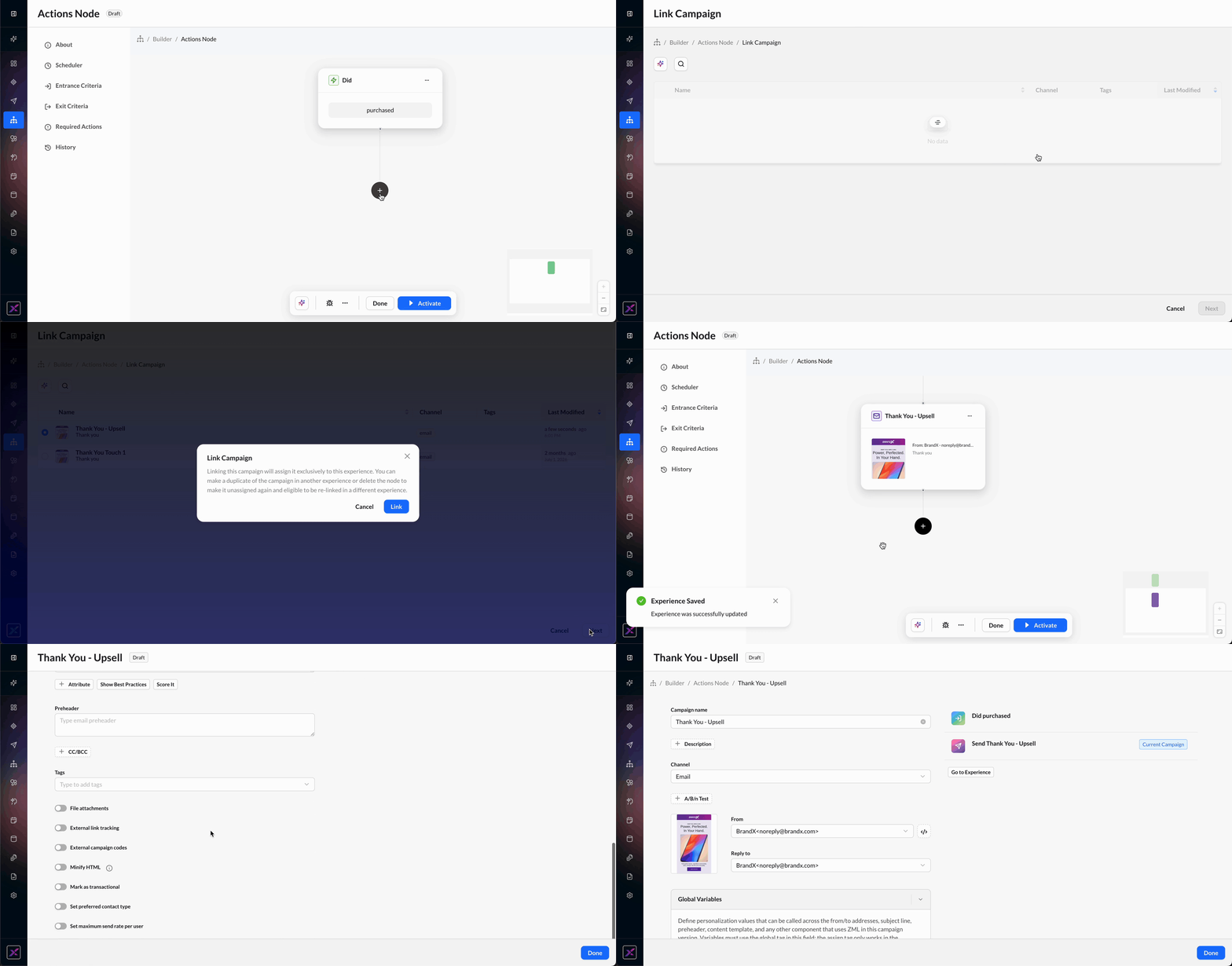
Experience Builder now makes it easier to reuse triggered campaigns when plans change. Instead of rebuilding or duplicating a campaign that has become unassigned, you can link it directly to another experience, preserving the work you’ve already done while keeping campaigns organized and connected to the right journey.

With the new Link Campaign option in the Add Campaign node, you can:

  • Move campaigns to the right experience: Link an existing unassigned triggered campaign to a different experience without creating a duplicate or rebuilding the campaign.

  • Recover work after restructuring a journey: Reattach campaigns that become unassigned when send nodes are removed or reorganized, preserving existing creative and settings.

  • Find and reuse campaigns more easily: Search your unassigned campaigns and quickly attach the one you need, helping keep your campaign list cleaner and reducing unnecessary setup.

Only campaigns that have not yet been sent are eligible to be linked, helping ensure reporting and campaign metrics remain associated with the experience where the campaign ultimately runs.

This enhancement will roll out to accounts between September 3 and September 10.

Learn More: Experience Builder | Actions Node

reassign_campaigns_in_eb.gif

Product Module: EXPERIENCE_BUILDER