

VoterPulse illustrates Zeta's analysis of the selected voter database. The tool also provides a deep dive into voter segments' key political and personal characteristics.
Navigation
From the Opportunities page, navigate to the VoterPulse tab under Customer insights.
-20260520-145638.gif)
Using VoterPulse
VoterPulse does not provide audience sizing capabilities, so it is best suited for audience insights and intelligence. It should not be used for audience availability estimates or unique audience counts (avails/uniques).
1. To get started, either type your state into the box in the top-left corner or select it directly from the map.
2. Next, choose the Congressional District.
3. Once the voter segments for that district appear on the right, select the segments you’d like to compare and analyze, then click View Analysis.
.gif?cb=4d0c8129482c1d4110ee3a993fa8091a)
Time Series
Time Series lets you see how voter interests and behaviors change between monthly VoterPulse refreshes for selected political audiences in the same state or congressional district. Use it when you need to identify meaningful shifts over time, not only a point-in-time audience profile.
1. After you click View Analysis, click on the Segments dropdown. Each option is a party plus a refresh month, for example, Democrats - July 2026 and Democrats - August 2026.
2. Select up to three party-month combinations. You can compare Democrats, Persuadables, and Republicans in the same month, or mix parties and months, such as Democrats - July 2026, Persuadables - August 2026, and Republicans - July 2026.
3. Click Compare. The existing insight tabs update for the selected combinations. The month appears in the segment name and in the chart legend.
-20260907-081056.gif?cb=4323396266f7007b55f7211b04596288)
.gif?cb=e04765e8cb508744c841cb97926d9f1e)
The data is based on a rolling 30-day average that updates with each monthly refresh, so sustained changes are easier to see than day-to-day fluctuations.
Insights
VoterPulse displays insights for the selected voter segment(s) across the following tabs:
-
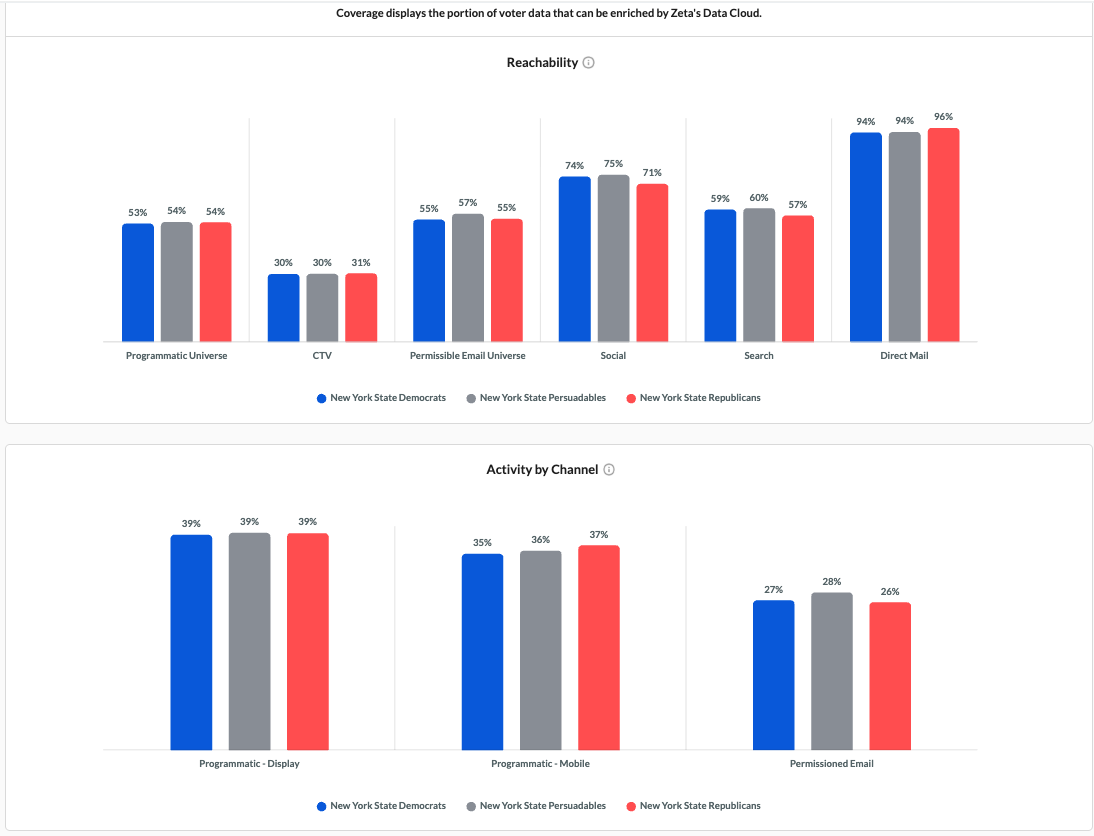
Coverage – Audience reachability and channel activity across key marketing channels
-
Demographics – Audience composition by age, gender, income, and ethnicity
-
Psychographics – Interests, attitudes, values, and lifestyle characteristics
-
Online Content Consumption – Digital media and content engagement behaviors
-
Financial & Household – Household composition, income, and financial indicators
-
Political Indexing – Political affiliations, voting tendencies, and engagement patterns
Coverage
The Coverage tab provides an overview of how effectively each voter segment can be reached and engaged across key marketing channels. It highlights audience reachability and activity levels across channels such as Programmatic, CTV, Social, Search, Email, and Direct Mail, enabling easy comparison between selected voter groups.
Demographics
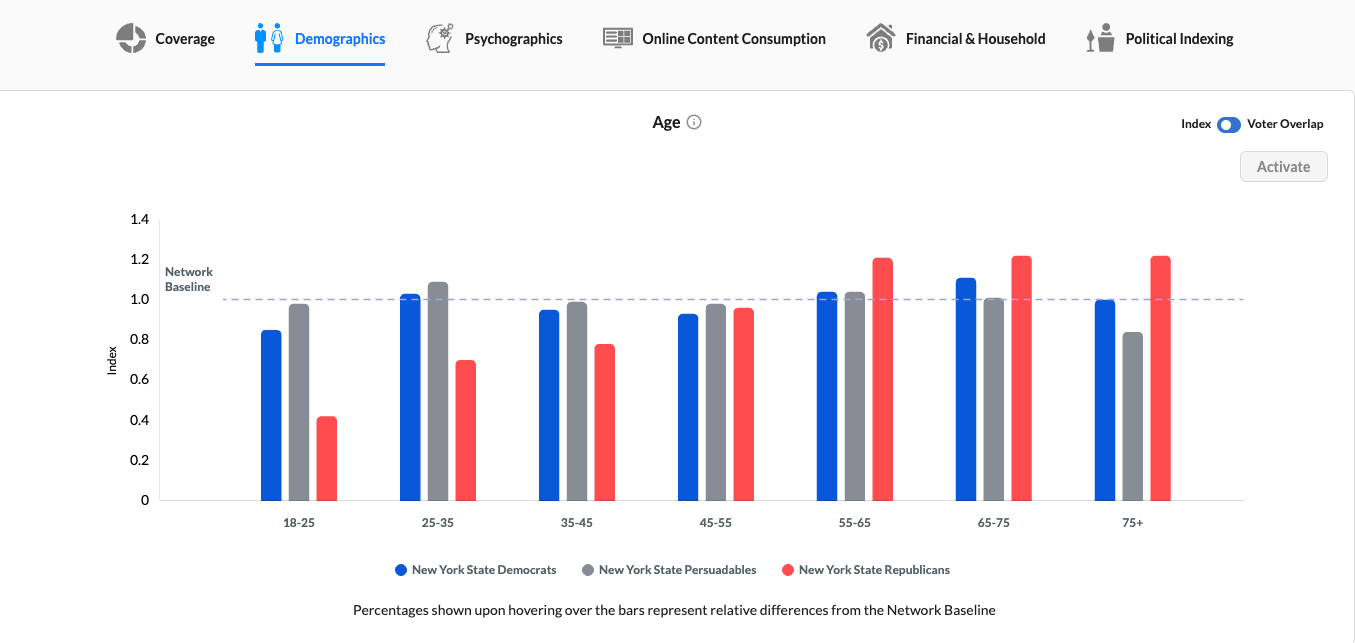
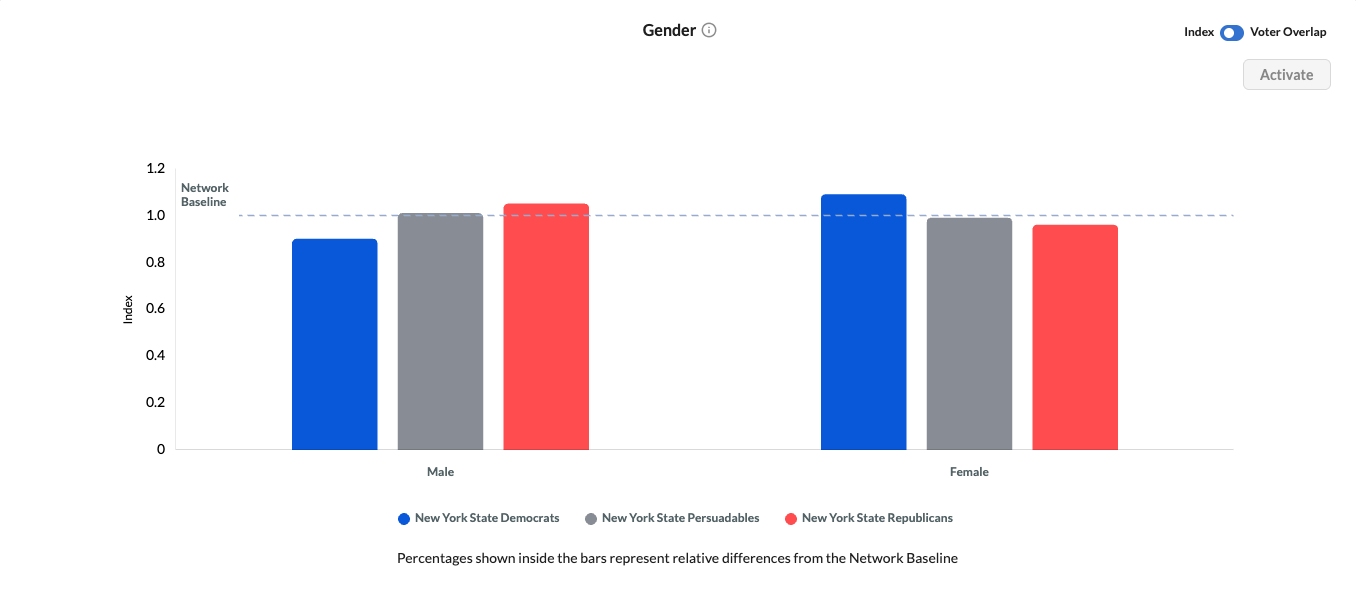
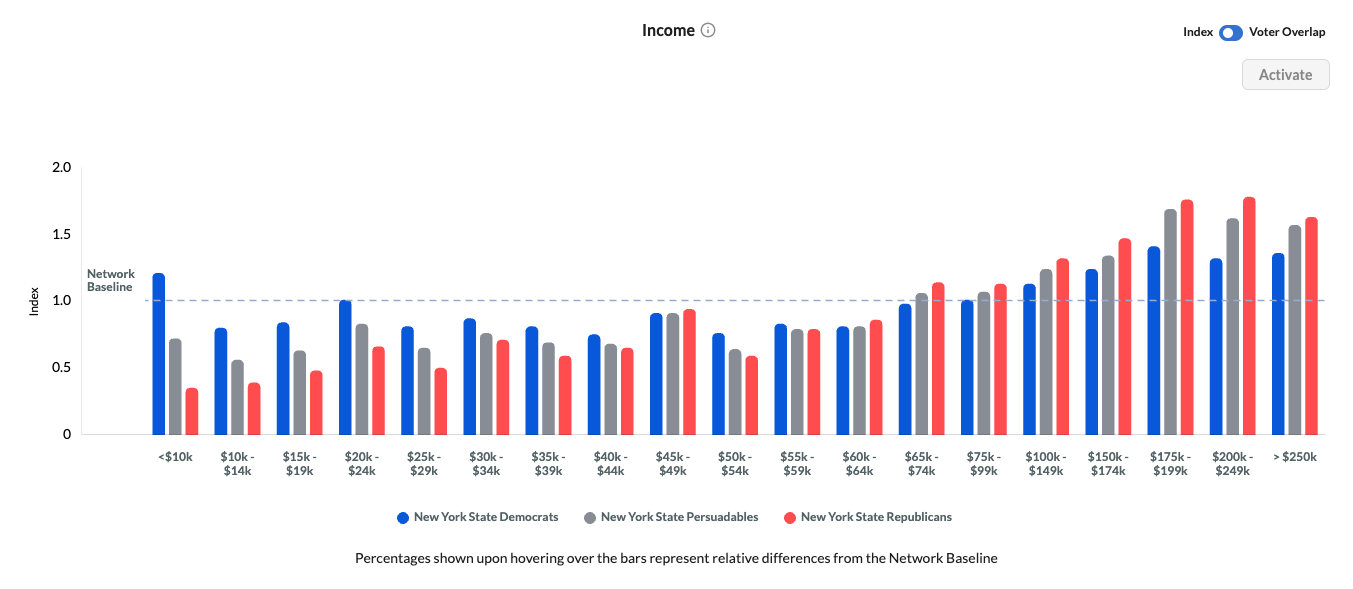
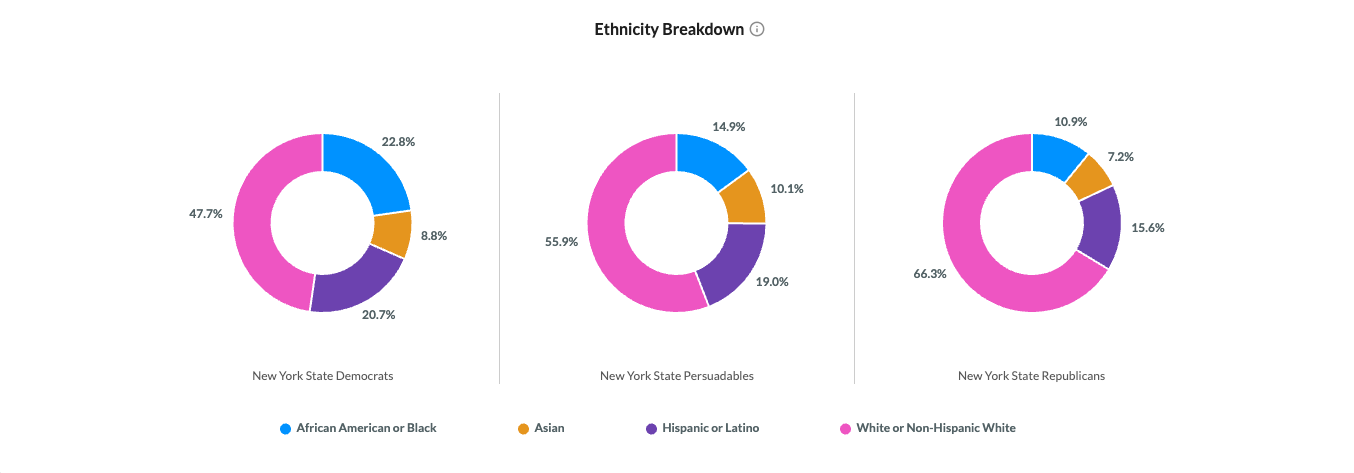
The Demographics tab provides a detailed view of the audience composition for each selected voter segment. It highlights differences across key demographic attributes such as age, gender, income, and ethnicity, helping users better understand and compare the makeup of each audience against the network baseline.
-
You can also toggle between Index and Voter Overlap views for deeper audience comparison and analysis.
.gif?cb=fb6ae9edb9e5d07a681b4f8421fd1e7d)
Psychographics
The Psychographics tab provides insight into the personality traits, values, motivations, and lifestyle characteristics of each selected voter segment. It highlights statistically significant attributes and indexes them against the network baseline, helping users understand how different audiences think, behave, and emotionally connect with messaging. Users can also sort attributes and remove outliers for more focused analysis.
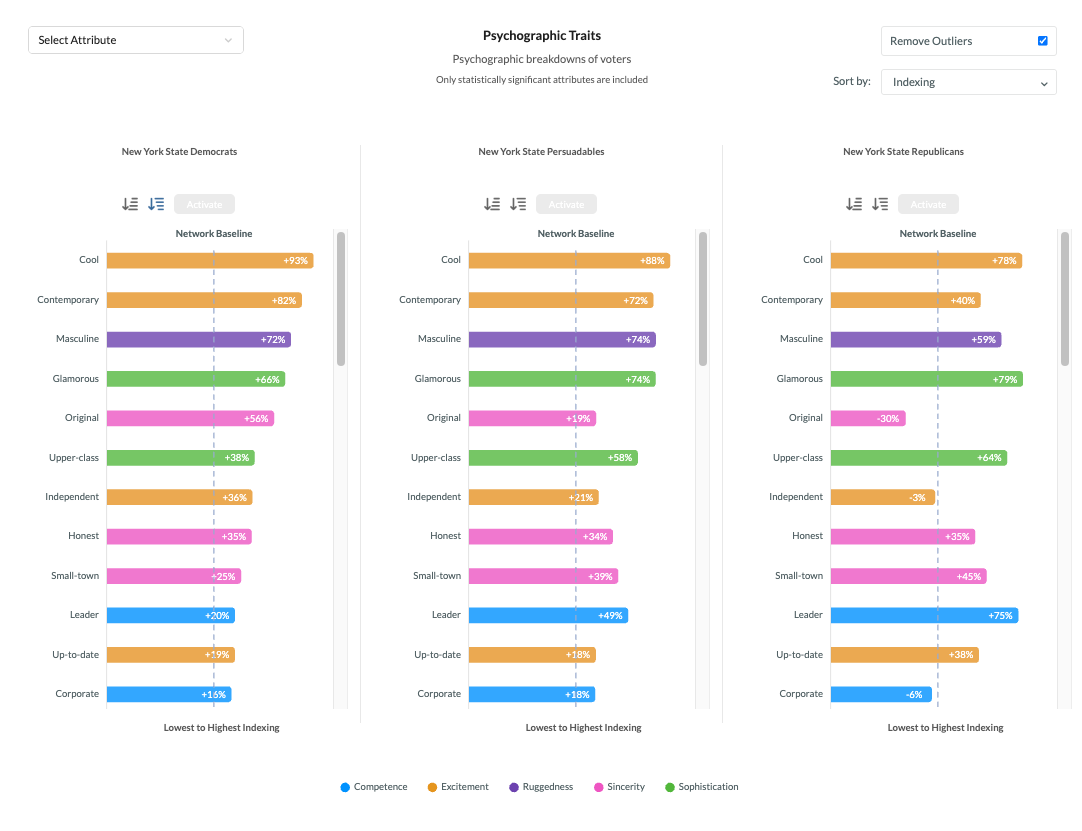
Click on individual traits to select them, then click Activate to open Audience Explorer with the selected traits automatically added for segmentation.
-20260520-155521.gif?cb=a9372828b38d2b653463cdf54cb13cb1)
Online Content Consumption
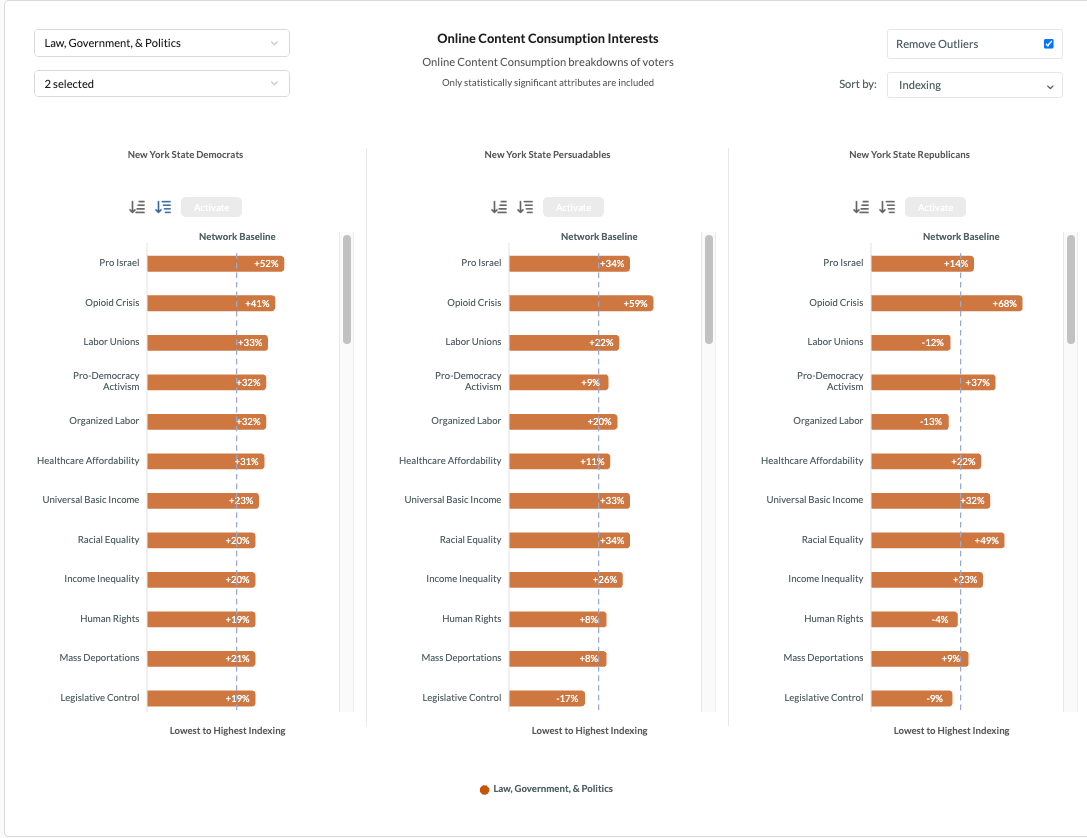
The Online Content Consumption tab highlights the topics, interests, and digital content categories that resonate most with each selected voter segment. It surfaces statistically significant engagement patterns across online content categories, helping users understand what audiences are consuming and engaging with most frequently. Users can filter by content category, sort by indexing, and remove outliers for more focused analysis.
-
Similar to Psychographics, you can click on the Online Content Consumption interests to select them, then click Activate to open Audience Explorer with the selected interests automatically added for segmentation.
Financial & Household
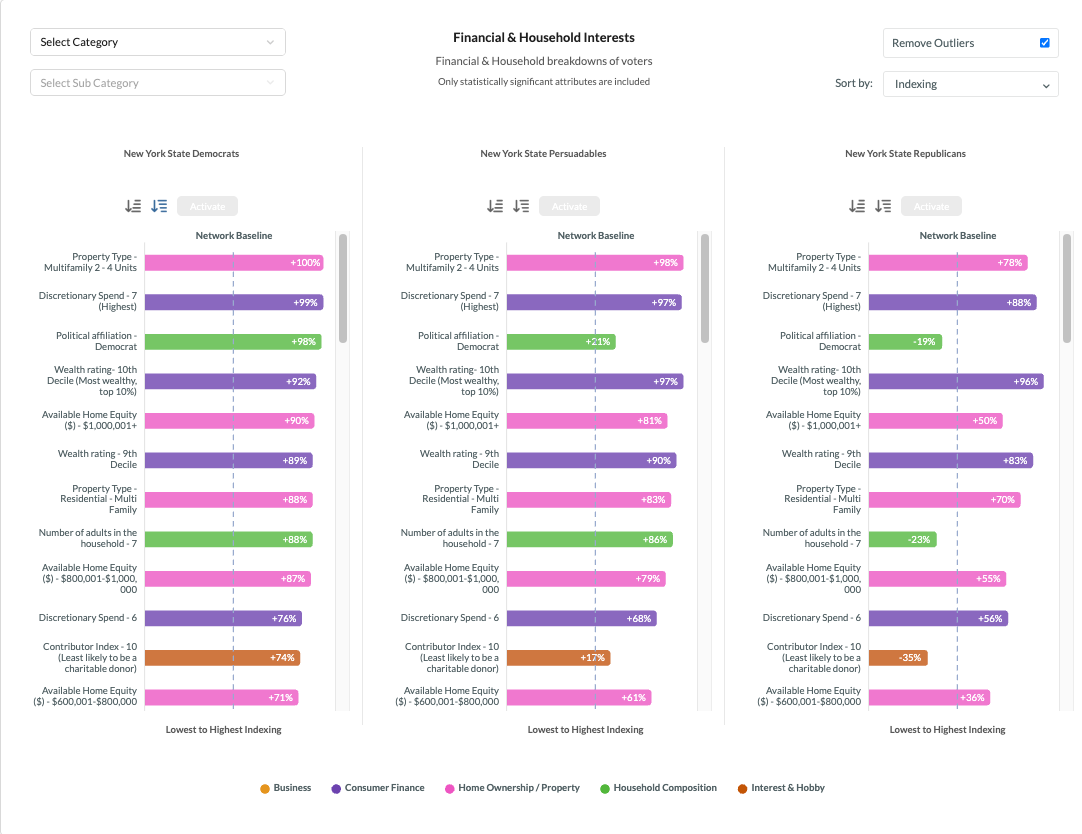
The Financial & Household tab provides insight into the financial characteristics, household composition, property ownership, and consumer behaviors of each selected voter segment. It highlights statistically significant attributes indexed against the network baseline, helping users better understand audience affluence, lifestyle, spending patterns, and household dynamics. Users can filter by category, sort by indexing, and remove outliers for more focused analysis.
-
Similar to Psychographics and Online Content Consumption interests, you can click on the Financial & Household interests to select them, then click Activate to open Audience Explorer with the selected interests automatically added for segmentation.
Political Indexing
The Political Indexing tab provides insight into the political behaviors, affiliations, voting history, donation activity, and civic engagement patterns of each selected voter segment. It highlights statistically significant political attributes indexed against the network baseline, helping users identify how audiences differ across key political and behavioral indicators.
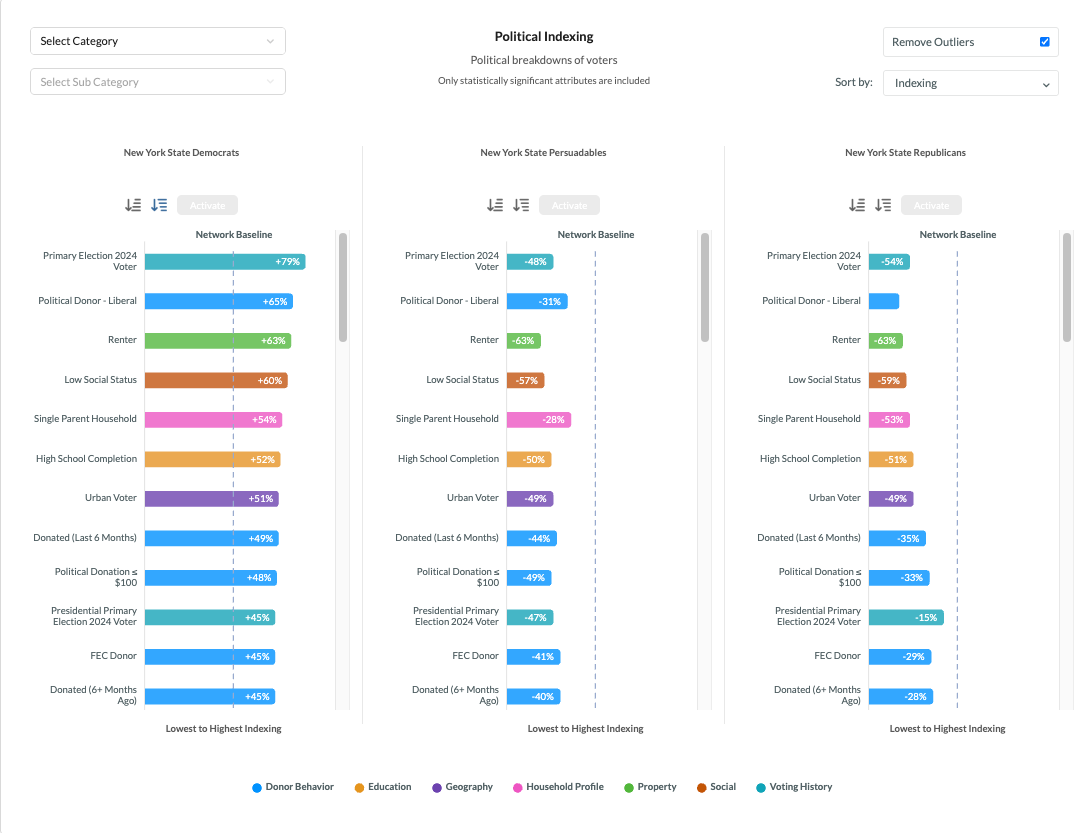
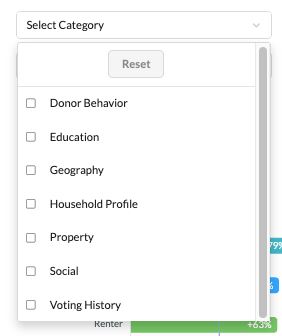
The tab includes voter-specific attributes such as voting history, donor behavior, party affiliation changes, household and social status indicators, property ownership characteristics, education indicators, donation recency and contribution ranges, as well as geographic classifications including Urban, Suburban, and Rural audiences. Users can filter by category, sort by indexing, and remove outliers for more focused analysis.
You can analyze these attributes in both Percentage View and Index View, similar to the other sections within VoterPulse.
How VoterPulse Works
VoterPulse organizes voter intelligence into searchable and mappable segments.
-
Analyze voters by geography, including state and district
-
Visualize audience distribution through interactive maps
-
Explore political and personal attributes within segments
-
Compare audiences to identify high-value or persuadable voters
Insights generated in VoterPulse can be applied directly to targeting strategies and voter file activation.
How Political Teams Can Use It
VoterPulse enables political teams to explore and analyze voter segments using Zeta’s U.S. voter database. It surfaces political, demographic, and behavioral characteristics that define electorates at the national, state, and district levels, supporting smarter targeting and message strategy.
Rather than relying on static voter lists, VoterPulse offers an interactive way to query, compare, and visualize voter audiences before activation.
-
Identify priority voter segments before launching media
-
Refine targeting based on geographic and audience insights
-
Inform messaging and channel strategy using voter characteristics
-
Align voter analysis with activation and media planning
VoterPulse provides a data-driven foundation for campaign strategy, helping teams understand who their voters are before deciding how and where to reach them.