

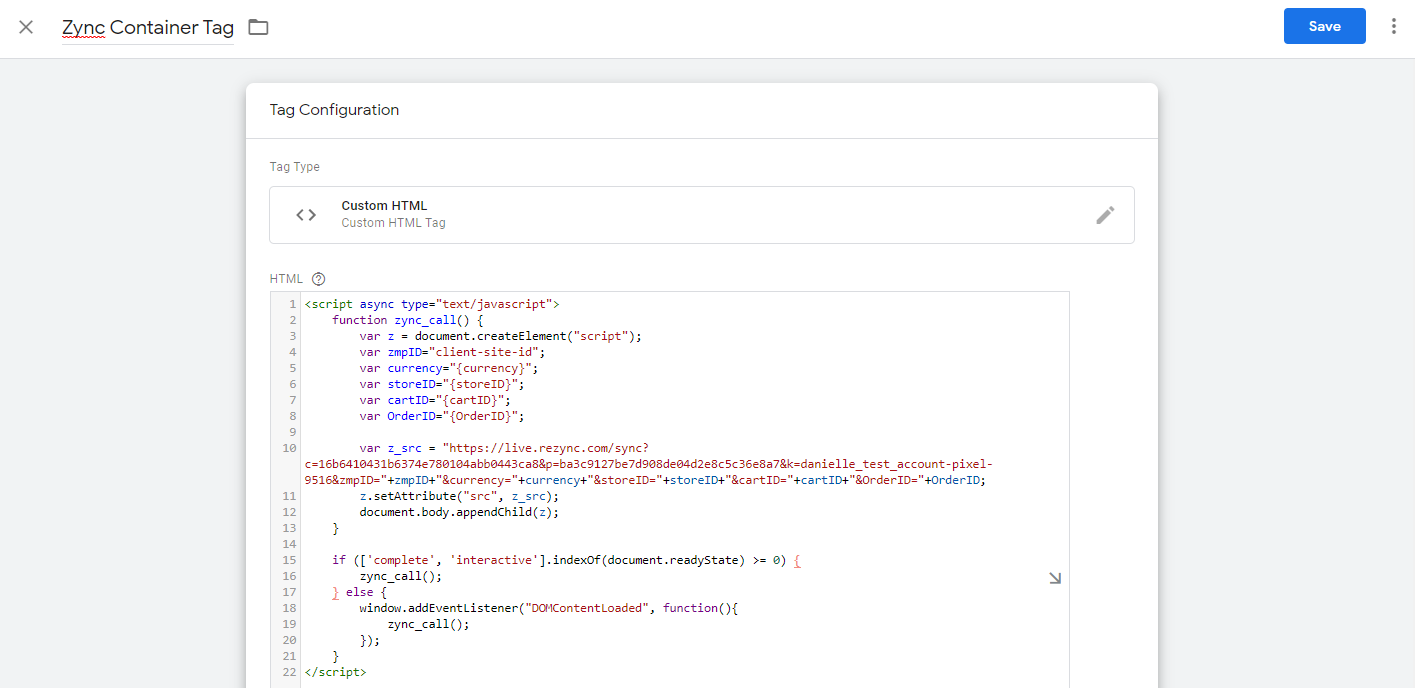
1. Add a new Custom HTML tag.
2. Paste the Zeta Global Container tag within the HTML input field.
3. (If applicable) Replace additional parameter value placeholders with the appropriate GTM Variable:
-
GTM Variables will be of the format:
{{Variable Name}}
4. Select appropriate Firing Triggers:
-
For Universal Tag: Trigger should include all website pages except the conversion page(s)
-
For Conversion Tag: Trigger should include website conversion page(s) or event(s)
Additional Notes about Google Tag Manager:
-
Use the chart below to confirm the
{{Random Number}}cachebust macro is set up correctly.
|
Google Tag Manager Version |
Access URL |
To Enable {{Random Number}} |
|---|---|---|
|
V1 |
Create a new user-defined variable (macro) of type Random Number. |
|
|
V2 |
Activate the Random Number Built-in Variable. |
-
Ensure firing rules (called Triggers) are correctly set up. If incorrectly set up, this can lead to unexpected conditional firing.
-
Confirm that the most recent changes have been published to the live container.