

Ad Discovery is a tool within Inventory Manager that gives publishers visibility into advertisers entering and operating across the LiveIntent Exchange. Publishers can review new advertisers joining the exchange and advertisers that may represent strong revenue opportunities for their inventory.
Designed for both allow-list and block-list publishers, Ad Discovery enables publishers to proactively evaluate demand and manage advertiser eligibility before campaigns reach their newsletter inventory.
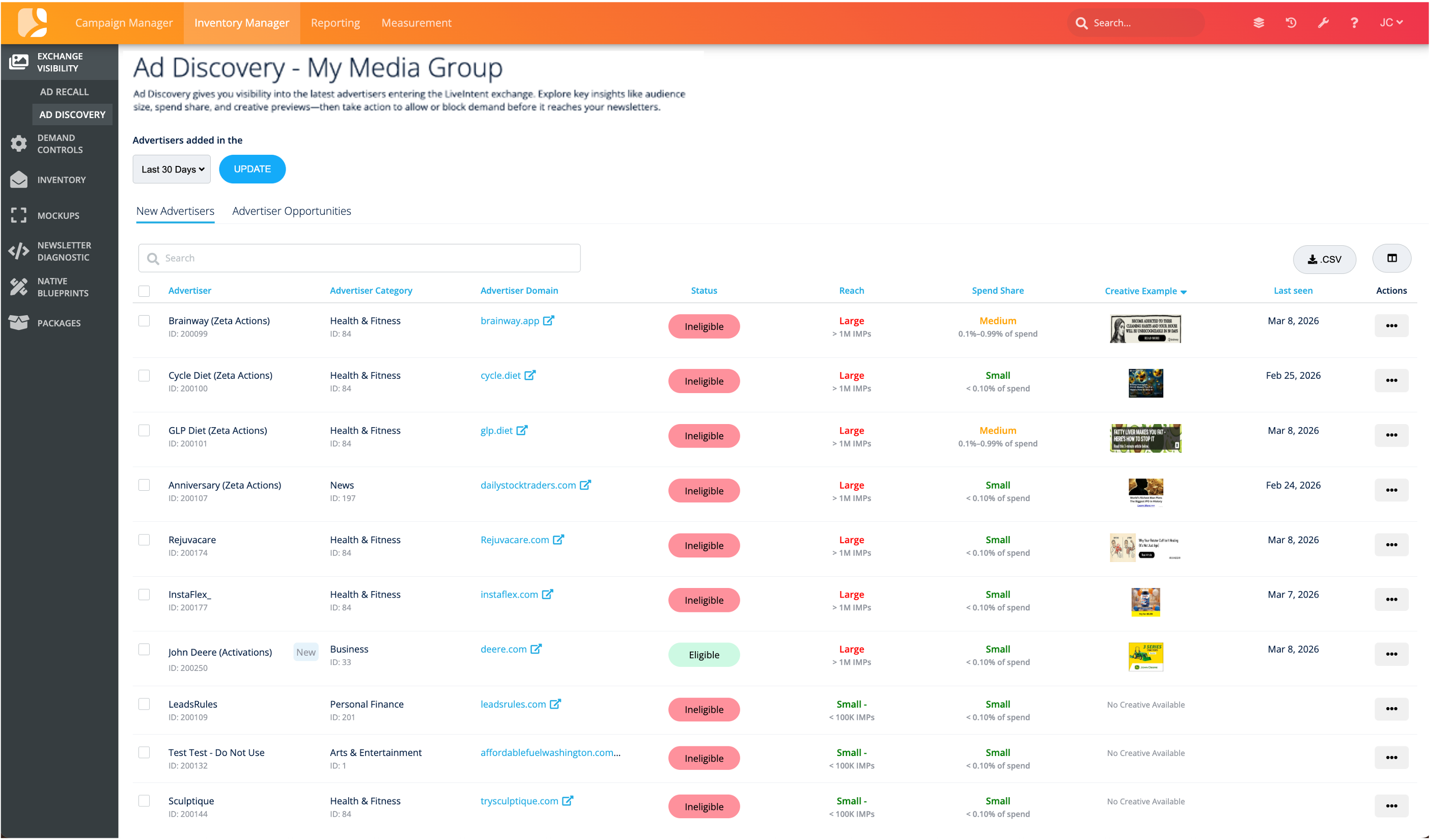
Accessing Ad Discovery
To open Ad Discovery:
1. Navigate to Inventory Manager.
2. Under Exchange Visibility in the left-hand navigation, click Ad Discovery.
3. Select your Media Group if prompted.
4. Use the timeframe selector to view advertisers added within a specific date range.
Navigating the Interface
Ad Discovery includes two tabs each with an Advertiser Table:
-
New Advertisers: Shows advertisers that have recently joined the LiveIntent Exchange. This view allows publishers to proactively review new demand sources before they begin delivering inside of their inventory.
-
Advertiser Opportunities: Highlights advertisers that may represent strong revenue potential for your inventory but are currently ineligible to serve ads across your Media Group.
-
This view helps publishers identify advertisers performing well across the LiveIntent Exchange that may be worth reviewing or enabling.
-
Advertisers in this view include an Opportunity Indicator column, which helps prioritize advertisers based on their potential revenue impact.
-
Understanding the Advertiser Table
The Ad Discovery table includes the following columns:
-
Advertiser Name & Category: Displays the advertiser name and associated category. Select the checkbox in the Advertiser column to block advertisers in bulk or select all advertisers by clicking the checkbox at the top of that column.
-
Audience Reach: An indicator of how broad the advertiser’s reach is across the exchange:
-
Small
-
Medium
-
Large
-
-
Spend Share: The advertiser’s relative share of spend within their category across the LiveIntent Exchange.
-
Opportunity Indicator (Advertiser Opportunities tab only): Shows the potential revenue opportunity of enabling the advertiser for your Media Group. This indicator compares the advertiser’s opportunity against their overall exchange activity to help publishers prioritize which advertisers may provide the greatest revenue potential. Opportunity levels include:
-
High - Advertiser represents strong potential revenue opportunity.
-
Moderate - Advertiser may provide incremental revenue opportunity.
-
Emerging - Advertiser currently represents limited opportunity.
-
-
Creative Example: A preview (when available) of a recent creative from the advertiser.
-
If no advertiser creative is available yet, the cell will display: “No creative available.”
-
-
Updated: Displays the most recent date the advertiser was added or last updated in the exchange dataset.
Managing Advertiser Eligibility
Status Column
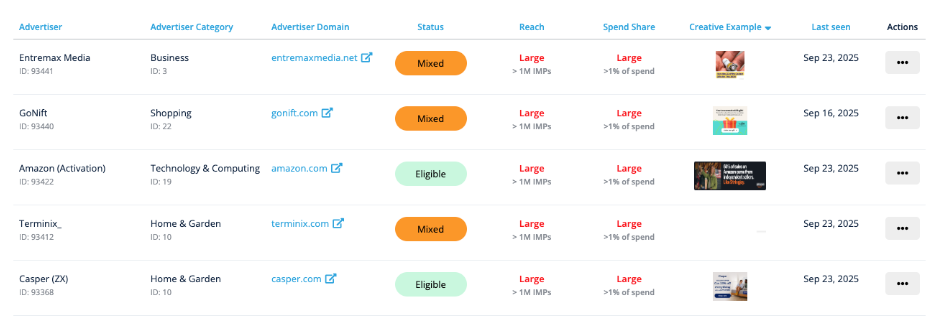
Each advertiser displays a status:
-
Eligible: Advertiser is currently allowed for all publishers in the Media Group.
-
Ineligible: Advertiser is currently blocked for all publishers.
-
Mixed: The advertiser has mixed eligibility across publishers (some blocked, some allowed).
Menu Actions
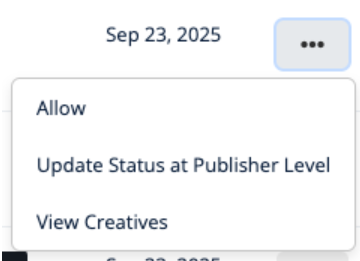
Clicking the ⋮ menu next to an advertiser reveals options based on their status:
-
Block/Allow for Media Group
Allows for a quick, one-click block or allows for the chosen advertiser. This action will be applied to your entire Media Group.-
Note: If advertisers have mixed Block/Allow settings across your Publishers, you will not see this option and should manage updates in Demand Controls at the publisher level.
-
-
Update Status at Publisher Level
Moves you into Demand Controls for more granular control. The advertiser domain will be carried into the Domain Eligibility settings, where you can define publisher-level overrides. -
View Creatives (Only shown when a creative is available)
Opens a modal showing recent creatives with blocking options.
Block Ad Creatives
In the modal, you can review all creatives for the selected advertiser along with associated IAB and Sensitive Content categories. For more information on those categories click here.
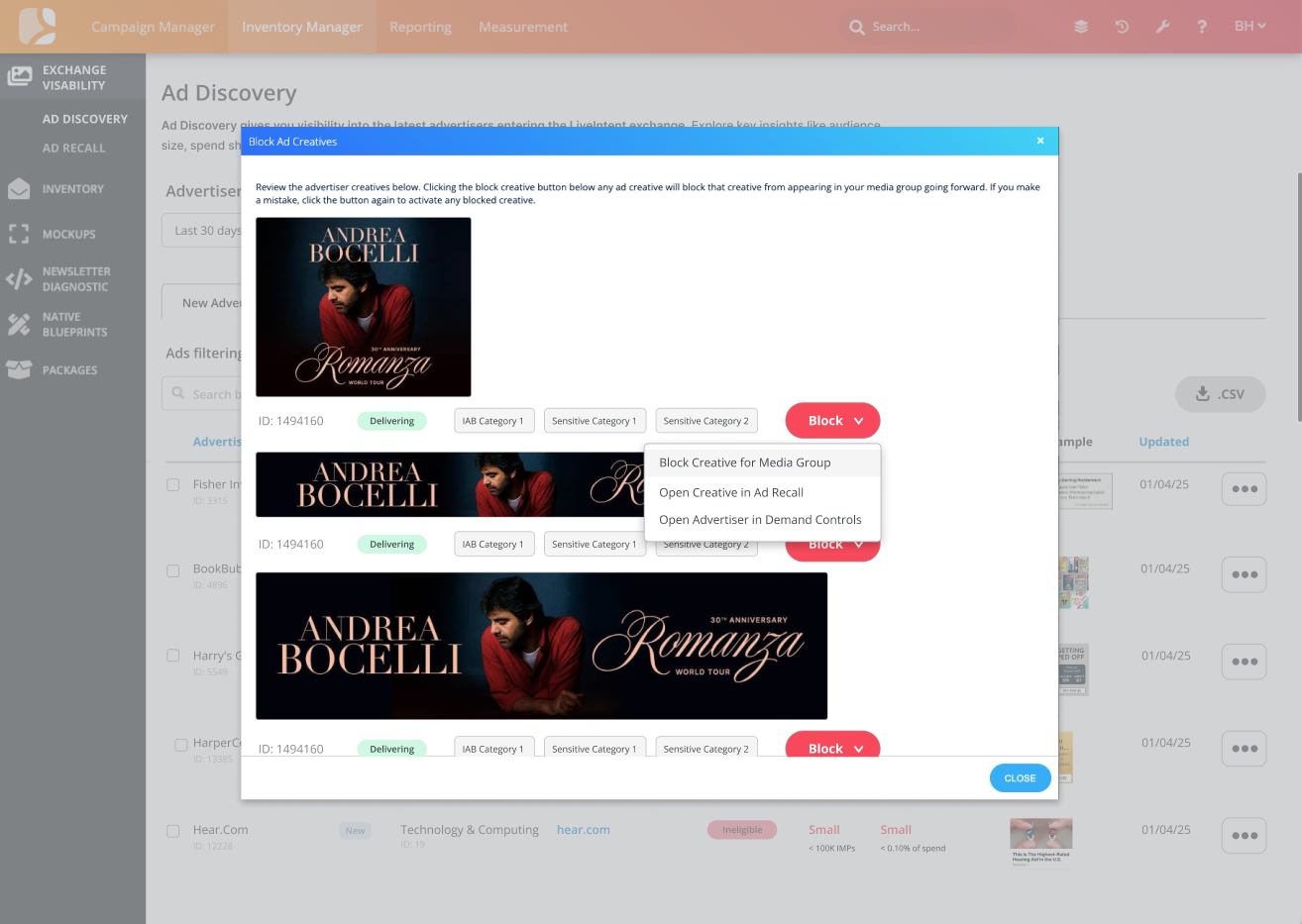
Blocking Options:
-
Block Creative for Media Group: Block the selected creative across your Media Group.
The above action does not block the entire advertiser.
-
Open Advertiser in Demand Controls: Block the advertiser domain for this creative at the Publisher, Newsletter, and/or Ad Slot level.
Understanding Eligibility Across Media Groups
Eligibility settings apply to the Media Group you selected at the start. Within a Media Group:
-
"Block/Allow for Media Group" updates eligibility for all publishers in that group.
-
"Update at Publisher Level" lets you define eligibility for individual publishers, newsletters, or ad slots via Demand Controls.
Using Advertiser Opportunities
The Advertiser Opportunities view helps publishers identify advertisers that may represent meaningful revenue potential.
Publishers often use this view to:
-
Identify high-performing advertisers that are currently blocked or ineligible
-
Review advertisers generating strong performance across the LiveIntent Exchange
-
Evaluate new demand sources that may align with their audience and content
From the Advertiser Opportunities table, publishers can take the same actions available elsewhere in Ad Discovery, including:
-
Allow or block advertisers for their Media Group
-
Review advertiser creatives
-
Adjust advertiser eligibility at the publisher level through Demand Controls
Frequently Asked Questions
Q: What happens when an advertiser has “Mixed” eligibility?
A: You won’t see a Block/Allow option in the menu. Instead, select "Update Status at Publisher Level" to make more granular changes (Publisher down to Ad Slot level) in Demand Controls.
Q: Why do some advertisers have no creative preview?
A: If the advertiser is brand new or hasn’t yet served on the Exchange, there may be no creative available yet.