

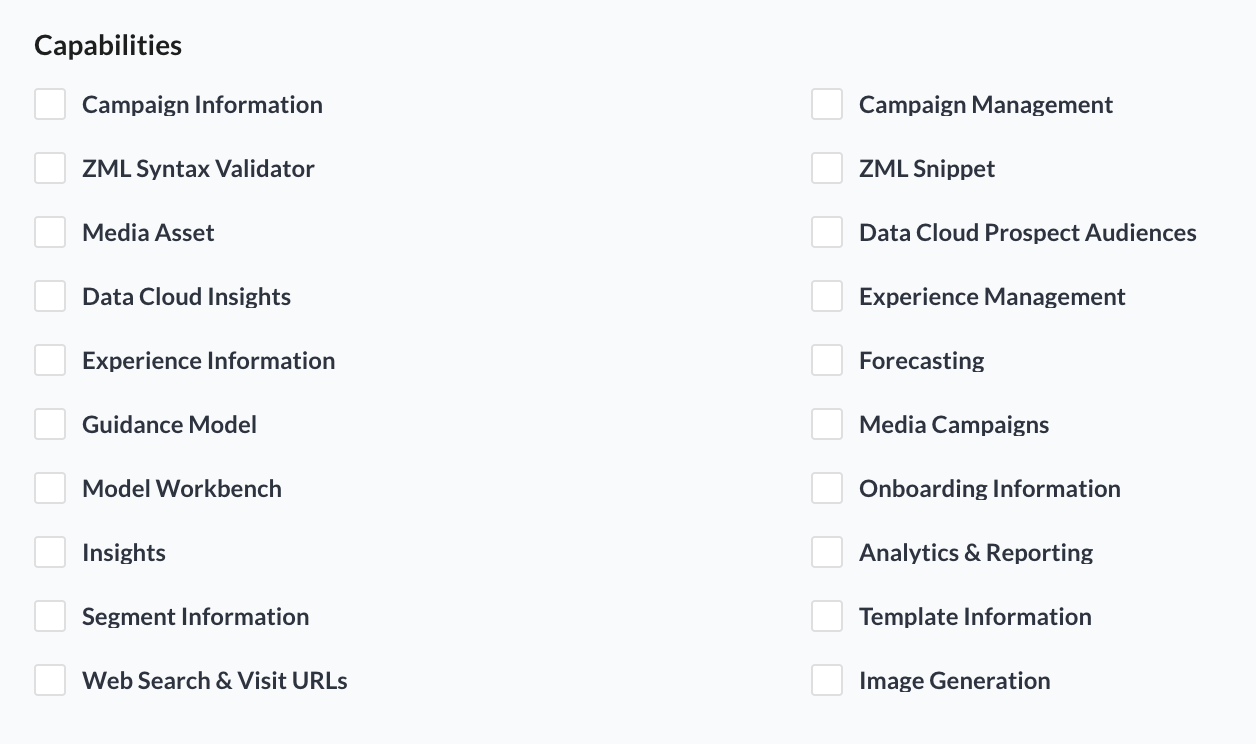
When building an agent in the AI Studio, creators can enable Capabilities to give AI Agents access to specific ZMP information and actions. These Capabilities define what an agent can access, analyze, create, update, or generate.
Each section below corresponds to a Capability in Agent Builder. The tools listed under that Capability explain what the agent can do once it is enabled.
Campaign Information
Allows your agent to retrieve marketing campaign information by ID, name, keyword, or in bulk so you can inspect what is running and use campaign details in follow-up workflows.
|
Tool |
Description |
|
Campaigns Fetcher |
Fetches marketing campaign information by campaign ID, name, or keyword. If no specific campaign is provided, it can return available campaigns for review. |
Campaign Management
Allows your agent to build, configure, and test multi-channel campaigns across email, SMS/MMS, and push.
|
Tool |
Description |
|
Campaigns Creator |
Creates and configures marketing campaigns, including launch type, schedule, audience or seed list, send-rate limits, per-version volume caps, and message templates. |
|
Campaign Proof Sends |
Sends test or proof messages before launch. Supports email and SMS proofs with automatic recipient-type detection. |
Segment Information
Allows your agent to understand audience data structures and manage segments.
|
Tool |
Description |
|
Activities and Events Fetcher |
Retrieves available activity/event names and event-level properties for building activity-based segment conditions. |
|
Audience and User Properties Fetcher |
Retrieves available audience/user properties for segmentation, filtering, and audience logic. |
|
Contact Property Fetcher |
Retrieves contact-level properties such as email, phone, status, preferences, and other contact attributes. |
|
Resources Schema Fetcher |
Retrieves resource schema information for building resource-based segment conditions. |
|
Segment Lister |
Browses, searches, and lists segments with pagination, sorting, and filters. |
|
Segment Fetcher |
Retrieves details for a specific segment by ID, name, or keyword. |
|
Segment Creator |
Creates a new segment or generates a segment payload using user, event, campaign, experience, contact, audience, score, and prospect audience conditions. |
|
Segment Modifier |
Updates an existing segment's name, status, conditions, or CDP conditions. |
User Segment Tables
Allows your agent to inspect mapped user segment tables and understand external data structures before downstream audience or query workflows.
|
Tool |
Description |
|
Segment Table Schemas Lister |
Lists mapped user segment table schemas for an external data source, including table names, IDs, descriptions, and identity metadata. |
|
Column Definitions |
Retrieves column names, data types, descriptions, and identity-key indicators for selected user segment tables. |
Experience Information
Allows your agent to search for and retrieve existing experiences/journeys so you can audit, reuse, or refine customer flows.
|
Tool |
Description |
|
Experience Fetcher |
Fetches an experience by ID or searches experiences by keyword, with sorting and pagination options. |
Experience Management
Allows your agent to create automated customer journeys and experiences using triggers, delays, splits, and actions.
|
Tool |
Description |
|
Experience Creator |
Creates customer journeys/automations by defining trigger, delay, split, and action nodes, such as sending a campaign, updating profile fields, or adding users to segments. |
Template Information
Allows your agent to find and retrieve marketing templates by ID or keyword.
|
Tool |
Description |
|
Template Finder |
Fetches a marketing template by exact template ID or searches templates by keyword, with sorting and pagination options. |
ZML Syntax Validator
Allows your agent to check Liquid/ZML code so that dynamic content and personalization can be validated before use.
|
Tool |
Description |
|
Liquid Code Validator |
Checks Liquid template code for correctness, including supported custom tags, and reports issues. |
ZML Snippet
Allows your agent to create and update reusable HTML snippets/content blocks.
|
Tool |
Description |
|
Create Snippet |
Creates a reusable HTML snippet/content block with optional metadata, status, and editor type. |
|
Update Snippet |
Updates an existing snippet's HTML/content, metadata, status, or editor type. |
Media Assets
Allows your agent to search and retrieve media assets from the media library.
|
Tool |
Description |
|
Media Asset Fetcher |
Searches media assets by keyword and supports filters such as status, file type, folder, tags, recursive folder search, sorting, and pagination. |
Image Generation
Allows your agent to create or edit images from text instructions.
|
Tool |
Description |
|
Image Generation |
Creates new images from text or edits existing images using OpenAI image generation. Supports size, quality, output format, background, and related image options. |
Analytics & Reporting
Allows your agent to run custom performance analysis across campaigns, segments, dimensions, and date ranges.
|
Tool |
Description |
|
Report Builder |
Retrieves marketing performance data across dimensions such as campaign, segment, channel, device, subject line, sender, recipient domain, recommendation type, and time period, with metrics such as sends, delivered, opens, clicks, conversions, revenue, bounces, complaints, and unsubscribes. |
Forecasting
Allows your agent to forecast campaign efficiency metrics for ZMP and DSP campaigns based on budget, duration, and targeting inputs.
|
Tool |
Description |
|
Campaign Metric Forecaster |
Forecasts performance for ZMP email/SMS and DSP campaigns using inputs such as platform, budget, duration, demographics, locations, user properties, events, ZMP segments, DSP audiences, devices, brand safety categories, and direct deals. |
Insights
Allows your agent to query pulse reports directly and answer questions using report-backed data.
|
Tool |
Description |
|
Pulse Report Data Retriever |
Retrieves pulse report data using natural-language questions and optional vertical filters. |
Guidance Model
Allows your agent to generate, retrieve, manage, and evaluate optimization recommendations and account deficiencies.
|
Tool |
Description |
|
Atomic Recommendations |
Calculates, lists, retrieves, and updates granular optimization recommendations for accounts, campaigns, line items, tactics, and goals. |
|
Card Recommendations |
Calculates, retrieves, and updates higher-level recommendation cards across one or more accounts. |
|
Performance Metrics |
Retrieves performance metrics associated with a recommendation card. |
|
Account Deficiency |
Retrieves account or campaign deficiency analysis by source, account, campaign, and goal. |
MTA Attribution
Allows your agent to retrieve ZMP-based MTA Attribution reporting data.
|
Tool |
Description |
|
MTA Datasource Information |
Finds the data source metadata needed to access the correct attribution report. |
|
MTA Datasource Schema Information |
Retrieves available attribution dimensions, metrics, and data structure for the selected report. |
|
MTA Attribution Report Data Fetcher |
Retrieves attribution report data using selected dimensions, metrics, filters, sorting, and pagination. |
Data Cloud Prospect Audiences
Allows your agent to explore Zeta Data Cloud prospect audience taxonomies so it can find relevant audience categories and entries for targeting, segmentation, and planning.
|
Tool |
Description |
|
Available Taxonomies |
Lists supported Data Cloud taxonomy categories, such as interests, demographics, psychographics, locations, transactions, propensities, and Zeta scores. |
|
Taxonomy Details |
Searches and retrieves specific taxonomy entries using a query, optional taxonomy filters, and result limits. |
Data Cloud Insights
Allows your agent to answer natural-language questions using CustomerPulse and Zeta Data Cloud Insights.
|
Tool |
Description |
|
Zeta Data Cloud Insights |
Answers questions about CustomerPulse-based insights, including acquisition, demographics, income, state segments, browsing and transaction interests, visitation, household traits, CTV usage, retention, preferred channels, life events, competitive dynamics, and reachability. |
Media Campaigns
Allows your agent to create and inspect DSP media campaigns, including campaigns, line items, targeting, flights, settings, costs, ads, pixels, audiences, and inventory objects.
|
Tool |
Description |
|
DSP Campaign Fetcher |
Retrieves detailed information for a DSP media campaign. |
|
DSP Campaign Creator |
Creates a new DSP media campaign with setup options such as name, currency, timezone, billing configuration, assigned team members, cross-device targeting, and goal type. |
|
DSP Line Items Fetcher |
Retrieves line items and tactics for a campaign, including budgets, pacing, goals, pricing, and delivery setup. |
|
DSP Flights Fetcher |
Retrieves flight dates, budgets, delivery status, and line-item assignments. |
|
DSP Settings Fetcher |
Retrieves campaign settings such as frequency caps, viewability settings, cross-device configuration, and contact assignments. |
|
DSP Cost Constraints Fetcher |
Retrieves cost constraints, margin rules, external costs, and fee assignments. |
|
DSP Targeting Fetcher |
Retrieves campaign targeting and exclusion settings across audiences, apps, sites, geography, devices, schedules, languages, and traffic quality. |
|
DSP Ads and Pixels Fetcher |
Retrieves assigned ads and conversion pixels for a media campaign. |
|
DSP Audience Fetcher |
Searches DSP/media activation audiences and returns matching audience definitions and IDs. |
|
DSP Direct Deals Fetcher |
Searches available DSP direct deals by name. |
|
DSP Traffic Quality Categories Fetcher |
Retrieves brand safety or traffic quality categories. |
|
DSP Locations Fetcher |
Searches available geographic targeting locations. |
Web Search & Visit URLs
Allows your agent to gather external information from the web and retrieve content from specific URLs.
|
Tool |
Description |
|
Web Search |
Searches the web for current information and returns source-backed results. |
|
URL Request |
Retrieves and extracts content from a specific URL so the agent can summarize, analyze, or verify it. |
Model Workbench
Allows your agent to discover available machine-learning model targets from the Model Workbench registry.
|
Tool |
Description |
|
List Model Target |
Lists available ML model targets from the Model Workbench registry. |