

At Zeta, customer data privacy and transparency are top priorities. In order to provide the flexibility and privacy tools our customers need, we enable two primary tag configuration types that define how data may (or may not) be ingested into the Zeta Identity Graph via tagging infrastructure.
-
CRM Configuration - no data is ingested into the Zeta Identity Graph
-
Advertiser Configuration - cookie linkage data may be ingested into the Zeta Identity Graph
These configurations are governed by which tags are enabled inside the Zync Container tag. Specifically, the tags that may collect data into the Zeta Identity Graph are:
-
The Zeta DSP Tag - used for cookie-based ad targeting
-
The LiveIntent Tag - used to enhance addressability through 3rd party cookie syncing
-
The “Active” LiveConnect Tag - used for cookieless resolution
CRM Configuration
In our CRM Configuration, data flows in such a way that we never ingest customer-provided data into our identity graph.
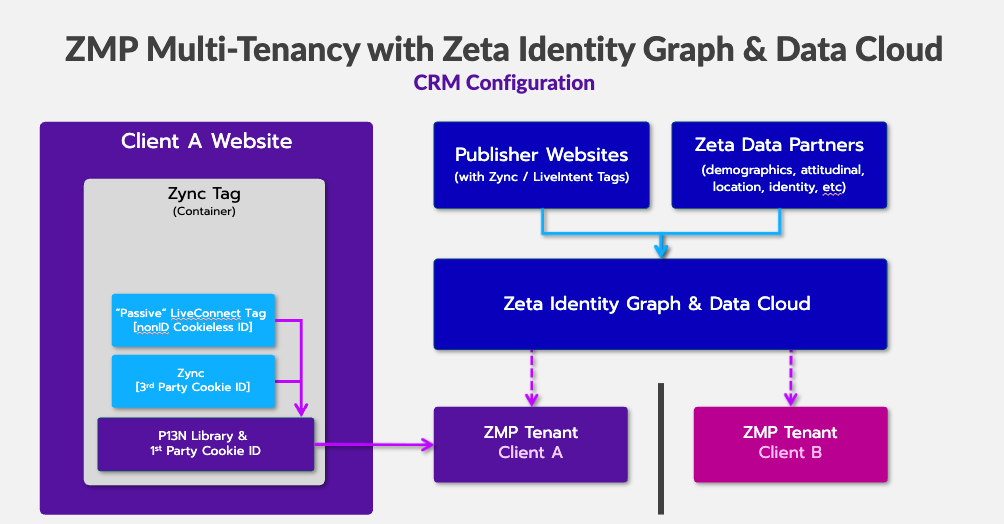
(No data collection into the Identity Graph)
|
Zeta DSP Tag |
Never enabled |
|
LiveIntent Tag |
Never enabled |
|
LiveConnect Tag configuration |
Passive |
|
Data Handling |
No data flows into the identity graph from the client’s website. |
Advertiser Configuration
In the Advertiser Configuration, we collect implicit cookie linkage data through our tagging infrastructure on customer websites, which may be incorporated into the Zeta Identity Graph. Note that first-party data provided by the client is still completely segregated from the Zeta Identity Graph.
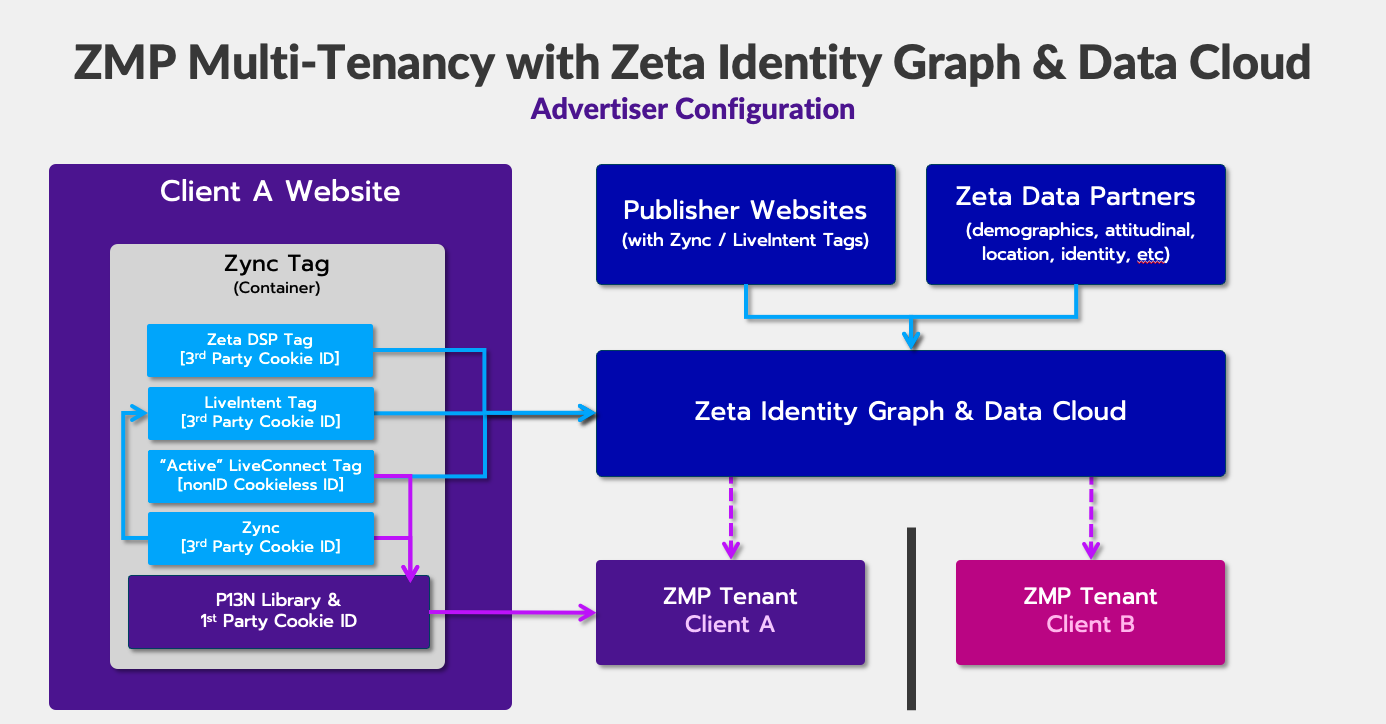
(Data collection into the Identity Graph)
|
Zeta DSP Tag |
Enabled |
|
LiveIntent Tag |
Enabled |
|
LiveConnect Tag configuration |
Active |
|
Data Handling |
Cookie linkage data flows from the client site to Zeta and may be ingested into the identity graph |
Let’s take a deeper look at the pathways through which this may happen, along with what data is collected and how it is used.
Data Ingestion Pathways
Zeta DSP Tag
How to Check If It’s Enabled
-
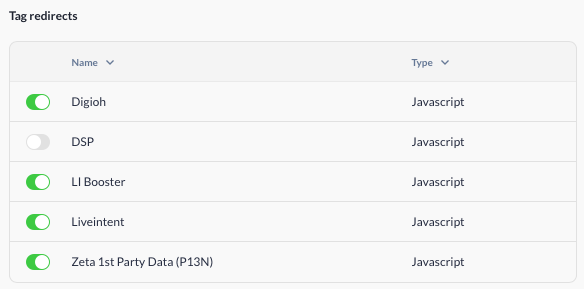
Go to Account Setup > Integrations > Website Tags
-
View the Tag Redirects Table
-
Look for a green checkmark next to "DSP" – this indicates the Zeta DSP Tag is active
How It Works
-
The Global Tag / Zync loads the Zeta DSP tag
-
The Zeta DSP tag reads or sets a 3rd party cookie, then makes a resolution call to the Zeta DSP server
-
The Zeta DSP server stores the cookie and ingests it into the identity graph
Data Collected
-
LiveIntent first-party cookie ID + apex domain
-
LiveIntent third-party cookie ID
-
IP address
-
Browser User Agent
-
Timestamp
How the Data is Used
Create/update linkages between identity spaces in our identity graph
LiveIntent Tag
|
Purpose |
Enhances user addressability by connecting the LiveIntent cookie space to Zeta’s (Zync) cookie space. This can improve reach within and beyond the Zeta ecosystem, often linking to hashed emails and DSP cookies. |
|
Default Status |
Disabled |
|
Default Status:
|
Can be requested and added as a piggyback to any Zync tag. |
How to Check If It’s Enabled
-
Go to Account Setup > Integrations > Website Tags
-
Click on each tag to view the Tag Redirects Table
-
Look for a green checkmark next to "LiveIntent" – this indicates the tag is active
-20250904-052605.png?cb=fc04b107dd9cd8f7e0cf48f36262e6ae)
How It Works
-
Your Zync tag sets or reads a 3rd-party Zync cookie
-
It redirects to the LiveIntent tag and P13N, passing along the Zync ID
-
LiveIntent sets/reads its own cookie and matches it with the Zync ID
-
This cookie linkage is stored in a segregated log and later batch-ingested into the Zeta Identity Graph
LiveIntent partner cookie syncs from liadm.com forward privacy and consent parameters when the sync is permitted. GDPR applicability and consent validation determine whether the partner call can proceed. See Privacy Guidelines for parameter forwarding and consent requirements.
Data Collected
-
LiveIntent Cookie ID (3rd party)
-
Zync Cookie ID (3rd party)
-
IP Address
-
Browser User Agent
-
Timestamp
How the Data is Used
-
To create or update cookie-to-cookie linkages in the Zeta Identity Graph
LiveConnect Tag
|
Purpose |
Improves the unknown-to-known match rate in Zeta Marketing Platform (ZMP) by resolving hashed emails and enhancing identity accuracy. |
|
Default Status |
Disabled |
|
Default Status:
|
Can be added manually as a piggyback to Zync JavaScript tags. |
How to Check If It’s Enabled
-
Go to Account Setup > Integrations > Website Tags
-
View the Tag Redirects Table
-
Look for a green checkmark next to "LI Booster" – this indicates the LiveConnect tag is active
How It Works
-
The Global Tag / Zync loads the LiveConnect tag
-
The LiveConnect tag reads or sets a 3rd-party and a 1st-party LiveConnect cookie, then makes a resolution call to the LiveConnect server to attempt to resolve the user's identity
-
If the resolution is successful, the hashed email is then passed to P13N
-
The LiveConnect server stores the cookie and identity data in a segregated log file and ingests it into the identity graph
Data Collected
-
LiveIntent first-party cookie ID + apex domain
-
LiveIntent third-party cookie ID
-
IP address
-
Browser User Agent
-
Timestamp
How the Data is Used
Create/update linkages between identity spaces in our identity graph